Service Fusion Review 2026: Pricing, Contract and Alternatives
Service Fusion publishes $208 to $533 a month for unlimited users. The real cost, the two mobile apps, and who should not buy it.

Disclosure This article features tools from our brand partners. If you choose to use them, we may receive compensation at no extra cost to you.
Our editorial choices are independent of these affiliate arrangements. Read our full affiliate disclosure.
Fervor is a CRO and web design studio, not a software reseller, and no vendor paid for placement here or for a kinder verdict. Affiliate links are flagged where they appear, and they never change what we report.
Page at a glance
Service Fusion is field service management software for residential service trades: HVAC, plumbing, electrical, appliance repair, garage door and a long list beyond them. It publishes every plan price, which is rare here, and it bills a flat rate per company instead of a rate per technician. Annual plans run $208, $325 and $533 a month. Month to month they run $245, $382 and $627. Users are unlimited on all three, so a shop that keeps adding trucks pays the same bill it paid in January. The catch sits in three places. Job costing and inventory are add-ons on the entry plan and no add-on carries a published price. The flat-rate price book is a Profit Rhino integration rather than a module. And the technician app most reviews score is not the app the vendor ships now. Closest alternatives: Housecall Pro, Workiz, FieldPulse and ServiceTitan.
The short verdict
Service Fusion is the right buy for a residential service shop running roughly 5 to 25 technicians, doing repair and replacement work rather than scheduled new construction, where the office runs QuickBooks and the owner is tired of a bill that climbs every time a seat gets added. Unlimited users at a published flat rate is the best structural deal in this category, and nobody else in the comparison table below offers it.
But two things should slow you down before you sign. The technician app is mid-migration, and the score you have probably read belongs to the old one. The other is that the pricing page and the subscription agreement do not describe the same commitment. Pricing was verified 27 July 2026, and every figure below came from Service Fusion or from the rival vendor it belongs to.
| Billing unit | Flat per company, published, unlimited users on every tier |
|---|---|
| Entry price | $208 a month billed annually, $245 month to month |
| Top tier | $533 a month billed annually, $627 month to month |
| Card processing | 2.90% plus $0.30 per credit card transaction, as low as |
| Offline mode | Notes, photos, tasks and checklists. Not payment, not job creation |
| Best fit | 5 to 25 technicians, residential service, QuickBooks office |
What works, and what to watch
Strong: three prices you can read without a sales call, unlimited users on all of them, a drag-and-drop dispatch grid with an unscheduled pool and per-technician dispatch zones, GPS fleet tracking customers can watch, both QuickBooks Online and Desktop, and integrated payments with card on file and job deposits.
Weak: the entry plan withholds job costing, inventory and job photos, no add-on carries a published price anywhere on the site, the flat-rate price book belongs to another vendor, the QuickBooks Desktop connector runs on Windows only, and the mobile app currently exists as two listings whose scores are three points apart.
What Service Fusion does
It runs the service business from one place: customers, estimates, jobs, the dispatch board, invoices and payments. The dispatch grid is drag-and-drop, technician availability shows at a glance, and unscheduled work sits in a pool you drag jobs out of rather than in a list somebody has to remember. So the dispatcher's day looks like a board rather than a spreadsheet, which is the whole point of buying one of these.
Two dispatch details change how a busy Monday runs. You can set dispatch zones so a technician only sees work in his own end of the city, and you can reassign an appointment straight from Map View. And the GPS layer feeds the customer side too, so a homeowner gets a name, a photo and an arrival window instead of a four-hour block.
What it does not run is the front of your funnel. There is no call-tracking or attribution partner on its partners page, and the phone product it does sell, ServiceCall.ai, is a VoIP add-on rather than a way to tell which search term produced the booking. That job belongs to a tool like CallRail.
Who it is for, and who should not buy it
It fits the shop where headcount is the thing that keeps breaking your software budget. Five to twenty-five technicians, residential service work, a dispatcher holding the schedule together with a whiteboard and a phone. At that size the flat price stops punishing you for hiring, which every per-seat platform in this category does.
So skip it in three cases. Skip it if you run fewer than 3 technicians, because at that size you are paying a dispatch-board price for a calendar and the cheaper per-seat plans genuinely cost less. Skip it if you are a new construction only outfit running scheduled builds, since a dispatch board with nothing to dispatch is an expensive job folder. And skip it if your office runs QuickBooks Desktop on a Mac, because the connector is Windows only and there is no way around that with an add-on.
What Service Fusion costs
The published plans
All six figures sit on the pricing page. Billed annually, Starter is $208 a month, Plus is $325 and Pro is $533. Month to month those same plans render at $245, $382 and $627. Every tier says unlimited users, and the vendor's own FAQ spells out what that means: one technician and one dispatcher, or twenty technicians and a full office, and the price is the same either way.
"Service Fusion bills a flat rate per company: Starter $208 a month, Plus $325 and Pro $533 billed annually, or $245, $382 and $627 month to month, with unlimited users on every tier."
Service Fusion (2026)
Read the annual footnote before you take the discount, though. The annual tiers are marked charged as one annual payment at sign-up, so the fifteen percent saving is not a smaller monthly draft. It is twelve months debited on day one.
The add-ons, which carry no prices
Here is where the sticker gets slippery. On Starter, job photo uploads, inventory management and job costing are all listed as add-ons rather than features. On Starter and Plus, custom documents, eSign documents, the customer web portal and progressive billing are add-ons too. Open API access is Pro only. And ServiceCall.ai and GPS fleet tracking are add-ons on all three tiers, including the $533 one.
Not one of those add-ons has a price printed anywhere on the site. So a shop that needs job costing on the entry plan cannot work out its bill from public information, which is the exact problem the published tiers were supposed to solve. Ask for the add-on rate card in writing.
What is not in the sticker price
Card processing sits on top. Service Fusion's payments page advertises "credit card processing rates as low as 2.90% + $0.30 Credit Card Transaction Fee". Read the front of that sentence rather than the number, because as low as is a floor and the page routes you to a quote rather than a rate card. Onboarding is the good news: the pricing page states that "All plans come with no contract requirements, personalized onboarding, and unlimited support through email, phone, or live chat", so there is no implementation fee to budget for.
"Service Fusion advertises credit card processing rates as low as 2.90% plus a $0.30 transaction fee, and routes buyers to a quote rather than a rate card."
Service Fusion (2026)
But now open the subscription agreement and read section 8.1, which says the term will "automatically renew for successive periods equal to the initial term". So the minimum term is whatever your order form says, and it auto-renews for the same length again. Section 8.2 sets the notice period at thirty days written notice before the end of the current term. Section 7.1 states that "All Fees are payable in United States Dollars, and non-refundable", and gives the vendor the right to change fees effective at any time on notice. There is also a $35.00 administrative charge per declined electronic transaction.
"Service Fusion section 8.1 renews the term automatically for successive periods equal to the initial term, and section 8.2 sets the notice period at thirty days written notice."
Service Fusion (2026)
So "no contract requirements" is true in the sense that nobody makes you sign a two-year term, and the agreement names no early termination fee or cancellation fee anywhere in it. But it is not true in the sense a contractor hears it. Buy the annual plan, pay twelve months up front, miss that notice period, and you have renewed for another twelve non-refundable months. That is a materially different product from the month-to-month one the marketing page describes, and it is the single most important paragraph on this page.
Our read on the features
The technician app, which is currently two apps
This is the finding that should change how you read every other review of this product. The original Service Fusion listing rates 4.6 out of 5 across 1.4K Ratings, and that is the number quoted almost everywhere. Its newest version is 1.13.2, dated 24 April 2025.
"The original Service Fusion listing rates 4.6 out of 5 across 1.4K ratings, on version 1.13.2 dated 24 April 2025."
Apple App Store (2025)
Now open the Service Fusion By EverPro listing, which is the one under active development. It rates 2.3 out of 5 across 18 Ratings, and version 2.9.0 shipped four days before we captured this page. Read its release notes and you can watch the migration happening in real time: fixed offline photo and document sync, fixed offline note-saving errors, resolved an offline banner that kept reappearing.
And the reviews on the new listing tell a consistent story. One says line-item descriptions are not editable and their shop switched back to the old app. Another says ordinary functions take longer than on the original. Eighteen ratings is a small sample and it would be dishonest to call that a settled verdict, but it is the sample describing the software you would be issued today. So ask the rep which listing your technicians will install.
Offline mode, and where its list stops
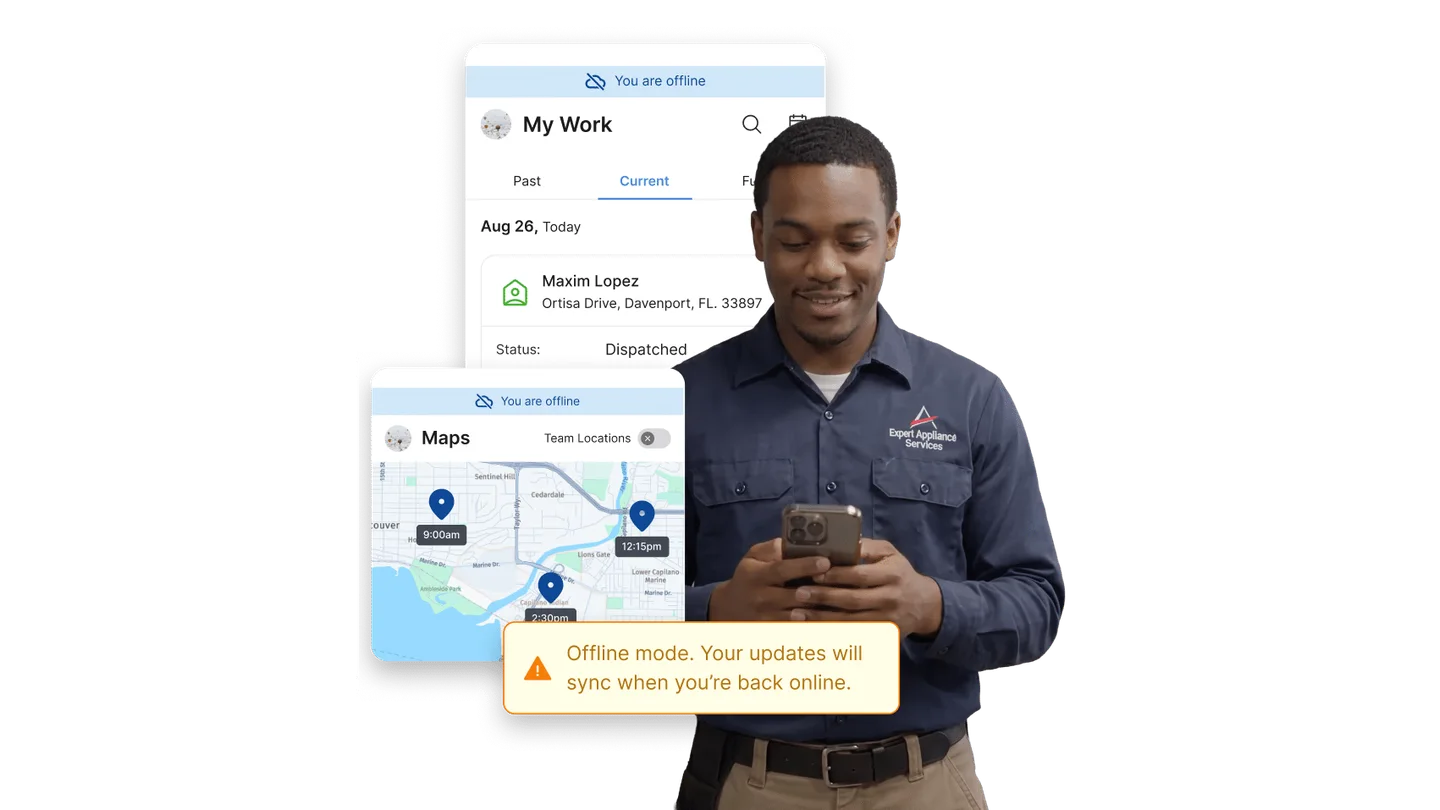
Offline is the axis that decides this category for anyone working basements, mechanical rooms and county roads, and Service Fusion publishes an unusually specific list. On its mobile app page a technician can view schedules and customer details, open notes, invoices and equipment information, add notes and photos, and complete tasks and checklists. Everything syncs when the connection returns, and the mode switches on by itself rather than needing jobs pre-loaded.
Read that list for what is missing, though. Taking a payment is not on it, and creating a job is not on it. Which matters, because the vendor's own artwork for that feature shows a deposit screen with a payment method picker under a No Signal badge, and one App Store reviewer in June wrote that it is supposed to work offline but does not. Those three things cannot all be right. So make the rep demonstrate a card payment on a phone in airplane mode before you sign.

The QuickBooks sync, in the direction it runs
Both QuickBooks Online and Desktop are supported, and the direction is the thing to get straight. The QuickBooks Online page describes invoices created in Service Fusion syncing to QuickBooks, payments syncing automatically, and customer records staying aligned. Every sentence on it moves data outward, from the field service platform into the accounting file, and nothing describes an invoice edited in QuickBooks flowing back.
Desktop is a different animal. Service Fusion's own setup article states that "The Service Fusion QuickBooks Desktop Integration tool is only compatible with Windows", and it needs a plugin installed on a machine in your office rather than the web-services connection QuickBooks Online uses. There is also an invoice-numbering trap in that article worth reading twice: Service Fusion invoices start at 1001, so your very first invoice number has to be raised by hand above your last QuickBooks one or your books collide on day one.
The flat-rate price book, which is somebody else's product
A flat-rate price book is table stakes for an HVAC or plumbing shop selling good, better, best at a customer's kitchen table. Service Fusion's flat rate page is real and the library is deep, with a claimed thirty thousand repair types. But it is an integration powered by Profit Rhino, it appears in no plan's feature list, and no price for it is published anywhere on the site.
Compare that with Housecall Pro, where flat-rate pricing is a named feature from the $149 a month tier upward. Plenty of shops prefer Profit Rhino's book to a native one, so this is a line item to price separately rather than a disqualification. What it is not is included in the plan you get quoted.
Service agreements and card on file
Recurring maintenance agreements are the difference between a seasonal HVAC business and a year-round one, so check how this bills before you migrate. Card on file and job deposits live in Service Fusion Payments, while eSign, progressive billing and recurring invoicing are all add-ons on Starter and Plus. So the membership engine an HVAC shop wants is assembled from three purchases rather than switched on.
Where it falls short
The add-on rate card is unpublished. Nine add-ons are named on the pricing page and none carries a figure. A published plan price you cannot finish is only half a published price.
The mobile app score is split across two listings. 4.6 on the one that stopped shipping in April 2025, 2.3 on the one shipping now. Any review quoting a single number for this product's app is quoting the wrong one.
The QuickBooks Desktop plugin is Windows only. No Mac path, no browser path, and the tool has to sit on a machine somebody keeps switched on.
Job costing is not on the entry plan. It arrives as a feature at Plus, so the $208 tier cannot tell you gross margin per job without a purchase you cannot price in advance.
The flat-rate price book is a third-party integration. It is Profit Rhino's product, priced separately, and absent from all three plan feature lists.
There is no attribution layer. ServiceCall.ai moves calls. Nothing in the product tells you which campaign produced the job, and the partners page carries no call-tracking vendor.
The contract language and the marketing language disagree. One page says no contract requirements. The other renews you automatically and makes every fee non-refundable.
How the answer changes by trade
The recommendation genuinely differs by trade here, because the flat unlimited-user price rewards headcount and the missing modules punish specific workflows. An HVAC contractor gets the strongest version of this. Crew size swings hard between a July heat wave and a quiet October, and a per-technician platform bills you for the peak. But the maintenance-agreement engine is assembled from add-ons, so price eSign and recurring invoicing before you compare. Our HVAC marketing hub covers the demand side of that same seasonality.
A plumbing contractor should stress-test offline first, because half your work happens in a basement with no bars and the published offline list stops before payment. And a landscaping contractor should look hardest at the annual billing footnote, since paying twelve non-refundable months at sign-up is a different decision when the phone rings for five of them. Our plumbing marketing hub has more on the emergency-call side.
For an electrical contractor the flat-rate question decides it, since a panel upgrade quoted from a price book closes differently from one quoted by the hour. And a roofing contractor is the one case where this is the wrong category altogether: a tear-off is a project with a measurement, a material order and a supplement, not a dispatched service call. Our roofing marketing hub covers what that demand looks like after a hail event.
How it compares
The honest comparison is about the billing unit rather than the sticker, because that is what moves when you hire. Every price below is published by the vendor it belongs to, and where a vendor publishes nothing this table says so rather than guessing.
| Platform | Starting price | Billing unit | Flat-rate price book | Trial |
|---|---|---|---|---|
| Service Fusion | $208 a month billed annually, $245 month to month | Flat per company, unlimited users | Third-party integration, price not published | Demo only |
| Housecall Pro | $59 a month billed annually, $79 month to month | Per user, 1 included, $35 a month for each extra | Included from the $149 tier | 14 days, no card |
| Workiz | Not published, request pricing | Per member, first 5 included, $55 a month for each extra | Ultimate tier only | 7 days, no card |
| FieldPulse | Not published, custom quote | Seat based, full access and limited field seats | Pricebook is a named product | Demo only |
| ServiceTitan | Not published, request pricing | Per technician | Included | Demo only |
Read the billing-unit column and the decision gets simple. Three of the five bill by the head, and two of those will not tell you the head rate until you take a call. ServiceTitan says on its own pricing page that "Our per-technician pricing is designed to fit your business and goals, at any size", which is a sentence with no number in it. FieldPulse publishes no figure at all. Workiz hides its plan prices behind Request pricing but does publish the seat rate, stating that "Each extra member for Standard plan costs $55/mo, annual payment", with the Pro seat at $65.
So Service Fusion and Housecall Pro are the two you can evaluate without talking to a salesperson, and they answer opposite questions. Jobber sits alongside Housecall Pro on the per-user side and publishes its plans too; its figures live on our own review rather than here, because its pricing page blocked our capture and an unevidenced number is worse than no number.
The verdict, by crew size
Under 5 technicians
Probably not. At $208 a month you are buying a flat rate whose advantage is headcount you do not have yet, and Housecall Pro's $59 entry plan does the same core work for a one-truck shop. Revisit this the month you put a fourth van on the road.
5 to 25 technicians
Yes, and this is the band the product is built for. Compare the $208 or $325 plan against a per-seat platform at your headcount and the gap is not close, especially through a seasonal peak when a per-technician bill follows every temporary hire. Take Plus rather than Starter unless you truly do not need job costing or inventory, because buying those back as add-ons at an unpublished rate is the worst version of this purchase.
25-plus technicians, or heavy commercial
Look harder. The economics keep improving as you grow, but the pieces that run a large shop are the ones bolted on here: the price book is somebody else's and the API only appears on the $533 tier. And a business at that size is usually buying a capacity-planning system rather than a dispatch grid, which is where the per-technician platforms earn their premium.
The number nobody checks
Now, Fervor is a CRO and web design studio rather than a Service Fusion alternative. But a dispatch board only earns its keep if jobs arrive on it, and that gap is the one we have data on.
In May 2026 we inspected 380 home services contractor websites for the State of HVAC report and the wider Contractor CRO Index 2026. Only 40% of them carried an online booking or scheduling widget of any kind, which is 152 sites with one and 228 without. And 82.8% loaded poorly enough on mobile that a homeowner is waiting before they see anything at all.
Which means you can buy the best-configured dispatch board in the trade and still watch it sit half empty, because the website in front of it never turns a visitor into a job. Pick the platform that fits your crew. Then open your own site on a phone and count the taps it takes to book you. The full statistics are public if you would rather check them yourself.
See whether your website is filling that dispatch board
Fervor inspects your site the way a homeowner uses it, then shows you the specific places calls and bookings leak out. It takes 5 business days.
Get a Site InspectionWhat we checked, and what we did not
We did not run Service Fusion on a live contractor account, and we will not imply otherwise. There is no self-serve trial here, so a hands-on test means a demo call and a signed order. What this page is instead: the pricing, mobile, flat rate, payments, QuickBooks, scheduling and partner pages read on 27 July 2026, the subscription agreement read section by section, the QuickBooks Desktop setup article read in full, and both Apple listings captured with their reviews and version histories.
Three sources refused us, and saying so is more useful than papering over it. Capterra, which shares one Gartner Digital Markets review pool with GetApp and Software Advice, blocked automated capture, so no star average and no quote from any of the three appears above. So did G2. So did Jobber's pricing page, which is why Jobber carries no figure here. And Google Play returned nothing we could verify, so no Android rating is asserted anywhere on this page even though most technicians carry Android.
Everything else is linked where it is claimed. Competitor pricing comes from Housecall Pro, Workiz, FieldPulse and ServiceTitan, each read on the same day. Payment processing runs through PaySimple with a Stripe card reader in the field, accounting connects to QuickBooks, and one partner rate is worth knowing because it is per-outcome rather than monthly: the Local Services Ads connector on the partners page runs free for thirty days and then 50 cents per lead reply.
If you want to evaluate Service Fusion yourself, its product site is where the three plan prices and the demo request live. Bring the add-on rate card question with you, and bring the app question too.
What Service Fusion users say
It's supposed to work offline but it doesn't. Hopefully they fix the user functionality.
This app was not thoroughly tested before release. Description of line items are not editable. We had to switch back to using the old app.
There are ordinary functions that take much longer to do on this app than the original.
Customer service is no help, have plenty of unanswered tickets. Will be looking at other options ASAP.
The whole Service Fusion desktop program and mobile app are great, overall.
Forget about using if your in a area without cell/data. Cant get any info.
Since updating a few months ago it has become really glitchy and often take several minutes to open
We have a "maintenance agreement module" which was released, knowing it doesnt function properly
Frequently asked questions
How much does Service Fusion cost?
Service Fusion publishes three plans and both billing cycles, which is unusual in this category. Billed annually, Starter is 208 US dollars a month, Plus is 325 and Pro is 533. Month to month those plans run 245, 382 and 627. Every tier includes unlimited users, so a shop with twenty technicians and a full office pays the same as a shop with one technician and one dispatcher. The annual tiers carry a footnote saying they are charged as one annual payment at sign-up, so the fifteen percent saving means twelve months debited on day one rather than a smaller monthly draft. Nine add-ons are named on that page and not one of them carries a published price, so ask for the add-on rate card in writing before you compare this against anything.
Does Service Fusion really have no contract?
Its pricing page says all plans come with no contract requirements and its own FAQ says plans are month to month. Its subscription agreement says something different. Section 8.1 states the term automatically renews for successive periods equal to the initial term. Section 8.2 requires thirty days written notice before the end of the current term to get out. Section 7.1 states that all fees are payable in United States Dollars and non-refundable, and gives the vendor the right to change fees effective at any time on notice. There is also a 35 dollar administrative charge for each declined electronic transaction. So a month-to-month buyer really can leave, but an annual buyer who misses the thirty-day window has renewed for another twelve non-refundable months.
What does Service Fusion cost beyond the subscription?
Three things sit outside the plan price. Card processing is advertised on the Service Fusion Payments page as rates as low as 2.90 percent plus 30 cents per credit card transaction, and the page routes you to a quote rather than a rate card, so treat that as a floor. Onboarding is the good news: the pricing page states that all plans include personalized onboarding and unlimited support by email, phone or live chat, so there is no implementation fee to budget. The third is the add-ons. Job costing, inventory and job photos are add-ons on Starter. Custom documents, eSign, the customer web portal and progressive billing are add-ons on Starter and Plus. ServiceCall.ai and GPS fleet tracking are add-ons on all three tiers, and none of them is priced publicly.
Does the Service Fusion mobile app work offline?
Partly, and the boundary matters more than the headline. Service Fusion publishes a specific list: a technician can view schedules and customer details, open notes, invoices and equipment information, add notes and photos, and complete tasks and checklists, and everything syncs when the connection returns. Offline mode switches on by itself rather than needing jobs pre-loaded. Taking a payment is not on that list and creating a job is not on that list. The vendor artwork for the same feature shows a deposit screen under a No Signal badge, and an App Store reviewer in June wrote that it is supposed to work offline but does not. Those cannot all be true, so make the rep demonstrate a card payment on a phone in airplane mode before you sign.
Which Service Fusion app will my technicians install?
Ask, because there are two live Apple listings and their scores are three points apart. The original Service Fusion listing rates 4.6 out of 5 across 1.4K ratings and its newest version is 1.13.2, dated 24 April 2025. The Service Fusion By EverPro listing rates 2.3 out of 5 across 18 ratings and shipped version 2.9.0 four days before this article was researched, which makes it the one under active development. Its release notes read like a migration in progress: fixed offline photo and document sync, fixed offline note-saving errors, resolved an offline banner that kept reappearing. Eighteen ratings is a small sample, so this is a question to put on your demo checklist rather than a verdict.
How does Service Fusion sync with QuickBooks?
Both QuickBooks Online and QuickBooks Desktop are supported, and the direction is what to check. The QuickBooks Online page describes invoices created in Service Fusion syncing to QuickBooks, payments recorded in Service Fusion syncing automatically, and customer records staying aligned, using Intuit OAuth. Every sentence on that page moves data outward from the field service platform into the accounting file, and nothing on it describes an invoice edited in QuickBooks flowing back. Desktop is different: it needs a plugin installed on a machine in your office, and Service Fusion states that its QuickBooks Desktop integration tool is only compatible with Windows. Its setup article also warns that Service Fusion invoices start at 1001, so your first invoice number has to be raised by hand above your last QuickBooks one.
Does Service Fusion include a flat-rate price book?
Not as a module. Flat rate is an integration powered by Profit Rhino with a claimed thirty thousand repair types behind it, and it does not appear in the feature list of any of the three plans. No price for it is published anywhere on the site. Compare that with Housecall Pro, where flat-rate pricing is a named feature from its 149 dollar a month tier upward. Plenty of HVAC and plumbing shops prefer the Profit Rhino book to a native one, so this is a line item to price separately rather than a disqualification. What it is not is included, and reviews that describe it that way are reading the wrong page.
What are the best Service Fusion alternatives?
It depends on whether headcount or transparency is your constraint. Housecall Pro is the closest one you can also evaluate without a sales call: 59 US dollars a month billed annually for one user, 149 for a plan including five, 299 for a plan including eight, and 35 a month for each user beyond that, with a fourteen-day trial and no card required. Workiz hides its plan prices behind a request-pricing button but does publish its seat rate, at 55 dollars a month for each extra member on Standard and 65 on Pro. FieldPulse publishes no figure at all and sells seats by custom quote. ServiceTitan publishes nothing either and states only that its pricing is per technician. Jobber belongs on your shortlist too, and its published plans are covered in our own Jobber review. So on price transparency, Service Fusion and Housecall Pro are the two you can compare on a Saturday morning.
Freshness
How we keep this page current
Three dates govern this review, and they carry different meanings. The initial source sweep is dated July 27, 2026; when only part of the evidence set is recaptured later, that later date is stated beside the refreshed claim. We last revised the page on July 30, 2026. And the user reviews we quote were posted over roughly the last 24 months, so their individual dates remain part of the evidence instead of being overwritten by a later pricing update.
We revise the page when Service Fusion changes a published price or a contract term, when a rating we cite moves by more than a few tenths, or when the vendor ships something big enough to change the verdict. We never bump the date just to look fresh, because Google treats that as manipulation and so do we. If a figure here reads as stale by the time you land on it, treat it as a floor and check the vendor's own page. We linked it at every number for exactly that reason.
Sourcing
How this review was researched
Every figure on this page traces to a captured source linked inline where it appears. The initial sweep is dated July 27, 2026; any later, partial recapture is dated at the claim rather than relabelling the whole evidence set. Ratings come from Capterra, GetApp, Software Advice and the Apple App Store. Note that Capterra, GetApp and Software Advice share one Gartner Digital Markets review pool, so an identical score across all three is a single sample rather than three corroborating ones, and this page treats it that way. G2, TrustRadius and Trustpilot block automated access, so where their numbers appear they are labelled as reported rather than verified. No claim here is sourced from Reddit or from a contractor Facebook group, because neither could be retrieved and quoting them would mean inventing attribution. Pricing marked as reported comes from third-party roundups, never from Fervor. Fervor's own findings come from the Contractor CRO Index 2026.
About
About Fervor Studio
Fervor Studio is a conversion rate optimization (CRO) and web design studio for home services contractors across North America, based in Cochrane, Alberta. Fervor does not sell field service management software and is not an alternative to Service Fusion. It publishes the Contractor CRO Index, a public benchmark measuring contractor website conversion potential using reproducible, open-source methods such as axe-core and Google Lighthouse. Fervor Studio is operated by Fervor Group Inc.
Fervor's full cross-trade dataset lives in the CRO Index statistics.
 Aug 1, 2026
 Tech Stack
Best Plumbing Software in 2026: Ten Ranked Across Four Classes
A plumbing company’s work runs through four classes of software that do not substitute for each other, and it only buys two of them. Ten products, each with a published price or an explicit statement that the vendor publishes none.
Read Article Jul 30, 2026
 Tech Stack
NiceJob vs Birdeye 2026: Pricing, Contracts and Review Gating
One of these vendors puts its price on the page and its cancellation terms in writing. The other puts a form in front of both, and the complaint record is where its contract length shows up.
Read Article Jul 30, 2026
 Tech Stack
Podium vs Birdeye 2026: Pricing, Contracts and Review Gating
Only one of these two will tell you what it costs before a sales call, and even that number carries a carve-out aimed squarely at trade contractors.
Read Article Jul 30, 2026
 Tech Stack
Best Electrical Contractor Software 2026: 11 Ranked and Priced
An electrical contracting business makes two software purchases that do not substitute for each other, and every roundup answering this query covers only one of them. Eleven platforms, with a published price or an explicit statement that the vendor publishes none.
Read Article Jul 30, 2026
 Tech Stack
Best HVAC Software in 2026: Eleven Ranked Across Three Classes
An HVAC contracting business buys across three classes of software that do not substitute for each other, and every roundup answering this query covers only one of them. Eleven products, each with a published price or an explicit statement that the vendor publishes none.
Read Article Jul 29, 2026
 Tech Stack
AccuLynx Pricing 2026: The Real Cost of a Quote-Gated Plan
One published figure, two blank plan cards, and a contract that says things the pricing page does not. A line-by-line breakdown of what AccuLynx really bills.
Read Article Jul 29, 2026
 Tech Stack
Houzz Pro Canada Review 2026: Pricing and Alternatives
Houzz Pro serves different pricing renderings. What Canadian buyers see, how GST/HST and payments work, what Custom gates, and what the annual contract commits you to.
Read Article Jul 29, 2026
 Tech Stack
JobNimbus Pricing in 2026: What the Quote Does Not Cover
JobNimbus prints no figure on any of its four plans. So the only rate you can read before a sales call is the payments meter, and it is the biggest line on the bill.
Read Article Jul 29, 2026
 Tech Stack
JobNimbus Review 2026: Pricing, Pros, Cons and Alternatives
JobNimbus rates 4.6 on Capterra and orders material straight from ABC Supply and SRS. But it publishes no price, and its supplement route carries a note.
Read Article Jul 29, 2026
 Tech Stack
BuildOps Review 2026: Pricing, Contract Terms and Alternatives
BuildOps runs commercial service and projects on one platform, and publishes no pricing at all. The billing unit, the 30-day data-export window, and who it suits.
Read Article Jul 29, 2026
 Tech Stack
FieldPulse Review 2026: Pricing, Pros, Cons and Alternatives
FieldPulse rates 4.6 on Capterra and is the platform contractors name when they leave a bigger system. But it publishes no price, and the contract runs a year.
Read Article Jul 29, 2026
 Tech Stack
Knowify Review 2026: Pricing, Job Costing and Alternatives
Knowify rates 4.5 on Capterra and its weakest sub-score is features. What the $99 Core plan withholds, which way the QuickBooks sync really runs, and who should not buy it.
Read Article Jul 28, 2026
 Tech Stack
AccuLynx Review 2026: Pricing, Tier Gating, Alternatives
AccuLynx rates 4.6 across 846 reviews and now publishes an entry price. What that price omits, which tier holds the insurance workflow, and who should skip it.
Read Article Jul 28, 2026
 Tech Stack
Unitel Voice Review 2026: Pricing, Features and Alternatives
Unitel Voice rates 4.6 on Capterra and gives a one-truck shop a business number for $9.99 a month. The published plans, the cost per call, and what it won't do.
Read Article Jul 28, 2026
 Tech Stack
NiceJob vs Podium 2026: Pricing, Contracts and Review Gating
Both vendors print a price, at very different scale and in different currencies. The gap that matters is what Podium will not print: the billing unit, and whether a trade shop gets the number on the page.
Read Article Jul 27, 2026
 Tech Stack
CompanyCam Review 2026: Pricing, Pros, Cons and Alternatives
Every page ranking for CompanyCam still quotes a per-user price the vendor no longer charges. Here are the real plans, the seat math, and who should skip it.
Read Article Jul 27, 2026
 Tech Stack
NiceJob Review 2026: Pricing, Pros, Cons and Alternatives
NiceJob rates 4.9 on Capterra and refuses to gate negative reviews. Real plan pricing, the active-customer threshold nobody publishes, and who should skip it.
Read Article Jul 26, 2026
 Tech Stack
Buildertrend Review 2026: Pricing, Limits and Alternatives
Buildertrend rates 4.5 across 2,486 Capterra reviews and quotes against your revenue rather than your seat count. The workflows, the export problem, the alternatives.
Read Article Jul 26, 2026
 Tech Stack
CallRail Review 2026: Pricing, Pros, Cons and Alternatives
CallRail rates 4.5 on Capterra, and its tracking numbers port out free. But the two usage rates that decide your real bill are the two it does not print.
Read Article Jul 26, 2026
 Tech Stack
Roofr Review 2026: Pricing, Pros, Cons and Alternatives
Roofr rates 4.6 on Capterra and sells $13 measurement reports against a market charging triple. But it will not import a report from anywhere else.
Read Article Jul 24, 2026
 Tech Stack
Housecall Pro Review 2026: Pricing, Pros, Cons, Alternatives
Housecall Pro has the shortest learning curve in the category and the widest review spread. Real pricing, the Instapay math, and the migration trap to plan around.
Read Article Jul 23, 2026
 Tech Stack
Jobber Review 2026: Pricing, Pros, Cons and Alternatives
Jobber rates 4.6 on Capterra with the best mobile app in the category. Real plan pricing, the feature gating that changes your entry price, and who it suits.
Read Article Jul 22, 2026
 Tech Stack
ServiceTitan Review 2026: Pricing, Pros, Cons, Alternatives
ServiceTitan rates 4.3 on Capterra but its weakest score is value for money. Real reported pricing, the 12-month contract, the exit fees, and who it suits.
Read Article Jun 2, 2026
 Tech Stack
HVAC Online Scheduling: The 43% Losing After-Hours Bookings
HVAC leads every trade on online booking at just 56.7%, which still leaves 43% of sites forcing an after-hours customer to wait for a business-hours phone call.
Read Article