CompanyCam Review 2026: Pricing, Pros, Cons and Alternatives
CompanyCam stopped charging per user. Real plan prices, the two-seat cap on Core, what a six-person crew pays, and 4 alternatives compared.

Page at a glance
CompanyCam is job site photo documentation software for trade contractors. Every photo it takes carries a timestamp and a location, files itself against the project instead of your camera roll, and pushes into the platform where the money lives. The pricing moved off the per-user model that most review pages still quote. Three self-serve plans are published: Core at $79 a month, Crew at $149 and Scale at $249, each bundling seats, with extra seats at $34. Annual billing takes 20 percent off, so those become $63, $119 and $199 with extra seats at $29. Core caps at two people. It connects to AccuLynx, JobNimbus, Jobber, JobTread, Leap and QuickBooks Online. It captures offline and syncs on reconnect. But it schedules nothing, dispatches nothing and invoices nothing, so it sits beside your field service platform rather than replacing it. Best fit is a roofing, restoration or HVAC crew between three and fifteen people. Closest alternatives: magicplan, Encircle, DocuSketch and XOi.
The short verdict
Buy CompanyCam if you run three to fifteen people doing residential exterior, mechanical or insurance restoration work, and the photos that prove what you did are spread across four personal phones right now. It's the one tool in this category with a price you can read without a sales call. And the capture is fast enough that a technician on a ladder will use it, which is the only thing that decides whether you keep paying for it.
But the sticker has moved, and the pages ranking for this query are behind it. So if you arrived from one asking whether CompanyCam is worth $19 a user, that framing no longer matches the vendor's own page. The plan is packaged now. Your real number is the plan price plus your seat count, and that gap is where the budgeting goes wrong.
All figures here were last researched 27 July 2026, read off the vendor's own rendered pricing page rather than a third-party summary.
| Pricing model | Packaged plan plus per-seat overage, published |
|---|---|
| Entry price | $79 monthly, or $63 billed annually |
| Real entry price | $149 monthly for anything past two people |
| Seat overage | $34 each monthly, $29 each on annual |
| Contract minimum | None stated. Annual terms auto-renew |
| Free trial | Offered. No length published on the pricing page |
| Best fit | Three to fifteen field people, photo-heavy trades |
What works, and what to watch
Strong: capture is one-handed and the photo sorts itself against the nearest project, so crew adoption survives past week two. Offline capture works and queues. Timestamps and location ride along in the metadata without anyone remembering to add them. And the connectors into AccuLynx, JobNimbus and Jobber are real two-way plumbing rather than a logo on a page.
Weak: the cheapest plan stops at two people, which is not a plan for a crew. Annotation and capture features are split across tiers in ways that only show up in the comparison matrix. Reviews and Google Business Profile sync are an add-on at every level. And the per-seat overage compounds quietly, which is the whole risk in a category priced by headcount rather than by revenue.
What CompanyCam does
You open the app, you shoot, and the photo lands in a project folder the app picked for you based on where you're standing. The core feature list on the pricing page leads with "Timestamped photos & videos", which is a fair summary of the whole product: a camera that files.
From there it turns those photos into shareable galleries, annotated before-and-afters, checklists and PDF reports, then pushes them into whatever platform runs your jobs. So you're buying an audit trail your crew produces without being asked to produce one.
Who it's for, and who it isn't
The fit is a field-heavy shop of roughly three to fifteen people where photographs are evidence rather than decoration. Insurance restoration is the sharpest case, because a drying log and a moisture map are worth nothing if the condition photos behind them are undated. Storm-season roofing is close behind. And any shop where a homeowner has ever said "that damage was already there" is in the market whether it knows it or not.
Who should not buy CompanyCam
Skip it if you work solo and your phone camera roll is enough. One person who already knows which album is which is paying $79 a month to solve a filing problem he doesn't have. But the app's real value shows up the moment a second person starts shooting, so revisit this on your first hire.
Skip it too if you need project management. This is a documentation tool rather than a project management platform: no scheduling, no dispatch, no job costing, no budgets. Contractors who buy it expecting those churn inside a quarter. So buy the platform first and this second.
And skip the Core plan specifically if you have a crew. It caps at two people, so the plan most reviews quote as the entry point is a solo-and-a-partner plan. Your entry price is the middle tier.
What it costs
The published plans
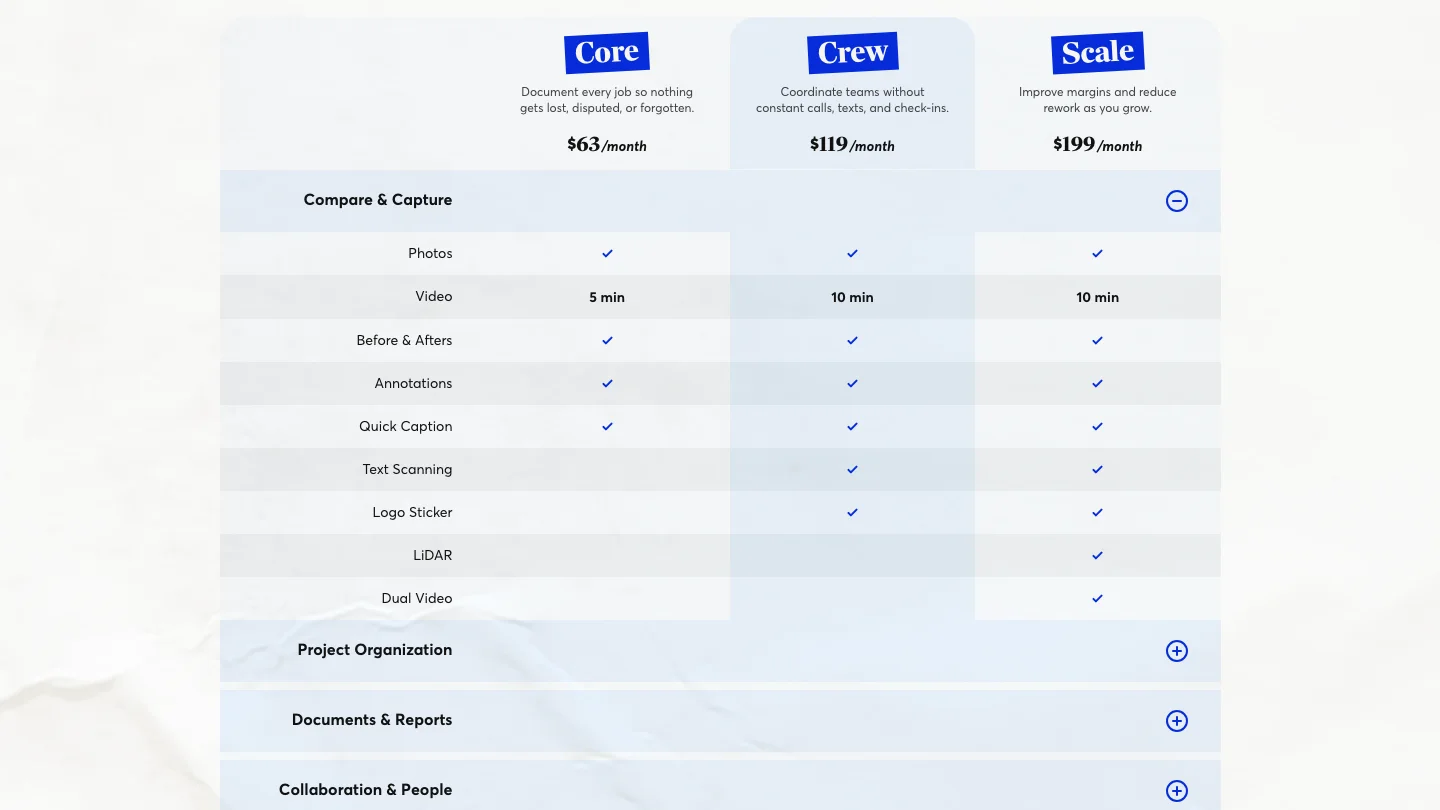
CompanyCam publishes its prices, which puts it ahead of most of this category. On monthly billing Core is $79, Crew is $149 and Scale is $249. The page offers annual billing at a stated 20 percent saving, which lands the same three plans at $63, $119 and $199. Enterprise is a sales conversation and the card says only "Includes 50+ Users".
"CompanyCam lists Core at $79 a month, Crew at $149 and Scale at $249, falling to $63, $119 and $199 on annual billing."
CompanyCam (2026)
So seats are where it gets interesting. Core includes one person and stops at two. Crew and Scale each include three. And every person past that runs $34 a month on monthly billing or $29 on annual, against a unit the page defines plainly: "A seat is one person with their own login."
The costs that aren't on the plan card
Tier gating on the capture itself. The Compare Plans matrix splits the camera across plans rather than splitting the admin. Before-and-afters, text scanning, the logo sticker and dual video are absent from Core. LiDAR is Scale only. Video runs "5 min" on Core against ten above it. Templates go from five on Crew to unlimited on Scale. So the feature you watched in the demo may not be on the plan you priced.
The marketing add-on. Review requests, Google Business Profile sync and automated social posts are not in any plan. They sit in a Marketing Suite add-on listed at $79 a month against a struck-through $99. Budget it separately or leave it out. And note that posting job photos to a Business Profile is something Google lets you do for nothing, so the add-on is buying automation rather than access.
"The CompanyCam Marketing Suite add-on is listed at $79 a month against a struck-through $99, and is in no plan."
CompanyCam (2026)
What isn't published at all. The pricing page carries no payment processing rate behind its Tap to Pay feature, no onboarding fee on the self-serve plans, and no free trial length beyond "Start your free trial. Cancel anytime." So those are questions for the sales call rather than answers on the page, and saying so beats guessing.
What is published, and matters. The FAQ states that "Annual plans auto-renew at the end of the term." But no early termination fee appears anywhere on the page, and no notice period either. What replaces them is a no-refund shape, covered below.
What a six-person crew pays
Six people, annual billing. Core is out at two. Crew is $119 for the first three plus three more at $29, and the vendor's own seat calculator returns $206 a month for exactly that configuration. Scale under the same math returns $286.
So call it $2,472 a year on Crew, or $3,432 on Scale. On monthly billing the same six people run $251 a month, which is $3,012 a year, and the flexibility costs you $540. And if you add the marketing add-on the Crew number becomes $3,420. Compare all of that against one supplement you win because the before photo was timestamped, and the arithmetic usually stops being interesting.
The capture, which is the whole product
Everything else in this category is downstream of one question: will a technician open the app while standing on a ladder holding a shingle. Feature depth can't rescue a capture flow that asks for a project selection first. Because the fifth time it asks, he goes back to the native camera and the documentation stops.
CompanyCam's answer is location. The app suggests the project you're standing on, so the photo sorts itself and one-handed capture stays one-handed. Shane H., a senior project manager in construction reviewing on Capterra, described the mechanism precisely: "The Geo Location feature automatically knows if your on a current job and when the app is opened that's the suggested job." So that's the entire crew adoption argument, and it's why this app gets used where a shared Dropbox folder doesn't.
It is not perfect. John R., a design consultant in construction, filed the honest version under cons: "Occasionally the gps software is off by a few feet but they get around that by allowing you to type in the address." So plan for a correction now and then on tight urban lots and townhouse rows.
Offline is the other half. The pricing FAQ states it directly: "You can capture photos on-site without service, and everything syncs when you're back online." And that matters in a crawlspace, a mechanical room, a basement mid-mitigation and most rural storm work, where a capture tool that needs a connection captures nothing.
What makes the photos hold up later
The reason to pay per person for a camera everyone already owns is metadata. Timestamps and location attach automatically, and the record shows who shot what. Angela N., who does accounting for a roofing company, spelled out the working version: photos are timestamped with the name of the employee who took them, homeowners can be looped in during the job, and municipal inspection photos live in the same place as everything else.
So think about what you're insuring against. A homeowner claims damage your crew caused. An adjuster asks for proof of pre-existing condition on a supplement. A warranty claim arrives two years after the job and the only person who remembers has left the payroll. Or a building inspector wants the ice-and-water shots you swore somebody took. In every one of those, a dated and located capture with a name on it settles the argument in about four minutes, and a camera roll doesn't.
Where the photos go next
A capture tool that ends in its own app is a second place to look for the same job, so the integration list is a buying criterion rather than a footnote. CompanyCam names AccuLynx, Jobber, JobNimbus, JobTread, Leap and QuickBooks Online as its top connectors on its integrations directory, and the reviews confirm the plumbing works in the direction you need.
But check the partner's side too, because that's where the field mapping gets documented rather than marketed. AccuLynx, JobNimbus and JobTread each publish their own connector page, and Leap rounds out the roofing and remodeling side. And the CompanyCam help centre is where the export and offline behaviour gets written down in detail. Ten minutes there before a trial beats ten minutes there after one.
Marjorie S., a sales rep and invoicing scheduler with more than two years on it, put the value in one line: "The fact that it works so perfectly with JobNimbus." Jaxton B., a roofing estimator, described the same mechanism on the other platform, saying photos taken in the app "have them automatically sorted into the appropriate customer profile on Acculynx". Angela N. reports the equivalent on the third: "We love that it automatically syncs with our jobs in Jobber."
But the edges are real. Laura U., a scheduling coordinator in electrical work, wrote that "The integration with Field Pulse has been challenging." Her shop documents agricultural sites where ditch pumps and pivots have no street address, so location-matched projects don't line up with the records in her field service platform. So if your work happens somewhere without an address, test that before the trial ends.
Worth saying plainly: the platforms above are where the money is, and this is the layer that feeds them. And if you're still choosing that platform, our reviews of Jobber, Housecall Pro and ServiceTitan cover what each one costs before you layer anything on top.
Where it falls short
Every page in this category lists "can get pricey" and moves on. So here are the specific gaps, and you can check every one inside a trial.
Core is not a crew plan. Two seats maximum. A three-person shop is on Crew whether the marketing says so or not.
The camera is tiered. Before-and-afters, text scanning and dual video are missing from the cheapest plan, and LiDAR only appears at the top. Lyla H., an administrator in construction, hit exactly this: "I was wanting to use the checklist but would need a different plan that was an additional $50 per month."
Reviews and Google sync are an add-on. At every tier. The comparison matrix marks them Add-on on Core, Crew and Scale alike.
LiDAR is iOS-only hardware. The FAQ states that "Dual Video and LiDAR capture require supported iOS devices." So an Android crew can't buy its way to that feature at any tier.
Merging projects loses context. Megan T., an office manager with more than two years on it, reported that "Merging jobs can be tricky sometimes because you lose notes and random communication on the job profiles." Duplicate projects are common when two people create the same address, so this one bites in practice.
It runs nothing operational. No scheduling, no dispatch, no estimating, no job costing. And the price is per head, so the bill grows with hiring rather than with revenue.
How the answer changes by trade
The software is horizontal. Its value differs sharply by trade, though, because what you get back tracks how often a photograph settles an argument.
A roofing contractor gets the strongest return. Tear-off exposes decking nobody agreed to pay for, storm work runs through adjusters, and a timestamped photo of the deck before the underlayment went down is the supplement. Our roofing marketing hub covers where that evidence does the rest of its work.
A restoration contractor is the other obvious buyer, and for a different reason. Water mitigation already runs on documentation, and the IICRC S500 standard is the reason: a drying log, a moisture map, daily readings. Photos are the layer that makes the file defensible, and carriers pay files that are complete. See our restoration marketing hub for the demand side of that.
An HVAC contractor sits in the middle. A change-out generates fewer photographs than a re-roof, so the per-seat cost lands on fewer billable arguments. But service techs shooting the condensate line before and after a callback is cheap insurance, and our HVAC marketing hub covers the trust side.
A remodeling contractor is the weakest fit of the four, by contrast, because the work is long, the client is on site daily, and selections disputes are settled by paperwork rather than by photographs. Useful, not urgent.
Contracts, cancellation and getting your data out
So this is where the category usually hurts contractors, and CompanyCam is better than the top of it. No minimum term appears on the pricing page, and no early termination fee. Cancellation is self-serve: "You can cancel whenever you want. You'll keep access through the end of your billing period."
But the catch is annual. The FAQ says "If you cancel mid-year, you'll keep access through the end of your annual term." An annual plan gets served out rather than refunded. So you're trading that annual discount against a twelve-month commitment you can't exit early, which is a fine trade at three seats and a worse one if you're about to restructure the crew.
On the photos themselves the terms are stated, and they're the right ones. "As long as you're a CompanyCam customer, your photos stay in your account." And on the way out: "If you ever cancel, you can export your photos before your access ends." Read that order carefully, because the export has to happen before access lapses rather than after. So put the calendar reminder on the cancellation date, not the renewal date.
What the reviewers report
Now the crowd's verdict, kept separate from ours. The Capterra listing carries 103 reviews on the product, with a 22 July 2026 update stamp on the page. G2, TrustRadius and Trustpilot block automated access, so nothing from those is reported here.
"The CompanyCam Capterra listing carries 103 reviews, with a 22 July 2026 update stamp."
Capterra (2026)
Read that corpus by category rather than by star rating, because the disqualifying details sit buried inside four- and five-star reviews. Praise clusters on photos sorting themselves, on cloud storage replacing a full camera roll, on the connector into whatever CRM the shop already runs, and on support people who pick up. And the complaints cluster on price against a small budget, and on features sitting one tier up from the one you bought.
Lyla H. gave the sharpest version of the money complaint, in a four-star review: "We have a small company so paying around $100 a month is a lot for our budget." Note what that number implies. A small shop paying roughly that is on Crew with an extra seat or two, not on the headline plan.
The oldest complaints are worth weighing against their dates. Sonja M., a director in construction, wrote a one-star review saying "Horrible customer service. When we had issues it was days before we received a response." and that "Updates often caused outages where our data was unavailable." That was 2021. Nothing in the recent corpus reads like it, so treat it as history rather than as a current warning.
How it compares
| Tool | Starting price | Price unit | Where it fits |
|---|---|---|---|
| CompanyCam | Published. $79 monthly, $63 annual | Plan plus per seat | Any trade, crews of three to fifteen |
| magicplan | No figure rendered at capture | Per project, unlimited users | Floor plans and sketch-led scoping |
| Encircle | Publishes no price | Not published | Restoration files and carrier reporting |
| DocuSketch | Published. $379 monthly, 5-pack | Per property credit | Restoration shops doing 360 tours |
| XOi | Request pricing | Not published | Mechanical service and asset data |
So the shortlist sorts on the unit, not on the feature grid. magicplan bills by project and states "Unlimited users included", which flips the arithmetic the moment your headcount is large and your project count is small. Its plan table showed "Loading available plans..." and never resolved a figure, so no starting price is reported here. Encircle publishes nothing at all on the page it titles pricing. DocuSketch charges by the property, starting at $379 a month for five, with $129 per additional office location on top. And XOi shows a "Request pricing" button on both published solutions.
One thing worth naming: a project management platform with a photo tab is no alternative here. The constraint is what a technician will do one-handed in an attic, and a tab inside a desktop-first tool doesn't clear it.
Nor is reality capture the comparison you're making, whatever a roundup tells you. Matterport and OpenSpace both do beautiful work, and both are built for capturing a building rather than a service call. So ignore any table that puts a laser scanner in the same column as a phone camera. A residential crew isn't choosing between those two things.
The verdict, by crew size
Solo to two people
Probably not, unless your work gets disputed often. Core fits you at $79 monthly or $63 on annual, and that's real money for a filing habit one person can keep. But a solo restoration or storm-roofing operator is the exception, because there the photograph is the invoice.
Three to fifteen people
Yes, and this is the band the product is built for. Crew at $149 monthly covers three, and each additional person is a known number rather than a surprise. But run the trial with your worst-adopting technician instead of your best one, since he's the one who decides whether this works.
Fifteen or more, or multi-location
Yes, with the seat math done first. At twenty people the overage is the bill and the plan is the rounding error, and Enterprise only starts at fifty. So price Scale against magicplan's per-project unit before you sign. That's the size where the two models cross.
The number nobody checks
Fervor is a CRO and web design studio, not a CompanyCam competitor. But there is a gap between capturing proof and getting paid for it, and that gap is the one we have data on.
We inspected 380 home services contractor websites for the State of Roofing report and the wider index. Only 34.2% of them showed a before-and-after gallery anywhere on the site. So that is 130 sites showing the work and 250 showing none. Split by trade it runs 39.2% for roofing and 13.5% for HVAC.
So picture the sequence you're paying for. Your crew shoots a thousand photographs a month, the app files every one, and then a homeowner comparing three quotes lands on a website carrying a stock image of somebody else's roof. The proof exists. It just never reached the page where somebody decides to call you. The full statistics are public, and the Contractor CRO Index carries the per-brand teardowns.
See whether your website uses the proof you're already capturing
Fervor inspects your site the way a homeowner uses it, then shows you the specific places your work goes missing. It takes 5 business days and the first several each week are free.
Get a Site InspectionWhat we checked, and what we didn't
So we didn't run CompanyCam on a live crew, and we're telling you that rather than implying otherwise. What this page is instead: the vendor's rendered pricing page including its seat calculator in three states and its billing FAQ, the Compare Plans feature matrix, the published pricing pages of four alternatives, and the Capterra corpus read by category rather than by star rating.
And one methodology note, because it changed two numbers. The plan prices on this vendor's page get written by script after load, so a raw fetch of the HTML returns empty cards and a stale figure in the comparison table. Everything quoted here is the rendered value, cross-checked against a screenshot of the same page and against the page's own annual discount arithmetic. Capterra returns a 403 to automated fetch, so its reviews were read in a browser and every cited sentence was re-verified verbatim against the live page before it was written down.
If you want to evaluate CompanyCam directly, its product site carries the published plan prices, the seat calculator and the trial signup.
What CompanyCam users say
The Geo Location feature automatically knows if your on a current job and when the app is opened that's the suggested job.
We have a small company so paying around $100 a month is a lot for our budget.
I was wanting to use the checklist but would need a different plan that was an additional $50 per month.
Horrible customer service. When we had issues it was days before we received a response.
The integration with Field Pulse has been challenging.
Merging jobs can be tricky sometimes because you lose notes and random communication on the job profiles.
The fact that it works so perfectly with JobNimbus.
I’ve used CompanyCam as a roofing estimator and it’s amazing to be able to take photos on this app and have them automatically sorted into the appropriate customer profile on Acculynx
We love that it automatically syncs with our jobs in Jobber.
Occasionally the gps software is off by a few feet but they get around that by allowing you to type in the address.
Updates often caused outages where our data was unavailable.
Frequently asked questions
How much does CompanyCam cost?
CompanyCam publishes its prices. On monthly billing Core is $79, Crew is $149 and Scale is $249. Annual billing carries a stated 20 percent discount, which puts the same three plans at $63, $119 and $199. Seats are bundled rather than sold individually at first: Core includes one person and caps at two, Crew and Scale each include three, and every person past the bundle costs $34 a month on monthly billing or $29 on annual. Enterprise is quote-only and starts at 50 users. Most review pages still quote a flat per-user figure, which the vendor no longer charges.
What does a six-person crew pay for CompanyCam?
On annual billing the vendor’s own seat calculator returns $206 a month for six people on Crew and $286 on Scale. Core is unavailable at that size because it caps at two users. On monthly billing the same six people run $251 a month on Crew. The Marketing Suite add-on, which carries review requests and Google Business Profile sync, is a separate $79 a month on top of any plan.
Does CompanyCam work offline?
Yes. The pricing FAQ states that you can capture photos on-site without service and everything syncs when you are back online, and Work offline, sync automatically is listed as a core feature on every plan. That matters in a crawlspace, a mechanical room or rural storm work, where a capture tool that needs a connection captures nothing.
Can you export your photos if you cancel CompanyCam?
Yes, but the order matters. CompanyCam states that your photos stay in your account as long as you are a customer, and that if you cancel you can export them before your access ends. Export therefore has to happen before the term runs out rather than after it. Annual plans auto-renew at the end of the term, and cancelling mid-year keeps access through the end of the annual term rather than refunding it.
Who should not buy CompanyCam?
Two profiles. The solo operator whose phone camera roll is genuinely enough, because the product earns its keep the moment a second person starts shooting. And the contractor who needs project management: this is a documentation tool, with no scheduling, dispatch, estimating or job costing, so buying it as a platform replacement leads to churn inside a quarter. A three-person crew should also skip the Core plan specifically, since it caps at two users.
What are the best CompanyCam alternatives?
magicplan, Encircle, DocuSketch and XOi. magicplan bills per project with unlimited users included, which reverses the arithmetic for a large crew running few jobs, though its plan table did not render a figure when read on 27 July 2026. Encircle publishes no price on its pricing page. DocuSketch is priced per property rather than per seat, starting at $379 a month for a five-property pack plus $129 per additional office location. XOi shows a Request pricing button on both of its published solutions. A project management platform with a photo tab is not an alternative, because the constraint is what a technician will do one-handed in an attic.
Freshness
How we keep this page current
Three dates govern this review, and they carry different meanings. The initial source sweep is dated July 27, 2026; when only part of the evidence set is recaptured later, that later date is stated beside the refreshed claim. We last revised the page on July 28, 2026. And the user reviews we quote were posted over roughly the last 24 months, so their individual dates remain part of the evidence instead of being overwritten by a later pricing update.
We revise the page when CompanyCam changes a published price or a contract term, when a rating we cite moves by more than a few tenths, or when the vendor ships something big enough to change the verdict. We never bump the date just to look fresh, because Google treats that as manipulation and so do we. If a figure here reads as stale by the time you land on it, treat it as a floor and check the vendor's own page. We linked it at every number for exactly that reason.
Sourcing
How this review was researched
Every figure on this page traces to a captured source linked inline where it appears. The initial sweep is dated July 27, 2026; any later, partial recapture is dated at the claim rather than relabelling the whole evidence set. Ratings come from Capterra, GetApp, Software Advice and the Apple App Store. Note that Capterra, GetApp and Software Advice share one Gartner Digital Markets review pool, so an identical score across all three is a single sample rather than three corroborating ones, and this page treats it that way. G2, TrustRadius and Trustpilot block automated access, so where their numbers appear they are labelled as reported rather than verified. No claim here is sourced from Reddit or from a contractor Facebook group, because neither could be retrieved and quoting them would mean inventing attribution. Pricing marked as reported comes from third-party roundups, never from Fervor. Fervor's own findings come from the Contractor CRO Index 2026.
About
About Fervor Studio
Fervor Studio is a conversion rate optimization (CRO) and web design studio for home services contractors across North America, based in Cochrane, Alberta. Fervor does not sell field service management software and is not an alternative to CompanyCam. It publishes the Contractor CRO Index, a public benchmark measuring contractor website conversion potential using reproducible, open-source methods such as axe-core and Google Lighthouse. Fervor Studio is operated by Fervor Group Inc.
Fervor's full cross-trade dataset lives in the CRO Index statistics.
 Aug 1, 2026
 Tech Stack
Best Plumbing Software in 2026: Ten Ranked Across Four Classes
A plumbing company’s work runs through four classes of software that do not substitute for each other, and it only buys two of them. Ten products, each with a published price or an explicit statement that the vendor publishes none.
Read Article Jul 30, 2026
 Tech Stack
NiceJob vs Birdeye 2026: Pricing, Contracts and Review Gating
One of these vendors puts its price on the page and its cancellation terms in writing. The other puts a form in front of both, and the complaint record is where its contract length shows up.
Read Article Jul 30, 2026
 Tech Stack
Podium vs Birdeye 2026: Pricing, Contracts and Review Gating
Only one of these two will tell you what it costs before a sales call, and even that number carries a carve-out aimed squarely at trade contractors.
Read Article Jul 30, 2026
 Tech Stack
Best Electrical Contractor Software 2026: 11 Ranked and Priced
An electrical contracting business makes two software purchases that do not substitute for each other, and every roundup answering this query covers only one of them. Eleven platforms, with a published price or an explicit statement that the vendor publishes none.
Read Article Jul 30, 2026
 Tech Stack
Best HVAC Software in 2026: Eleven Ranked Across Three Classes
An HVAC contracting business buys across three classes of software that do not substitute for each other, and every roundup answering this query covers only one of them. Eleven products, each with a published price or an explicit statement that the vendor publishes none.
Read Article Jul 29, 2026
 Tech Stack
AccuLynx Pricing 2026: The Real Cost of a Quote-Gated Plan
One published figure, two blank plan cards, and a contract that says things the pricing page does not. A line-by-line breakdown of what AccuLynx really bills.
Read Article Jul 29, 2026
 Tech Stack
Houzz Pro Canada Review 2026: Pricing and Alternatives
Houzz Pro serves different pricing renderings. What Canadian buyers see, how GST/HST and payments work, what Custom gates, and what the annual contract commits you to.
Read Article Jul 29, 2026
 Tech Stack
JobNimbus Pricing in 2026: What the Quote Does Not Cover
JobNimbus prints no figure on any of its four plans. So the only rate you can read before a sales call is the payments meter, and it is the biggest line on the bill.
Read Article Jul 29, 2026
 Tech Stack
JobNimbus Review 2026: Pricing, Pros, Cons and Alternatives
JobNimbus rates 4.6 on Capterra and orders material straight from ABC Supply and SRS. But it publishes no price, and its supplement route carries a note.
Read Article Jul 29, 2026
 Tech Stack
BuildOps Review 2026: Pricing, Contract Terms and Alternatives
BuildOps runs commercial service and projects on one platform, and publishes no pricing at all. The billing unit, the 30-day data-export window, and who it suits.
Read Article Jul 29, 2026
 Tech Stack
FieldPulse Review 2026: Pricing, Pros, Cons and Alternatives
FieldPulse rates 4.6 on Capterra and is the platform contractors name when they leave a bigger system. But it publishes no price, and the contract runs a year.
Read Article Jul 29, 2026
 Tech Stack
Service Fusion Review 2026: Pricing, Contract and Alternatives
Service Fusion bills flat per company with unlimited users, which is the best structural deal in field service software. The published plans, the contract behind the no-contract line, and the app score every other review gets wrong.
Read Article Jul 29, 2026
 Tech Stack
Knowify Review 2026: Pricing, Job Costing and Alternatives
Knowify rates 4.5 on Capterra and its weakest sub-score is features. What the $99 Core plan withholds, which way the QuickBooks sync really runs, and who should not buy it.
Read Article Jul 28, 2026
 Tech Stack
AccuLynx Review 2026: Pricing, Tier Gating, Alternatives
AccuLynx rates 4.6 across 846 reviews and now publishes an entry price. What that price omits, which tier holds the insurance workflow, and who should skip it.
Read Article Jul 28, 2026
 Tech Stack
Unitel Voice Review 2026: Pricing, Features and Alternatives
Unitel Voice rates 4.6 on Capterra and gives a one-truck shop a business number for $9.99 a month. The published plans, the cost per call, and what it won't do.
Read Article Jul 28, 2026
 Tech Stack
NiceJob vs Podium 2026: Pricing, Contracts and Review Gating
Both vendors print a price, at very different scale and in different currencies. The gap that matters is what Podium will not print: the billing unit, and whether a trade shop gets the number on the page.
Read Article Jul 27, 2026
 Tech Stack
NiceJob Review 2026: Pricing, Pros, Cons and Alternatives
NiceJob rates 4.9 on Capterra and refuses to gate negative reviews. Real plan pricing, the active-customer threshold nobody publishes, and who should skip it.
Read Article Jul 26, 2026
 Tech Stack
Buildertrend Review 2026: Pricing, Limits and Alternatives
Buildertrend rates 4.5 across 2,486 Capterra reviews and quotes against your revenue rather than your seat count. The workflows, the export problem, the alternatives.
Read Article Jul 26, 2026
 Tech Stack
CallRail Review 2026: Pricing, Pros, Cons and Alternatives
CallRail rates 4.5 on Capterra, and its tracking numbers port out free. But the two usage rates that decide your real bill are the two it does not print.
Read Article Jul 26, 2026
 Tech Stack
Roofr Review 2026: Pricing, Pros, Cons and Alternatives
Roofr rates 4.6 on Capterra and sells $13 measurement reports against a market charging triple. But it will not import a report from anywhere else.
Read Article Jul 24, 2026
 Tech Stack
Housecall Pro Review 2026: Pricing, Pros, Cons, Alternatives
Housecall Pro has the shortest learning curve in the category and the widest review spread. Real pricing, the Instapay math, and the migration trap to plan around.
Read Article Jul 23, 2026
 Tech Stack
Jobber Review 2026: Pricing, Pros, Cons and Alternatives
Jobber rates 4.6 on Capterra with the best mobile app in the category. Real plan pricing, the feature gating that changes your entry price, and who it suits.
Read Article Jul 22, 2026
 Tech Stack
ServiceTitan Review 2026: Pricing, Pros, Cons, Alternatives
ServiceTitan rates 4.3 on Capterra but its weakest score is value for money. Real reported pricing, the 12-month contract, the exit fees, and who it suits.
Read Article Jun 2, 2026
 Tech Stack
HVAC Online Scheduling: The 43% Losing After-Hours Bookings
HVAC leads every trade on online booking at just 56.7%, which still leaves 43% of sites forcing an after-hours customer to wait for a business-hours phone call.
Read Article