JobNimbus Review 2026: Pricing, Pros, Cons and Alternatives
All four JobNimbus plans gate by headcount, and Xactimate is absent from the public integrations page. What each tier gates, and 4 roofing alternatives.

Disclosure This article features tools from our brand partners. If you choose to use them, we may receive compensation at no extra cost to you.
Our editorial choices are independent of these affiliate arrangements. Read our full affiliate disclosure.
Fervor is a CRO and web design studio, not a software reseller, and no vendor paid for placement here or for a kinder verdict. Affiliate links are flagged where they appear, and they never change what we report.
Page at a glance
JobNimbus runs a roofing job from lead to payment, and its best work is the production half: aerial measurements ordered inside the job from EagleView or Hover, then material orders that go straight to ABC Supply, SRS Roof Hub, QXO or Beacon PRO+ with live pricing on them. It publishes no price at all. Four plans, Essentials, Pro, Premium and Enterprise, each gated by headcount at 3, 10, 19 and 20-plus users, and each carrying a Request pricing button rather than a number. The billing shape is an account fee for the CRM plus role-based seats for Admin, Sales and Field users. Capterra rates it 4.6 across 482 reviews and lists a starting price under a plan name JobNimbus does not sell. Essentials caps you at two integrations with no multi-location support. The Xactimate route runs through XactAnalysis and the help centre says it works only with legacy financials, which decides the buy if supplements pay your bills. Closest alternatives are AccuLynx, Roofr and Leap.
The short verdict
JobNimbus is the right buy for a residential home-exteriors contractor running roofing, siding, gutters or fencing work, at somewhere between 4 and 19 users, who orders material from a distributor already wired into it. Best for shops where the office runs production off a job board and the money problem is chasing paperwork rather than dispatching emergency calls. And if you do commercial work, or service work with recurring maintenance agreements, this is the wrong shape of tool for half your business.
Pricing verified July 27, 2026. That verification found no prices, which turns out to be the most useful thing on this page.
| Pricing model | Quote only. Nothing published |
|---|---|
| Plans | Essentials, Pro, Premium, Enterprise |
| Tier gate | Headcount: up to 3, 10, 19, then 20-plus users |
| Billing unit | An account price for the CRM, plus role-based seats |
| Trial | 14-day trial, no credit card required |
| Contract | Monthly or annual agreements. No long-term term required |
| Trade focus | Roofing first, plus siding, gutters and fencing |
| Best fit | Residential exteriors shops of roughly 4 to 19 users |
What works, and what to watch
Strong: distributor ordering with live pricing at four named suppliers, measurement ordering inside the job folder, a job board that maps to how a roofing office already thinks, a QuickBooks sync that covers Desktop as well as Online, a 14-day trial with no card, and no long-term contract requirement.
Weak: a price you cannot find anywhere, an entry tier capped at two integrations, a supplement route the vendor's own documentation limits to legacy financials, reporting that reviewers have complained about for two years running, and a data export on the way out that runs one record at a time.
What JobNimbus does
A homeowner calls after a hailstorm. You put them on a board as a lead, order an EagleView from inside the job, price the roof replacement off the report in roofing squares, send a proposal they sign on a phone, order the asphalt shingle bundles from your supply house, schedule the tear-off crew, invoice, take the card payment, and push all of it into QuickBooks. So that whole line is the product, and every module hangs off the job record rather than off a dispatch calendar.
That distinction is the reason a roofer would leave a general field-service platform for this one. A horizontal platform is organised around a technician's day. JobNimbus is organised around a project's stages, which is how exterior work runs: a job can sit in one status for a fortnight waiting on an adjuster, then move three stages in an afternoon. The pricing page counts Project Boards as a plan feature for exactly that reason.
Who JobNimbus is for
The test is your trade mix and your supply house. If you sell roofing, siding, gutters or fencing to homeowners, and you buy from ABC Supply, SRS, QXO or Beacon, then the ordering workflow alone takes the re-keying out of every material order, and the platform is doing work a generic tool cannot. The vendor's own answer to who it serves is home exteriors contractors, specifically ones who work primarily in roofing, restoration roofing, solar, gutters, and siding.
It also suits a shop that has outgrown a spreadsheet but has not yet hired an operations manager. Rebekah M., a bookkeeper at a construction company writing on Capterra on 1 April 2026, switched from AccuLynx and gave the plain reason: JobNimbus was a cheaper option. That is the position it holds in this category, and the reviews say so more often than the marketing does.
"A bookkeeper writing on 1 April 2026 switched from AccuLynx to JobNimbus and gave the plain reason that JobNimbus was the cheaper option."
Capterra (2026)
Who should not buy JobNimbus
Do not buy JobNimbus if you run more than one trade and the second one is not an exterior. A roofing and HVAC shop puts half its work in a system with no dispatch board, no recurring maintenance agreements and no flat-rate price book, so the mechanical side ends up back in a spreadsheet within a quarter. You should stay on a horizontal platform and accept shallower roofing depth instead.
Skip it if commercial is a real share of your work. Brandon B., a commercial vice president writing on 9 April 2024, put it in one line: he says he has to use JobNimbus for residential and another product for commercial. His specific gaps were job costing and vendor and customer portals. JobNimbus now sells a Profit Tracker for job-level margin, so treat the costing half of that complaint as dated and the portal half as still worth asking about.
And walk away if you close under roughly 40 jobs a year. The vertical premium in this layer is paid in a monthly fee you cannot compute in advance, and at that volume a free measurement-and-proposal tool covers the same ground for nothing.
What JobNimbus costs
The tiers, and the prices that are not on them
JobNimbus publishes no pricing. Its pricing page names four plans and gates each one on headcount rather than on features you would recognise: Essentials up to 3 users, Pro up to 10, Premium up to 19, and Enterprise at 20 or more. Every card ends in a Request pricing button. The page even runs an FAQ entry headed "Why don't you list pricing on the website?", and the answer is that contracting businesses aren't one-size-fits-all.
"JobNimbus gates its four plans on headcount rather than features: Essentials up to 3 users, Pro up to 10, Premium up to 19 and Enterprise at 20 or more, each ending in a Request pricing button."
JobNimbus (2026)
But the same FAQ gives away the billing shape, which is more useful than a headline number would be. There is an account-based price for the CRM that includes all the necessary features for your whole team, and then role-specific Project Management pricing for Admin, Sales, and Field team members. So this is two meters on one bill. An account fee, plus per-seat fees that differ by what the seat does. Any quote you get should break those apart, because a shop with two admins and nine field users pays a different shape of bill than a shop with nine admins.
What the page does tell you is where the caps sit, and the caps are the tier gating. Essentials gives you 3 project boards, 10 automations a month, a maximum of 2 integrations and no multi-location support at all. Pro raises that to 5 boards, 30 automations and a maximum of 5 integrations. Premium is the first tier with unlimited integrations. Suppliers and QuickBooks sit outside that cap and are unlimited on every plan, which is genuinely good. Still, two integrations is a tight budget once EagleView, Hover and CompanyCam are all things you want on the same account.
"JobNimbus Essentials caps at 3 project boards, 10 automations a month and a maximum of 2 integrations."
JobNimbus (2026)
The one public number, and why I will not repeat it as a price
Search for JobNimbus pricing and you will be handed confident figures. I checked where each one came from. Every page printing a per-user rate was published by a company that sells against JobNimbus or runs a switch-away funnel, and a competitor's estimate of a quote-gated rival is marketing rather than data. So none of it appears here.
The one figure from a neutral source is Capterra's, and it contradicts the vendor. Capterra lists a starting price of $300, labelled Per User, Per Month, under a plan named Basic. JobNimbus sells no plan called Basic, and the unit does not survive one line of arithmetic either. Take that rate at face value and a full 19-seat Premium account is $5,700 a month, or $68,400 a year, for a roofing CRM. Nothing in 482 reviews reads like a product at that price. Read the listing as a directory field filled in badly rather than as a rate. And read the whole episode as the point: the only public number attached to this product is wrong in a way nobody has corrected, which is what happens when a vendor publishes nothing.
What it costs beyond the subscription
The non-subscription column is unusually clean for this category, and it is one of the better reasons to shortlist the product. JobNimbus states there are no required setup or onboarding fees, and that all plans include implementation guidance. Paid Professional Services exist for migration, custom workflows and integration work, and the plan table lists Professional Services as an add-on on Essentials, Pro and Premium.
On contracts, the answer is a straight no. JobNimbus says you do not have to sign a long-term contract and that it offers monthly or annual agreements. There is no published minimum term, no published early termination or cancellation fee, and no stated notice period. That is a real advantage over Leap, whose own pricing page says all Leap plans are available in one-year contracts paid monthly.
Two costs stay unquoted. Payment processing runs through JobNimbus Payments for card, debit and ACH, and no processing rate appears on the pricing page. The Marketing Bundle and the Communications Bundle, which is where texting lives, are both Request pricing as well. So before you sign, get four numbers in writing: the account fee, each role's seat rate, the payment processing rate, and the texting add-on.
The roofing workflow, feature by feature
Measurement into estimate
You order an EagleView from inside the job and the roof measurement report attaches to the job folder when it is ready. Hover works the same way, and the 3D model and detailed measurements attach on delivery. That is the right shape for a roofing estimator: no re-keying, no separate portal, no PDF sitting in someone's email. RoofScope and ArcSite also appear in the help centre's integration list, so there is more than one measurement route. Budget for those reports separately, though. You buy them from the measurement vendor, not from JobNimbus, and that bill arrives on its own.
Estimate into material order
This is the strongest module and the clearest reason to pick a vertical platform over a general one. The integrations page names four distributor routes, each with live pricing and direct ordering: Roof Hub by SRS Distribution with delivery updates, ABC Supply, QXO for ordering from your local branch, and PRO+ from Beacon for building estimates on Beacon materials. Supplier integrations are listed as unlimited on every plan, so this capability is not gated to a higher tier.
Ask one question during the trial anyway. Live pricing means your negotiated pricing only if your branch account is linked correctly, and delivery to the roof is a field on the supplier's side rather than the platform's. Place one real order before the fourteen days run out.
The supplement route, and the note attached to it
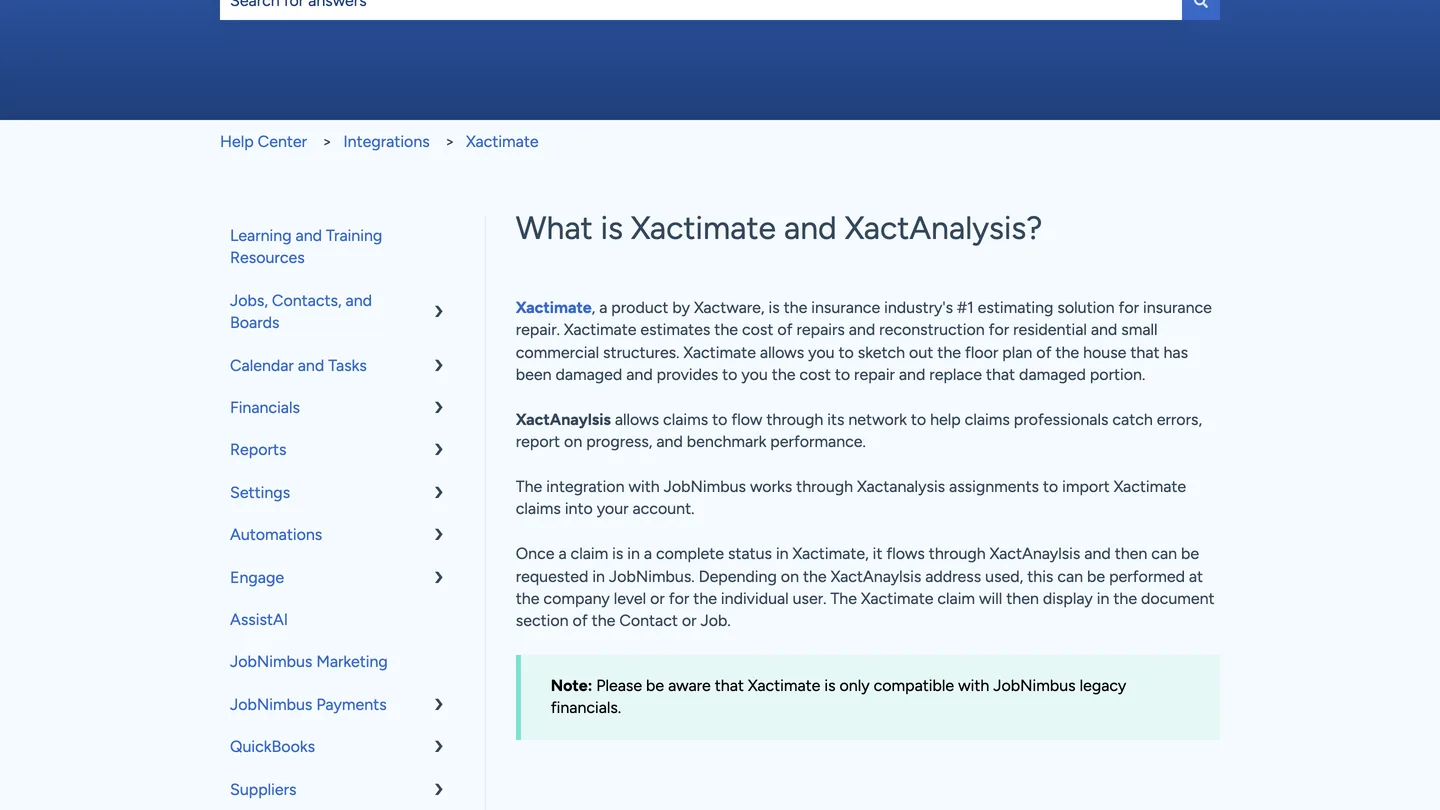
Here is the finding that changes the decision for insurance restoration work. The public integrations page never mentions Xactimate. The help centre does, and it explains that the integration works through XactAnalysis assignments to import Xactimate claims into your account, that a claim flows through XactAnalysis once it is complete, and that imported products and services land in the estimate builder with the Xactimate line item number and activity code intact.
Then it adds this, on all three of its Xactimate articles: Xactimate is only compatible with JobNimbus legacy financials. Enabling it also requires an access profile specifically named Admin, and an XactAnalysis Contractor or Xactimate SP account with integrations enabled on the Xactware side. So the carrier and adjuster half of a restoration roofer's week runs on an older financials stack inside the product. If supplements pay your bills, that single note is worth more than every feature list on the marketing site, and you want it answered by a human before you sign.
What you give up against a horizontal platform
Every page in this category sells the trade depth and none of them price the loss, so here it is. Going vertical costs you the integration marketplace. Compared to a horizontal FSM, JobNimbus connects to roughly two dozen named partners, most of them roofing-specific, and the entry plan caps you at two of them. Jobber and the other general platforms carry app marketplaces an order of magnitude larger, published prices you can compare in a spreadsheet, and a per-user rate you can multiply.
You also give up the service side outright. There is no dispatch board built around a technician's day, no maintenance agreement engine, no flat-rate price book and no truck-stock inventory. Those absences are correct for a roofer and disqualifying for anyone who also sells service.
And you give up price discovery, which is the cost nobody counts. A published-price product lets you model three years of headcount growth on a Sunday night. A quote-gated one makes you book a call, sit through a demo, and take a number from someone whose job is the number. That is a real tax on your time, and it favours the vendor in every negotiation.
Where it falls short
Six specific gaps. You can check every one of them inside the trial.
No published price, on any tier. You cannot model your own bill, compare two vendors on a spreadsheet, or budget headcount growth without a sales call.
The Xactimate route is limited to legacy financials. Documented by the vendor, repeated three times, and absent from every marketing surface.
Essentials caps you at two integrations and no multi-location. Multi-location is not supported at all on the entry plan, and it tops out at two locations on Pro.
Reporting is the recurring complaint. Damian O., a project manager writing on 13 November 2024, named a lack of reporting in detail to track all jobs. Julia C., a VP of operations writing on 11 November 2024, says the mobile app could not do what her team needed in terms of reporting. The vendor points both at its Insights module, so test Insights specifically rather than the platform generally.
The bugs are small, frequent and real. William H., a project manager writing on 9 December 2025, reports that the profit margin sliding scale numbers are always off and that support could not fix it. Maria P., a project manager writing on 20 September 2025, wanted the calendar bugs fixed. Neither is fatal. Both are the kind of thing that costs an office manager twenty minutes a week forever.
The add-ons are where the bill grows. Matthew O., a sales lead writing on 28 November 2024, made the sharpest version of the point: he says that if you are not already paying for EagleView, the program does not do what it claims. Measurement, texting and marketing are all separate line items.
Getting your data back out
Transactional data exports fine. You build a custom report for contacts or jobs, save it, and export to CSV or Excel, which covers the records an accountant will ask for.
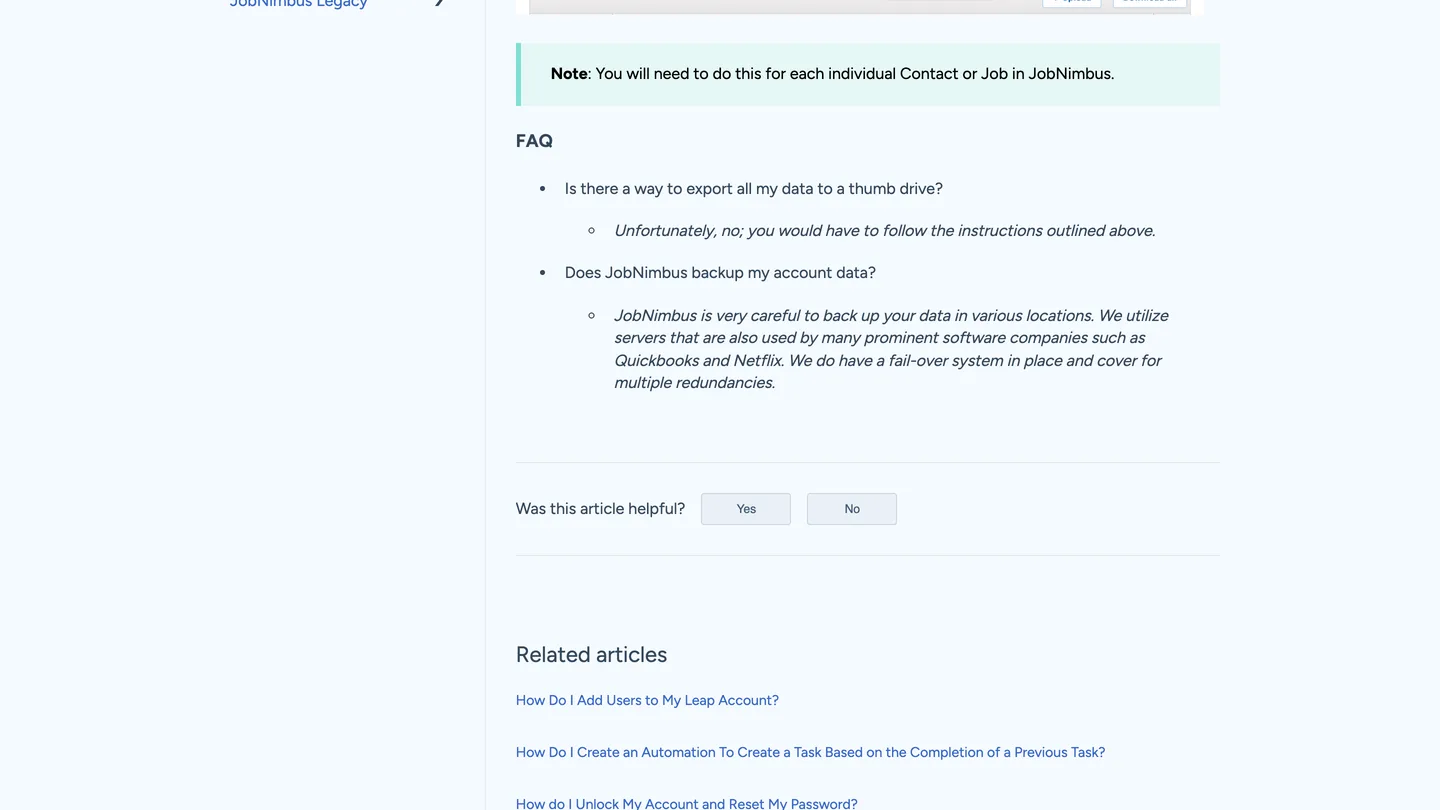
Documents and photos are the problem, and for a roofer those are most of the value. JobNimbus's backup documentation says the Download All button on a Contact or Job record saves a zip of the attachments on that record, then adds the sentence that decides it: you will need to do this for each individual Contact or Job in JobNimbus. Its own FAQ asks whether there is a way to export all your data to a thumb drive and answers "Unfortunately, no; you would have to follow the instructions outlined above."
So a shop with 900 closed jobs and adjuster photos on every one is looking at 900 downloads. Pair that with the cancellation article, which says JobNimbus does not guarantee to hold data for canceled accounts, and the order of operations stops being optional. Export first. Cancel second. Leave yourself a fortnight.
"JobNimbus does not guarantee to hold data for cancelled accounts, so a shop with 900 closed jobs faces 900 downloads before it cancels."
JobNimbus (2026)
What the reviewers report
JobNimbus scores 4.6 out of 5 across 482 Capterra reviews, with Ease of Use at 4.6, Value for Money at 4.6, Customer Service at 4.5 and Features at 4.4. Features being the weakest of the four is a fair summary of everything above: people like using it more than they like what it does.
"JobNimbus scores 4.6 out of 5 across 482 reviews, with Ease of Use 4.6, Value for Money 4.6, Customer Service 4.5 and Features 4.4, its weakest."
Capterra (2026)
Consistent praise: how quickly a new hire learns it, the estimate builder, document and photo storage in one place, and onboarding help that several reviewers describe as hands-on. Consistent complaints: reporting depth, a cluttered interface at volume, and small persistent glitches. Nikki C., a permit technician writing on 27 April 2026, likes it and still says the interface can feel a bit cluttered when managing a lot of jobs.
One number worth treating carefully is the vendor's own. The pricing page cites a 4.8 mobile rating from 5,000-plus reviews in one place and from 8,000-plus contractors in another, and the Capterra listing puts it at 9,000-plus. Those cannot all be the same count. The App Store listing settles the iOS half at 4.8 from 12K ratings, which is a genuinely strong result and a bigger number than any of the three the vendor prints. So the app is fine. The lesson is about the marketing copy: take vendor-published proof at the precision the vendor took it, and go to the primary listing when the number matters.
"The JobNimbus iOS app rates 4.8 from 12K App Store ratings, a larger count than any of the vendor-cited figures."
Apple App Store (2026)
How it compares
A real alternative covers the same roofing workflow. A general field-service platform is a downgrade path rather than an alternative, and Jobber sits in the table below on exactly that basis. Every figure in it was read on 27 July 2026 on the vendor's own pricing page, and nothing is estimated.
| JobNimbus | AccuLynx | Roofr | Leap | Jobber | |
|---|---|---|---|---|---|
| Published price | None. Quote only | None. Quote only | $0 Starter, $249 Essentials, $349 Scale | $79 Essential, $298 Team, $750 Premium | $199 a month on Grow |
| Billing unit | Account fee plus role-based seats | Not published | Per account, unlimited users | $99 per additional user | $29 per additional user |
| Distributor ordering | SRS Roof Hub, ABC Supply, QXO, Beacon PRO+ | SRS, ABC Supply and QXO named | Material ordering on the free plan | ABC Supply, SRS and QXO named | Not named on its pricing page |
| Aerial measurement | EagleView and Hover, ordered in-app | Eagleview and Hover named | Native reports at $13 to $19 | Eagleview named, no Hover | Not named on its pricing page |
| Xactimate route | Via XactAnalysis, legacy financials only | Not named on its integrations page | ESX file per report, uploads to Xactimate | Not named on its pricing page | Not named on its pricing page |
| Free tier or trial | 14-day trial, no credit card | Demo request only | Free Starter plan, no monthly cost | 14-day trial on Essential | Trial first, pick a plan later |
So Roofr wins on transparency by a distance, and it is the only one of the five that lets a solo roofer start at nothing and grow into a CRM. AccuLynx is the closest like-for-like and is just as quote-gated, which makes those two hard to compare without booking two sales calls. Leap publishes its prices and then asks for a one-year contract. And JobNimbus sits where the reviews keep putting it: cheaper than AccuLynx, deeper than a general platform, and impossible to price from public information.
The verdict, by crew size
One to three users
Probably not yet. Essentials caps you at two integrations with no multi-location, and you would be paying a quote-gated fee for a production system you are not running yet. Start on a free measurement and proposal tool, prove the workflow, then come back when a second crew makes the paperwork the bottleneck.
Four to nineteen users
Yes, and this is the band the product is built for. Ask for the account fee and every role rate separately, place one real supplier order during the trial, and if you touch insurance work, get the Xactimate and legacy-financials question answered by a human before you sign anything.
Twenty or more users
Yes, and negotiate. Enterprise is the only tier with unlimited locations and unlimited automations, and at that headcount you are the customer a quote-gated vendor wants. Get AccuLynx to quote the same scope in the same week, because two quotes are the only price discovery this category offers.
The lead has to arrive before the CRM can work it
Fervor is a CRO and web design studio rather than a JobNimbus competitor. But a lead-to-payment platform starts at the lead, and that is the part we happen to have measured.
In May 2026 we inspected 130 roofing contractor websites for the Contractor CRO Index 2026. Of the 111 of them with a captured form, 55 ship a form carrying 11 or more fields, which is 49.5% of them, and the median form runs 10 fields. Then 53.1% put a CAPTCHA in front of it. And only 8.5% show a before-and-after gallery anywhere, on sites selling the most visual trade there is.
So the job board sits waiting on leads that a ten-field form and a CAPTCHA are quietly turning away. No CRM recovers those, at any price, published or not. The full statistics are public, and our roofing marketing hub covers where the rest of the leaks sit.
Fix the form before you buy the CRM
Fervor inspects your site the way a homeowner uses it, then shows you the specific places roofing leads leak out before any software gets involved. It takes 5 business days.
Get a Site InspectionWhat we checked, and what we could not
We did not run JobNimbus on a live roofing account, so nothing here is a hands-on performance claim. What this page is instead: the vendor's pricing page and integrations page read in full, the help-centre articles on Xactimate, XactAnalysis, cancellation and data backup read directly, the Capterra listing read in a rendered browser, and the pricing pages of AccuLynx, Roofr, Leap and Jobber read the same day for the comparison. Every one of those pages is committed as a text snapshot, so each figure can be re-checked against the bytes we read.
The gap we could not close is the price. JobNimbus publishes none, every third-party page printing a per-user figure is published by a company that sells against it, and the one neutral directory figure is filed under a plan name the vendor does not sell. So we reported the absence instead of borrowing a competitor's number and calling it a fact. G2, TrustRadius and Trustpilot block automated access, so nothing here comes from any of them, and no contractor forum thread was read verbatim.
If you want to evaluate JobNimbus directly, its product site is where the trial starts. But ask for the account fee, every role rate, the payment processing rate and the texting add-on in the first conversation, and get all four in writing.
What JobNimbus users say
Jobnimbus was a cheeper option than acculynx.
There are a few glitches with it, for one, the profit margin sliding scale numbers are always off, and there was nothing that tech support could do to fix it.
I have to use JobNimbus for residential and another product for commercial as Nimbus doesnt do any job costing or vendor portals, or customer portals
I feel like if you aren't already paying for eagle view then if really doesn't do what it claims.
The mobile app wasn’t our favorite and it could not do what we needed it to do in terms of reporting.
REPORTS, LACK OF REPORTING IN DETAIL TO TRACK ALL JOBS AND MAKE ACCESSMENTS
The interface can feel a bit cluttered at times, especially when managing a lot of jobs.
The e-mail system was terrible and the biggest reason why we are switching to another CRM.
I believe the calendar could use updated and fix a few bugs and problems it has.
Frequently asked questions
How much does JobNimbus cost?
JobNimbus does not publish any pricing. Its pricing page names four plans, Essentials for up to 3 users, Pro for up to 10, Premium for up to 19 and Enterprise for 20 or more, and every one of them ends in a Request pricing button. The page carries an FAQ entry titled "Why don't you list pricing on the website?" and answers that contracting businesses are not one size fits all. The same FAQ does describe the billing shape: an account-based price for the CRM, plus role-specific Project Management pricing for Admin, Sales and Field team members. Search results will hand you confident per-user figures, but every page found printing one is published by a company that sells against JobNimbus, so none is repeated here.
Why does Capterra list JobNimbus at $300 per user per month?
Capterra shows a starting price of $300, labelled Per User, Per Month, under a plan name of "Basic". JobNimbus sells no plan called Basic; its plans are Essentials, Pro, Premium and Enterprise. That figure is best read as a directory field filled in badly rather than as a rate you should budget against, and it is the clearest illustration of what happens when a vendor publishes nothing: the only public number attached to the product contradicts the vendor and nobody has corrected it.
Does JobNimbus integrate with Xactimate for supplements?
Yes, through XactAnalysis, but with a limitation the marketing site never mentions. JobNimbus's public integrations page does not name Xactimate at all. Its help centre does, and three separate Xactimate articles carry the same note: Xactimate is only compatible with JobNimbus legacy financials. The integration imports claims from an XactAnalysis Contractor account into the estimate builder, carrying the Xactimate line item number, activity code, quantity, cost and price. Enabling it needs an access profile specifically named Admin plus an XactAnalysis or Xactimate SP account with integrations enabled. If insurance supplements pay your bills, get that legacy-financials note explained by a human before you sign.
Which suppliers can JobNimbus order material from?
Four distributor routes are named on its integrations page, each with live pricing and direct ordering: Roof Hub by SRS Distribution, which also returns delivery updates, ABC Supply, QXO for ordering from a local branch, and Beacon PRO+ for building estimates on Beacon materials. Supplier integrations and the QuickBooks integration are both listed as unlimited on every plan, so material ordering is not gated to a higher tier. That matters, because a separate Integrations row does cap you at 2 connections on Essentials and 5 on Pro.
Does JobNimbus require a contract?
No. JobNimbus states you do not have to sign a long-term contract and that it offers monthly or annual agreements depending on plan and onboarding needs. It also states there are no required setup or onboarding fees, though paid Professional Services are offered as an add-on for migration, custom workflow building and integration work. There is a 14-day trial with no credit card required. No minimum term, early termination fee or notice period is published.
How hard is it to get your data out of JobNimbus?
Transactional data is fine and documents are painful. You export contacts and jobs by building a custom report and exporting it to CSV or Excel. Attachments are different: the Download All button saves a zip of the files on one Contact or Job record, and JobNimbus's own note says you will need to do this for each individual Contact or Job. Its FAQ asks whether there is a way to export all your data to a thumb drive and answers "Unfortunately, no". The cancellation article adds that JobNimbus does not guarantee to hold data for canceled accounts. So export before you cancel, and budget real time for a shop with hundreds of photo-heavy jobs.
Who should not buy JobNimbus?
Two profiles. A multi-trade shop whose second trade is not an exterior, because there is no dispatch board, no recurring maintenance agreements and no flat-rate price book, so the mechanical half of the business ends up back in a spreadsheet. And a contractor with meaningful commercial volume: one Capterra reviewer, a commercial vice president, reports running JobNimbus for residential and a second product for commercial. JobNimbus now sells a Profit Tracker for job-level margin, so treat the job-costing half of that complaint as dated and the portal half as a question to ask.
What are the best JobNimbus alternatives?
AccuLynx, Roofr and Leap cover the same roofing workflow. AccuLynx is the closest like-for-like and is equally quote-gated, so comparing the two means booking two sales calls. Roofr publishes everything: a $0 Starter plan, Essentials at $249 a month and Scale at $349, with unlimited users on every plan, native measurement reports at $13 to $19, and an ESX file per report that uploads straight into Xactimate. Leap publishes $79 for a single-user Essential plan, $298 for Team plus $99 per additional user, and $750 for Premium, then asks for a one-year contract paid monthly. A general field-service platform such as Jobber is a downgrade path rather than an alternative, because it carries no distributor ordering and no aerial measurement.
Freshness
How we keep this page current
Three dates govern this review, and they carry different meanings. The initial source sweep is dated July 27, 2026; when only part of the evidence set is recaptured later, that later date is stated beside the refreshed claim. We last revised the page on July 30, 2026. And the user reviews we quote were posted over roughly the last 24 months, so their individual dates remain part of the evidence instead of being overwritten by a later pricing update.
We revise the page when JobNimbus changes a published price or a contract term, when a rating we cite moves by more than a few tenths, or when the vendor ships something big enough to change the verdict. We never bump the date just to look fresh, because Google treats that as manipulation and so do we. If a figure here reads as stale by the time you land on it, treat it as a floor and check the vendor's own page. We linked it at every number for exactly that reason.
Sourcing
How this review was researched
Every figure on this page traces to a captured source linked inline where it appears. The initial sweep is dated July 27, 2026; any later, partial recapture is dated at the claim rather than relabelling the whole evidence set. Ratings come from Capterra, GetApp, Software Advice and the Apple App Store. Note that Capterra, GetApp and Software Advice share one Gartner Digital Markets review pool, so an identical score across all three is a single sample rather than three corroborating ones, and this page treats it that way. G2, TrustRadius and Trustpilot block automated access, so where their numbers appear they are labelled as reported rather than verified. No claim here is sourced from Reddit or from a contractor Facebook group, because neither could be retrieved and quoting them would mean inventing attribution. Pricing marked as reported comes from third-party roundups, never from Fervor. Fervor's own findings come from the Contractor CRO Index 2026.
About
About Fervor Studio
Fervor Studio is a conversion rate optimization (CRO) and web design studio for home services contractors across North America, based in Cochrane, Alberta. Fervor does not sell field service management software and is not an alternative to JobNimbus. It publishes the Contractor CRO Index, a public benchmark measuring contractor website conversion potential using reproducible, open-source methods such as axe-core and Google Lighthouse. Fervor Studio is operated by Fervor Group Inc.
 Aug 1, 2026
 Tech Stack
Best Plumbing Software in 2026: Ten Ranked Across Four Classes
A plumbing company’s work runs through four classes of software that do not substitute for each other, and it only buys two of them. Ten products, each with a published price or an explicit statement that the vendor publishes none.
Read Article Jul 30, 2026
 Tech Stack
NiceJob vs Birdeye 2026: Pricing, Contracts and Review Gating
One of these vendors puts its price on the page and its cancellation terms in writing. The other puts a form in front of both, and the complaint record is where its contract length shows up.
Read Article Jul 30, 2026
 Tech Stack
Podium vs Birdeye 2026: Pricing, Contracts and Review Gating
Only one of these two will tell you what it costs before a sales call, and even that number carries a carve-out aimed squarely at trade contractors.
Read Article Jul 30, 2026
 Tech Stack
Best Electrical Contractor Software 2026: 11 Ranked and Priced
An electrical contracting business makes two software purchases that do not substitute for each other, and every roundup answering this query covers only one of them. Eleven platforms, with a published price or an explicit statement that the vendor publishes none.
Read Article Jul 30, 2026
 Tech Stack
Best HVAC Software in 2026: Eleven Ranked Across Three Classes
An HVAC contracting business buys across three classes of software that do not substitute for each other, and every roundup answering this query covers only one of them. Eleven products, each with a published price or an explicit statement that the vendor publishes none.
Read Article Jul 29, 2026
 Tech Stack
AccuLynx Pricing 2026: The Real Cost of a Quote-Gated Plan
One published figure, two blank plan cards, and a contract that says things the pricing page does not. A line-by-line breakdown of what AccuLynx really bills.
Read Article Jul 29, 2026
 Tech Stack
Houzz Pro Canada Review 2026: Pricing and Alternatives
Houzz Pro serves different pricing renderings. What Canadian buyers see, how GST/HST and payments work, what Custom gates, and what the annual contract commits you to.
Read Article Jul 29, 2026
 Tech Stack
JobNimbus Pricing in 2026: What the Quote Does Not Cover
JobNimbus prints no figure on any of its four plans. So the only rate you can read before a sales call is the payments meter, and it is the biggest line on the bill.
Read Article Jul 29, 2026
 Tech Stack
BuildOps Review 2026: Pricing, Contract Terms and Alternatives
BuildOps runs commercial service and projects on one platform, and publishes no pricing at all. The billing unit, the 30-day data-export window, and who it suits.
Read Article Jul 29, 2026
 Tech Stack
FieldPulse Review 2026: Pricing, Pros, Cons and Alternatives
FieldPulse rates 4.6 on Capterra and is the platform contractors name when they leave a bigger system. But it publishes no price, and the contract runs a year.
Read Article Jul 29, 2026
 Tech Stack
Service Fusion Review 2026: Pricing, Contract and Alternatives
Service Fusion bills flat per company with unlimited users, which is the best structural deal in field service software. The published plans, the contract behind the no-contract line, and the app score every other review gets wrong.
Read Article Jul 29, 2026
 Tech Stack
Knowify Review 2026: Pricing, Job Costing and Alternatives
Knowify rates 4.5 on Capterra and its weakest sub-score is features. What the $99 Core plan withholds, which way the QuickBooks sync really runs, and who should not buy it.
Read Article Jul 28, 2026
 Tech Stack
AccuLynx Review 2026: Pricing, Tier Gating, Alternatives
AccuLynx rates 4.6 across 846 reviews and now publishes an entry price. What that price omits, which tier holds the insurance workflow, and who should skip it.
Read Article Jul 28, 2026
 Tech Stack
Unitel Voice Review 2026: Pricing, Features and Alternatives
Unitel Voice rates 4.6 on Capterra and gives a one-truck shop a business number for $9.99 a month. The published plans, the cost per call, and what it won't do.
Read Article Jul 28, 2026
 Tech Stack
NiceJob vs Podium 2026: Pricing, Contracts and Review Gating
Both vendors print a price, at very different scale and in different currencies. The gap that matters is what Podium will not print: the billing unit, and whether a trade shop gets the number on the page.
Read Article Jul 27, 2026
 Tech Stack
CompanyCam Review 2026: Pricing, Pros, Cons and Alternatives
Every page ranking for CompanyCam still quotes a per-user price the vendor no longer charges. Here are the real plans, the seat math, and who should skip it.
Read Article Jul 27, 2026
 Tech Stack
NiceJob Review 2026: Pricing, Pros, Cons and Alternatives
NiceJob rates 4.9 on Capterra and refuses to gate negative reviews. Real plan pricing, the active-customer threshold nobody publishes, and who should skip it.
Read Article Jul 26, 2026
 Tech Stack
Buildertrend Review 2026: Pricing, Limits and Alternatives
Buildertrend rates 4.5 across 2,486 Capterra reviews and quotes against your revenue rather than your seat count. The workflows, the export problem, the alternatives.
Read Article Jul 26, 2026
 Tech Stack
CallRail Review 2026: Pricing, Pros, Cons and Alternatives
CallRail rates 4.5 on Capterra, and its tracking numbers port out free. But the two usage rates that decide your real bill are the two it does not print.
Read Article Jul 26, 2026
 Tech Stack
Roofr Review 2026: Pricing, Pros, Cons and Alternatives
Roofr rates 4.6 on Capterra and sells $13 measurement reports against a market charging triple. But it will not import a report from anywhere else.
Read Article Jul 24, 2026
 Tech Stack
Housecall Pro Review 2026: Pricing, Pros, Cons, Alternatives
Housecall Pro has the shortest learning curve in the category and the widest review spread. Real pricing, the Instapay math, and the migration trap to plan around.
Read Article Jul 23, 2026
 Tech Stack
Jobber Review 2026: Pricing, Pros, Cons and Alternatives
Jobber rates 4.6 on Capterra with the best mobile app in the category. Real plan pricing, the feature gating that changes your entry price, and who it suits.
Read Article Jul 22, 2026
 Tech Stack
ServiceTitan Review 2026: Pricing, Pros, Cons, Alternatives
ServiceTitan rates 4.3 on Capterra but its weakest score is value for money. Real reported pricing, the 12-month contract, the exit fees, and who it suits.
Read Article Jun 2, 2026
 Tech Stack
HVAC Online Scheduling: The 43% Losing After-Hours Bookings
HVAC leads every trade on online booking at just 56.7%, which still leaves 43% of sites forcing an after-hours customer to wait for a business-hours phone call.
Read Article