BuildOps Review 2026: Pricing, Contract Terms and Alternatives
BuildOps bills per field and office user, and its crew app rates 3.1 across 457 App Store ratings. What the contract locks in, and who it fits.

Disclosure This article features tools from our brand partners. If you choose to use them, we may receive compensation at no extra cost to you.
Our editorial choices are independent of these affiliate arrangements. Read our full affiliate disclosure.
Fervor is a CRO and web design studio, not a software reseller, and no vendor paid for placement here or for a kinder verdict. Affiliate links are flagged where they appear, and they never change what we report.
Page at a glance
BuildOps is field service management software built for commercial mechanical and electrical contractors, and it runs service work and construction projects on one platform rather than bolting projects onto a residential tool. It publishes no prices. Its pricing page is a request form, billing is per field and office user, and there is no free trial anywhere on the site. It fits a commercial HVAC contractor or electrical contracting business running roughly 10 to 200 technicians on a mix of maintenance agreements and project work. Skip it under about 10 technicians, and skip it if you are new construction only with nothing to dispatch. The technician app is the weak spot: 3.1 out of 5 across 457 App Store ratings. The contract terms a buyer can read carry no renewal clause and give you thirty days after termination to export your data. The closest alternatives are ServiceTitan, ServiceTrade, FieldEdge and Simpro.
The short verdict
BuildOps is the right buy for a commercial HVAC contractor or electrical contracting business running somewhere between 10 and 200 technicians, where the work is a mix of recurring maintenance agreements and multi-week projects, and where the office is currently running two systems because the service tool cannot handle submittals and the project tool cannot dispatch. That is a narrow shop profile. It is also a real one, and almost nothing else in field service management is built for it.
But you cannot price it before you talk to a salesperson, and you cannot read the contract term before one is sent to you. Pricing was verified 27 July 2026, and the honest headline is that there is no price to verify.
| Pricing model | Quote only. No figure published anywhere on the vendor site |
|---|---|
| Billing unit | Per field and office user. Subcontractors need no licence |
| Trial | None. Demo only |
| Implementation | 8 to 12 weeks, stated by the vendor. Included with every plan |
| Technician app | 3.1 out of 5, 457 US App Store ratings, iOS and Android |
| Best fit | 10 to 200 technicians, commercial mechanical or electrical, service plus projects |
What works, and what to watch
Strong: service work and project work share one database, so the dispatch board and the job-cost dashboard are looking at the same job. Offline is offline-first rather than view-only. Asset history is captured by photographing the nameplate. The ERP list is short but it is the right short list for commercial work, naming Viewpoint Vista, Viewpoint Spectrum, Sage Intacct, NetSuite and QuickBooks. And the pricing FAQ discloses one thing almost no vendor in this category will put in writing, which is that subcontractors do not consume licences.
Weak: a mobile app rated 3.1 across 457 ratings, and the written complaints are about crashes and load times rather than missing features. No published price and no headcount field on the pricing form, so the quote is a conversation rather than a calculation. No estimating integration named for electrical contractors. And the terms of service you can read before signing contain no renewal clause, no notice window and no exit for convenience.
What BuildOps does
It runs a commercial contracting business off one database. Dispatch, scheduling, quoting, invoicing, reporting and the technician app come in every plan, and the project side adds submittals, RFIs, change orders, daily reports and job costing. So the pitch is not that it dispatches better than Jobber. The pitch is that the board dispatching your service technicians and the dashboard tracking a six-week retrofit are the same system, which is exactly the seam where a growing commercial shop usually ends up running two subscriptions and reconciling them by hand.
The vendor sells plans scoped to service only, projects only, or both, and says you can add the other side later. Worth knowing before the demo, because it means "what does BuildOps cost" has at least two answers depending on which half you buy, and the salesperson will ask which one you want before naming either.
Who it is for, and who should not buy it
It fits the commercial mechanical or electrical shop that has outgrown a residential platform. Ten to two hundred technicians, chiller and rooftop maintenance agreements or scheduled electrical service across a portfolio of buildings, plus project work that runs weeks rather than hours. If your dispatcher is scheduling the same technician across three days on one job, most of this category cannot represent that and BuildOps can.
So skip it in three cases. Skip it if you run fewer than 10 technicians, because the platform is scoped to commercial complexity you are paying for and not using, and an 8 to 12 week implementation is a lot of office time for a shop of six. Skip it if you are a new construction only operation with no service calls, since there is nothing to dispatch and a construction project tool will serve you better. And skip it if you are a residential service business, because the whole product is built to strip residential patterns out rather than support them.
What BuildOps costs
The vendor publishes nothing, and the form proves it
There is not a single dollar figure on the BuildOps pricing page. Not a starting price, not a tier name with a number on it, not a per-seat rate. What sits there instead is a form headed "Pricing Request for BuildOps" asking for first name, last name, work email, company name, phone number and a free-text message.
And read that field list again, because the omission is the point. The form never asks how many technicians you run, how many office users you need, or which trades you cover. Yet the vendor's own answer to "How much does BuildOps cost?" says plans are "built around the number of people who need it, the trades you run, and the tools your back office depends on." So the three inputs that determine your price are not collected by the form that requests it. A salesperson gathers them on a call, which means the number you eventually hear was scoped with a person who already knows your revenue.
The billing unit, and the one genuinely useful disclosure
Billing is per user, and the vendor is specific about which users count. Its pricing FAQ states that "BuildOps pricing is based on the number of field and office users on your account," so a dispatcher and a technician both consume a licence. The terms of service back this up from the legal side, requiring the customer to keep authorised users at or under the number of licences purchased under the Order Form.
Then the disclosure worth the read: "Subcontractors are managed through BuildOps but do not require their own licenses. Your PMs and accounting team manage subcontract workflows from their existing seats." For a commercial electrical contractor who subs out fire alarm or controls work, that is real money, and it is the kind of thing per-seat vendors usually leave you to discover after the fact. Credit where it is due.
What sits outside the subscription
Implementation and onboarding: included, no figure. The vendor says implementation and onboarding support come with every plan and names no setup fee. It also puts the timeline at 8 to 12 weeks for both HVAC and electrical shops, which is office labour you are paying for even when the vendor is not billing you for it.
Payment processing rate: not disclosed. And no processing rate appears on any BuildOps page fetched for this review.
Contract minimum term and auto-renewal: not disclosed publicly. This is the finding, and it is covered in full below.
Early termination: not disclosed. No exit fee, cancellation fee or notice period appears in the public terms. The pricing page does state "No hidden platform fees," which is a claim about fees rather than about the term you are committing to.
Our read on the features
The dispatch board
The board is drag-and-drop and it handles multi-day scheduling, which is the single capability that separates a commercial tool from a residential one. Its more interesting trick is certification-based dispatch: the electrical page describes a board that suggests assignments based on who holds which certification, who is available, and who is closest to the site. For a shop where a journeyman electrician and a licensed electrician are not interchangeable on a given scope, that is a genuine capacity-planning feature rather than a scheduling nicety.
The technician app, which is the weak point
BuildOps: Commercial Trades on the App Store rates 3.1 out of 5 across 457 US ratings, with version 3.78.0 shipped on 10 July 2026. And the written reviews are consistent about what is wrong. It is not missing features. A technician writing in August 2024 reports that adding inventory items takes thirty seconds to load "even on 1GBPS WiFi." A nineteen-year HVACR technician writing in May 2024 reports frequent outages and form upload failures. Another reports deleting and reinstalling weekly.
"BuildOps: Commercial Trades rates 3.1 out of 5 across 457 US App Store ratings, on version 3.78.0."
Apple App Store (2026)
So weigh that against the vendor's claim that most team members are comfortable after one or two training sessions. Both can be true. Learning the workflow is not the same problem as the app freezing on a rooftop in July, and the second one is what the technicians write about.
Offline, which is the real differentiator
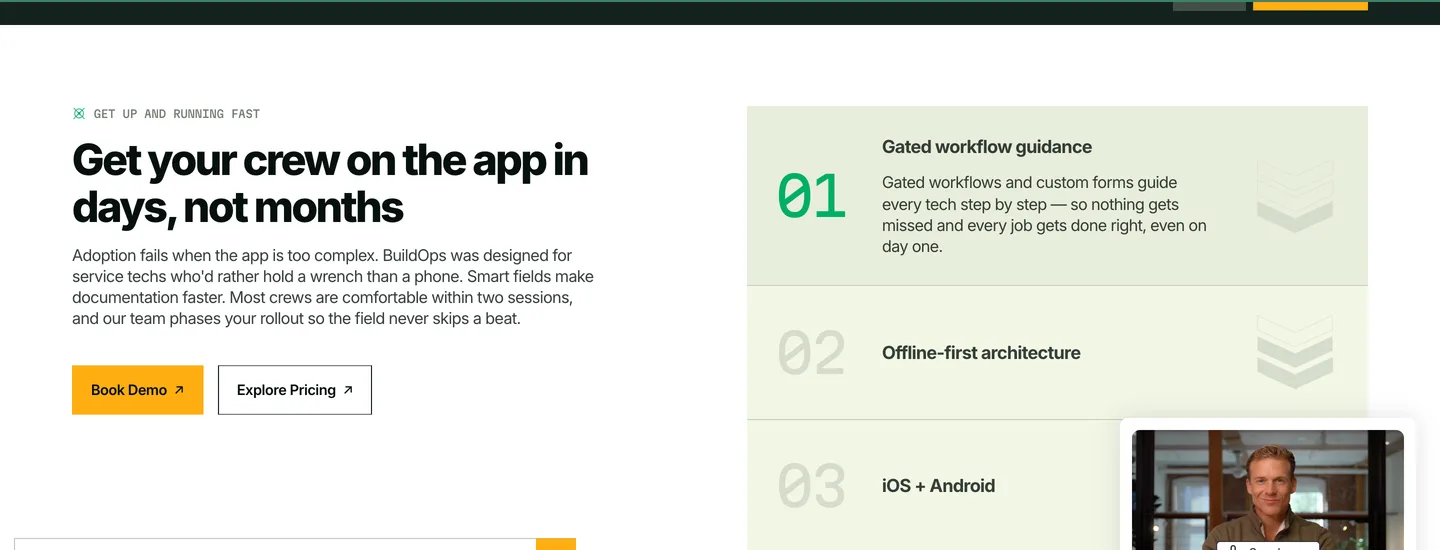
This is where BuildOps beats the residential platforms outright, and it matters more than the star rating does. The vendor states the app "saves all data locally, even in basements, on rooftops, or in dead zones," and that it "was designed offline-first." Technicians can build and send quotes and generate and email invoices from the app, not merely view scheduled work. Compare that with Jobber, whose app lets a technician view jobs and customer notes without a connection but cannot create a job, take payment or sync until it reconnects. For a mechanical room three floors underground, one of those is a working day and the other is a notepad.
Asset history and service agreements
A technician photographs the equipment nameplate and OCR pulls make, model and serial into the asset record, which then carries the full history of recommended and completed repairs. For a commercial HVAC contractor holding maintenance agreements across forty rooftop units, that record is the product. And recurring maintenance agreements run on the same platform as the service board, so a plan visit and a breakdown call land in the same place.
One capability the vendor never claims, and you should ask about on the demo: there is no flat-rate price book described anywhere on the site. That is defensible for commercial work, where quotes are built from scope rather than picked off an option sheet, but if you run a residential division alongside the commercial one, the price book you rely on there does not exist here.
Job costing and real-time WIP
Both the HVAC and electrical pages lead with a "Real-time WIP guard," meaning labour, hours, materials and asset usage tracked across the life of a project rather than reconciled at the end of the month. And that is the argument for buying the projects half rather than only the service half, since gross margin per job is the number a commercial shop loses money by learning late.
Integrations, and the clause that removes your remedy
Accounting first, because it is the integration that decides this purchase. The named list is Viewpoint Vista and Viewpoint Spectrum, Sage Intacct, NetSuite and QuickBooks. On direction the vendor is unambiguous: it claims a two-way sync, saying field data such as time tracking, purchase orders and invoicing flows "directly with your ERP's job costing and payroll modules. Data flows both ways." So it syncs invoices, purchase orders, customers and job costs in both directions rather than pushing one way into accounting. An HVAC shop also gets Bluon, the commercial refrigerant and technical data repository, which is a trade-specific connection worth having.
Then the two layers the vendor never addresses, and you should ask about both. There is no named payment processor anywhere on the site. No Stripe, no Square, no integrated payments product, and no processing rate, which is unusual in a category where the platform usually takes a cut of every card transaction. And there is no phone system, VoIP or call tracking integration named either, so if you run CallRail or an answering service, attribution from ringing phone to booked job is a workaround rather than a native link. Neither absence is fatal for commercial work, where the invoice usually goes to accounts payable rather than a card at the door. Both are worth pricing before you assume they are included.
But the integrations page itself names no partner in text at all. Every logo is an image, and the visible categories are ERP accounting, field intelligence, expense and payroll, and procurement. You cannot read which objects sync, in which direction, from that page.
Now the part to take to your lawyer rather than your dispatcher. The terms of service state that a third-party integration failing to meet the customer's specifications or expectations "shall not constitute a breach of this Agreement and shall not give rise to any right of Customer to terminate this Agreement or receive any refund, credit, or other remedy." And then the terms add a clarifying line: "For clarity this includes enterprise resource planning integrations." So the ERP sync is the headline reason a commercial contractor buys this, and it is explicitly carved out of every remedy in the contract. Get the sync demonstrated against your own Vista or Spectrum instance before you sign, because afterwards it is not a breach.
The contract, and getting your data back out
Read the public terms looking for a renewal clause and you will not find one. The words auto-renew, automatically renew and renewal do not appear. Section 13 says only that the agreement "starts on the Effective Date and shall continue to apply until all Orders have expired or been terminated," and the termination rights it grants cover an uncured material breach after thirty days' notice, a party ceasing operation, or insolvency. There is no termination for convenience anywhere a buyer can read. Which means the contract minimum term, the renewal behaviour and the notice window all live in the Order Form, and the Order Form arrives after the sales conversation. Ask for it in writing early.
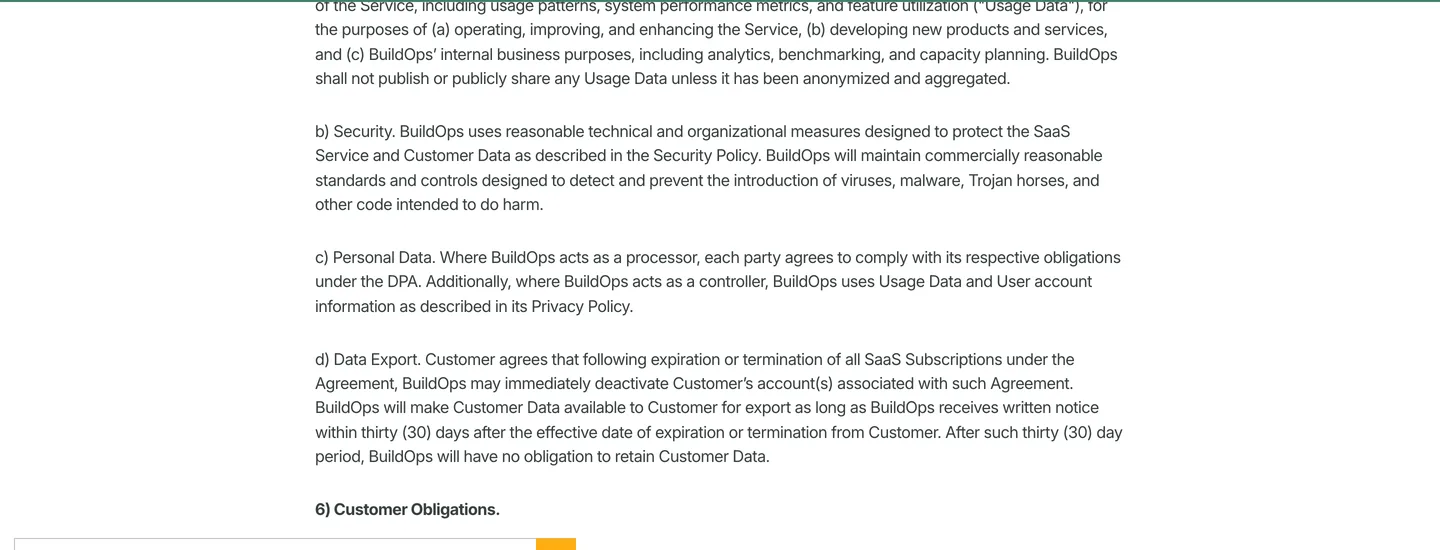
Section 5(d) is the one to diary. On expiration or termination BuildOps "may immediately deactivate Customer's account(s)," and it will make your data available for export "as long as BuildOps receives written notice within thirty (30) days after the effective date of expiration or termination." After that window, the terms say BuildOps "will have no obligation to retain Customer Data." So the export is not automatic and it is not indefinite. Somebody has to send a written request inside a month, during the exact month a shop is busy standing up a replacement system. Put it in the calendar the day you sign, not the day you cancel.
And one clause explains why independent evidence about this product is so thin. Restriction 3(a)(g) says the customer will not "publish benchmarks or performance information about the Services or facilitate third parties to compile benchmarks or performance measurements about any Services." Meanwhile the vendor's own pricing page cites a BuildOps benchmark report for its 76 percent revenue-per-technician figure. Read those two together and the position is that the vendor may publish performance numbers and its customers may not. That is a common enough SaaS clause and it is not evidence of anything sinister. It is still worth knowing when you go looking for a second opinion and cannot find one.
"The BuildOps pricing page cites its own benchmark report for a 76 percent revenue-per-technician figure while its terms forbid customers publishing benchmarks about the service."
BuildOps (2026)
Where it falls short
No price, and no way to estimate one honestly. Third-party sites print per-user rates for BuildOps. None of those figures appears on a BuildOps page, and several of the sites carrying them sell competing platforms, so this review does not repeat them.
No free trial. The phrase does not occur once across the pricing page, the terms, the platform pages or either trade page. So evaluating this product means a demo and then a signature.
The technician app drags the whole platform. 3.1 out of 5, and the complaints are stability rather than scope.
No electrical estimating integration is named. The electrical page lists Sage, Viewpoint and QuickBooks and nothing else. No Accubid, no ConEst, no McCormick, no TurboBid, and no pricing-service connection such as NetPricer or TRA-SER. An electrical estimator working from NECA labor units and a live price file is keeping that work somewhere else.
The trade pages are one template with the trade name swapped. Read the HVAC page and the electrical page side by side and the section headings, the nine FAQ questions and most of the body match. Only one of three differentiator tiles changes: HVAC gets asset history, electrical gets certification-based dispatch. That does not make the product generic, but it does mean the trade pages are not evidence of trade-specific depth. Ask the demo to show you the difference.
Written user evidence stops in early 2025. Apple's public review feed carries no written review after 3 February 2025 even though ratings kept accumulating, and Capterra and Gartner Peer Insights both block automated access. So the corpus you can read is thinner than a five-figure commitment deserves.
How the answer changes by trade
For a commercial HVAC contractor this is close to purpose-built. Refrigerant type and amounts get logged at the asset level through digital forms, which is the record you need when an EPA Section 608 leak-rate question arrives eighteen months later and the technician who did the work has moved on. The federal rule sets leak-rate thresholds and repair deadlines for appliances holding 50 or more pounds of refrigerant, and it is the record-keeping obligation most likely to bite a commercial shop, so an asset-level log is compliance work rather than a nicety. Nameplate capture builds the equipment record for every condenser and air handler on a roof without anyone typing a serial number. The Bluon connection puts commercial troubleshooting data in the same app as the work order. Where it does not help is design-side work: nothing here touches Manual J load calculation or a system change-out proposal, so Wrightsoft or Cool Calc stays in your stack. Our HVAC marketing hub covers the demand side of the same business.
"The federal refrigerant rule sets leak-rate thresholds and repair deadlines for appliances holding 50 or more pounds."
US Environmental Protection Agency (2026)
For an electrical contracting business the service half is strong and the preconstruction half is absent. Certification-based dispatch is the standout, because matching a master electrician or a journeyman electrician to a scope by held certification is a real constraint that generic boards ignore. But there is no electrical takeoff, no assembly library, no NECA labor units, and no named integration to any electrical estimator. Read the electrical page's own integration answer and it lists Sage, Viewpoint and QuickBooks, full stop. No Accubid, no ConEst IntelliBid, no McCormick, and no live price-file service. So a shop bidding conduit runs and electrical panel upgrades off a competitive takeoff will run BuildOps for execution and something else for the bid, and the handoff between them is manual re-entry. Our electrician marketing hub covers how that work gets found in the first place.
How it compares
The honest comparison is mostly a row of blanks, and that is the finding. Four of the five platforms a commercial contractor would shortlist publish no price at all. App ratings are Apple's own figures, pulled 27 July 2026.
| BuildOps | ServiceTitan | ServiceTrade | FieldEdge | Housecall Pro | |
|---|---|---|---|---|---|
| Price on its own pricing page | None | None | Not verified | None | Published plan tiers |
| What the pricing page shows instead | A Pricing Request form | Request Pricing | Not verified | Request Pricing | Plan cards |
| iOS app rating | 3.1, 457 ratings | 3.4, 4,298 ratings | 4.2, 585 ratings | 1.8, 418 ratings | 4.6, 28,042 ratings |
| Built for | Commercial, service plus projects | Residential and commercial | Commercial service | Residential service | Residential service |
Read the app-rating row and one thing jumps out. Every platform built for commercial work sits between 1.8 and 4.2, while the residential platforms sit near 4.6 on twenty to sixty times the sample. That gap is not proof the commercial tools are worse, because a residential app with 28,000 ratings and a commercial app with 457 are not measuring the same population or the same job. But it does mean a commercial contractor should treat a 4.6 residential rating as irrelevant to his decision, and should treat 3.1 as the number to press on during the demo.
Against ServiceTitan, which is the comparison most buyers are running, the split is scope rather than quality. ServiceTitan is deeper on residential marketing attribution, memberships and franchise tooling. BuildOps is built for commercial service plus projects on one database and does not carry the residential apparatus. Neither publishes a price, so the shortlist will cost you two sales cycles either way.
The verdict, by crew size
Under 10 technicians
No. The complexity you are buying is commercial project management, and at six technicians you will spend 8 to 12 weeks implementing capability you will not use for two years. But if the work is commercial service through and through, look at ServiceTrade first. If it is residential, Housecall Pro publishes its prices and gives you a fourteen-day trial, which is a materially cheaper way to find out you were wrong.
10 to 200 technicians, commercial mechanical or electrical
Yes, and this is the shop the product was built for. Take the demo, but take it with three demands. Ask for the Order Form language on term, renewal and notice before you negotiate price. Ask them to run your own ERP against a test job rather than a canned dataset. And put two of your own technicians on the app for a week, because the 3.1 rating is the risk you are underwriting and nobody in the office will feel it.
Enterprise, multi-region
Probably, with the same caveats and one more. SOC 2 compliance and role-based permissions are documented, which clears the usual procurement questions. But at that size you are also the customer most exposed by the export clause, since the data you would need to move is years of asset history across hundreds of buildings. Negotiate a longer export window into the Order Form. Thirty days is the default, not the ceiling.
The number nobody checks
Now, Fervor is a CRO and web design studio rather than a BuildOps alternative. But a commercial contractor buying an operations platform is solving for capacity, and capacity only earns money if the work keeps arriving, which is the gap we happen to have data on.
In May 2026 we inspected 380 home services contractor websites for the Contractor CRO Index 2026. 82.8% of them had poor mobile loading performance, which is the measurement a facilities manager's phone makes when he is standing in a plant room at seven in the morning looking for somebody to call. A dispatch board that can absorb forty more calls a week is worth exactly as much as the number of calls that reach it.
So pick the platform that fits your crew. Then open your own site on a phone and time it. The full statistics are public if you would rather check them yourself.
See whether your website is feeding that new dispatch board
Fervor inspects your site the way a building owner uses it, then shows you the specific places calls and quote requests leak out. It takes 5 business days.
Get a Site InspectionWhat we checked, and what we did not
We did not run BuildOps on a live commercial contract, and we will not imply otherwise. There is no free trial to sign up for, so a hands-on test means a demo and a signed Order Form. What this page is instead: nine pages on the vendor's own site fetched and read on 27 July 2026, including pricing, the terms of service read clause by clause, integrations, the technician app, the HVAC page and the electrical page. Ratings and every quoted user review come from Apple's own App Store listing data.
What we refused to print matters as much. Web search returned a tiered per-user rate for BuildOps and an all-in per-user figure several times higher. Neither appears on any BuildOps page, and the third-party pages carrying them are either listing sites with no stated method or vendors selling a competing platform. A price you cannot open the vendor's own page and read is not a price, so none of it is here. Capterra and Gartner Peer Insights both return 403 to automated fetch and Google Play blocks it too, so no figure or quote comes from any of the three. Competitor pricing in the table above comes from each vendor's own page: ServiceTitan, FieldEdge and Housecall Pro. ServiceTrade and Simpro both return 403 to automated fetch, so their rows say not verified rather than guessing, and Jobber does the same, which is why the offline comparison above cites its documented app behaviour rather than a price. The SOC 2 reference is to the AICPA's SOC 2 framework, and the App Store figures come from Apple's own listing.
If you want to evaluate BuildOps yourself, its product site is where the demo request lives. Fervor earns nothing if you book one. There is no BuildOps affiliate programme and this page carries no tracked link.
What BuildOps users say
It's was difficult to find a service software that works for our commercial needs, but we finally found BuildOps and it's working perfectly.
My company (small electrical contractor focused on commercial and industrial service work) moved from mostly paper and pencil to BuildOps about two months ago.
When adding inventor items, the list takes 30 seconds to load, even on 1GBPS WiFi.
They are experiencing frequent outages and issues uploading forms and the app continually crashes.
Every week I have to delete and reinstall this app to get it to work properly.
Sometimes information is hidden by too many layers.
The transition was not smooth, but the overall product is great.
Users have a wide range of tech literacy and they all managed to get the hang of the app.
We wish it had more to offer to our operations managers to be able to quickly manage some scheduling aspects while on the go.
Had to be made by office personnel so they would do less and techs do more.
Unfortunately recently it has have had a lot of freezing issues
We are a commercial electrical company and find build ops extremely useful. While we have experienced a few bugs in the past build ops has a great team and they are dedicated to making it the best product.
Frequently asked questions
How much does BuildOps cost?
BuildOps publishes no pricing. Its pricing page carries no dollar figure of any kind, only a Pricing Request form asking for name, work email, company name, phone number and a message. The vendor states that pricing is based on the number of field and office users on your account and that the exact cost per user depends on the plan and features included. Third-party sites print per-user rates for BuildOps, but none of those figures appears on a BuildOps page and several of the sites carrying them sell competing platforms, so this review does not repeat them. Expect a scoped quote after a demo rather than a number you can budget against today.
Does BuildOps have a free trial?
No. The phrase free trial does not occur once across the BuildOps pricing page, terms of service, platform pages or trade pages as read on 27 July 2026. Evaluation runs through a booked demo, and a hands-on test means a signed Order Form. That is worth planning for, because it means you cannot put the technician app in a technician hand before you commit.
What is the BuildOps contract length, and does it auto-renew?
Neither is disclosed publicly. The words auto-renew, automatically renew and renewal do not appear anywhere in the BuildOps terms of service. Section 13 says only that the agreement continues until all Orders have expired or been terminated, and it grants termination rights for an uncured material breach after 30 days notice, a party ceasing operation, or insolvency. There is no termination for convenience in anything a buyer can read before signing. Term length, renewal behaviour and any notice window therefore live entirely in the Order Form, so ask for that language in writing before you negotiate on price.
What happens to your data if you leave BuildOps?
Section 5(d) of the terms of service states that on expiration or termination BuildOps may immediately deactivate your account, and that it will make your data available for export as long as it receives written notice within thirty days after the effective date of expiration or termination. After that thirty-day window the terms say BuildOps will have no obligation to retain your data. So the export is neither automatic nor indefinite: somebody has to send a written request inside a month, during the exact month you are standing up a replacement system. Diary it the day you sign, and negotiate a longer window into the Order Form if you are carrying years of asset history.
What are the biggest complaints about BuildOps?
The technician mobile app. BuildOps: Commercial Trades rates 3.1 out of 5 across 457 US App Store ratings, and the written reviews are consistent that the problem is stability rather than missing features: crashes, freezing, weekly reinstalls, and inventory lists that take thirty seconds to load. Office-side reviewers are far more positive than field-side ones, which is a pattern worth testing on your own crew during the demo rather than taking either side on trust.
Does BuildOps integrate with QuickBooks and other ERPs?
Yes. BuildOps names Viewpoint Vista, Viewpoint Spectrum, Sage Intacct, NetSuite and QuickBooks, and describes the sync as bidirectional, moving time tracking, purchase orders, invoicing and customer data between BuildOps and your accounting system. Commercial HVAC contractors also get Bluon. One caveat to raise before signing: the terms of service state that a third-party integration failing to meet your specifications or expectations is not a breach and gives no right to terminate or to any refund, credit or other remedy, and they add that this explicitly includes enterprise resource planning integrations. Get the sync demonstrated against your own ERP instance first.
Is BuildOps better than ServiceTitan?
They are built for different shops rather than being better or worse. ServiceTitan is deeper on residential marketing attribution, memberships and franchise tooling, and it serves both residential and commercial work. BuildOps carries no residential apparatus at all and instead runs commercial service and construction projects on one database, which is the seam where a growing commercial mechanical or electrical shop usually ends up paying for two systems. Neither publishes a price, so shortlisting both costs two sales cycles. On the Apple App Store, ServiceTitan Field rates 3.4 across 4,298 ratings against BuildOps at 3.1 across 457.
What are the best BuildOps alternatives?
For commercial service work the closest comparisons are ServiceTrade, which rates 4.2 across 585 App Store ratings and is scoped to commercial service, and ServiceTitan for a shop that also runs a residential division. FieldEdge and Simpro round out the shortlist, though FieldEdge is residential-leaning and its app rates 1.8 across 418 ratings. If you are under ten technicians and the work is residential, Housecall Pro publishes its prices from $59 a month billed annually with a 14-day trial, which is a far cheaper way to test the category. None of the commercial platforms except Housecall Pro publishes a price at all.
Does BuildOps work for HVAC and electrical contractors specifically?
It is built for both, with real trade-specific capability on the service side. HVAC contractors get refrigerant type and amounts logged at the asset level through digital forms, nameplate capture that fills in make, model and serial from a photo, and a Bluon connection for commercial technical data. Electrical contractors get certification-based dispatch that matches technicians to scopes by held certification. The gap on both sides is preconstruction: nothing here touches Manual J load calculation for HVAC, and no electrical estimating integration is named at all, so Accubid, ConEst or McCormick stays in your stack and the handoff is manual.
Freshness
How we keep this page current
Three dates govern this review, and they carry different meanings. The initial source sweep is dated July 27, 2026; when only part of the evidence set is recaptured later, that later date is stated beside the refreshed claim. We last revised the page on July 30, 2026. And the user reviews we quote were posted over roughly the last 24 months, so their individual dates remain part of the evidence instead of being overwritten by a later pricing update.
We revise the page when BuildOps changes a published price or a contract term, when a rating we cite moves by more than a few tenths, or when the vendor ships something big enough to change the verdict. We never bump the date just to look fresh, because Google treats that as manipulation and so do we. If a figure here reads as stale by the time you land on it, treat it as a floor and check the vendor's own page. We linked it at every number for exactly that reason.
Sourcing
How this review was researched
Every figure on this page traces to a captured source linked inline where it appears. The initial sweep is dated July 27, 2026; any later, partial recapture is dated at the claim rather than relabelling the whole evidence set. Ratings come from Capterra, GetApp, Software Advice and the Apple App Store. Note that Capterra, GetApp and Software Advice share one Gartner Digital Markets review pool, so an identical score across all three is a single sample rather than three corroborating ones, and this page treats it that way. G2, TrustRadius and Trustpilot block automated access, so where their numbers appear they are labelled as reported rather than verified. No claim here is sourced from Reddit or from a contractor Facebook group, because neither could be retrieved and quoting them would mean inventing attribution. Pricing marked as reported comes from third-party roundups, never from Fervor. Fervor's own findings come from the Contractor CRO Index 2026.
About
About Fervor Studio
Fervor Studio is a conversion rate optimization (CRO) and web design studio for home services contractors across North America, based in Cochrane, Alberta. Fervor does not sell field service management software and is not an alternative to BuildOps. It publishes the Contractor CRO Index, a public benchmark measuring contractor website conversion potential using reproducible, open-source methods such as axe-core and Google Lighthouse. Fervor Studio is operated by Fervor Group Inc.
 Aug 1, 2026
 Tech Stack
Best Plumbing Software in 2026: Ten Ranked Across Four Classes
A plumbing company’s work runs through four classes of software that do not substitute for each other, and it only buys two of them. Ten products, each with a published price or an explicit statement that the vendor publishes none.
Read Article Jul 30, 2026
 Tech Stack
NiceJob vs Birdeye 2026: Pricing, Contracts and Review Gating
One of these vendors puts its price on the page and its cancellation terms in writing. The other puts a form in front of both, and the complaint record is where its contract length shows up.
Read Article Jul 30, 2026
 Tech Stack
Podium vs Birdeye 2026: Pricing, Contracts and Review Gating
Only one of these two will tell you what it costs before a sales call, and even that number carries a carve-out aimed squarely at trade contractors.
Read Article Jul 30, 2026
 Tech Stack
Best Electrical Contractor Software 2026: 11 Ranked and Priced
An electrical contracting business makes two software purchases that do not substitute for each other, and every roundup answering this query covers only one of them. Eleven platforms, with a published price or an explicit statement that the vendor publishes none.
Read Article Jul 30, 2026
 Tech Stack
Best HVAC Software in 2026: Eleven Ranked Across Three Classes
An HVAC contracting business buys across three classes of software that do not substitute for each other, and every roundup answering this query covers only one of them. Eleven products, each with a published price or an explicit statement that the vendor publishes none.
Read Article Jul 29, 2026
 Tech Stack
AccuLynx Pricing 2026: The Real Cost of a Quote-Gated Plan
One published figure, two blank plan cards, and a contract that says things the pricing page does not. A line-by-line breakdown of what AccuLynx really bills.
Read Article Jul 29, 2026
 Tech Stack
Houzz Pro Canada Review 2026: Pricing and Alternatives
Houzz Pro serves different pricing renderings. What Canadian buyers see, how GST/HST and payments work, what Custom gates, and what the annual contract commits you to.
Read Article Jul 29, 2026
 Tech Stack
JobNimbus Pricing in 2026: What the Quote Does Not Cover
JobNimbus prints no figure on any of its four plans. So the only rate you can read before a sales call is the payments meter, and it is the biggest line on the bill.
Read Article Jul 29, 2026
 Tech Stack
JobNimbus Review 2026: Pricing, Pros, Cons and Alternatives
JobNimbus rates 4.6 on Capterra and orders material straight from ABC Supply and SRS. But it publishes no price, and its supplement route carries a note.
Read Article Jul 29, 2026
 Tech Stack
FieldPulse Review 2026: Pricing, Pros, Cons and Alternatives
FieldPulse rates 4.6 on Capterra and is the platform contractors name when they leave a bigger system. But it publishes no price, and the contract runs a year.
Read Article Jul 29, 2026
 Tech Stack
Service Fusion Review 2026: Pricing, Contract and Alternatives
Service Fusion bills flat per company with unlimited users, which is the best structural deal in field service software. The published plans, the contract behind the no-contract line, and the app score every other review gets wrong.
Read Article Jul 29, 2026
 Tech Stack
Knowify Review 2026: Pricing, Job Costing and Alternatives
Knowify rates 4.5 on Capterra and its weakest sub-score is features. What the $99 Core plan withholds, which way the QuickBooks sync really runs, and who should not buy it.
Read Article Jul 28, 2026
 Tech Stack
AccuLynx Review 2026: Pricing, Tier Gating, Alternatives
AccuLynx rates 4.6 across 846 reviews and now publishes an entry price. What that price omits, which tier holds the insurance workflow, and who should skip it.
Read Article Jul 28, 2026
 Tech Stack
Unitel Voice Review 2026: Pricing, Features and Alternatives
Unitel Voice rates 4.6 on Capterra and gives a one-truck shop a business number for $9.99 a month. The published plans, the cost per call, and what it won't do.
Read Article Jul 28, 2026
 Tech Stack
NiceJob vs Podium 2026: Pricing, Contracts and Review Gating
Both vendors print a price, at very different scale and in different currencies. The gap that matters is what Podium will not print: the billing unit, and whether a trade shop gets the number on the page.
Read Article Jul 27, 2026
 Tech Stack
CompanyCam Review 2026: Pricing, Pros, Cons and Alternatives
Every page ranking for CompanyCam still quotes a per-user price the vendor no longer charges. Here are the real plans, the seat math, and who should skip it.
Read Article Jul 27, 2026
 Tech Stack
NiceJob Review 2026: Pricing, Pros, Cons and Alternatives
NiceJob rates 4.9 on Capterra and refuses to gate negative reviews. Real plan pricing, the active-customer threshold nobody publishes, and who should skip it.
Read Article Jul 26, 2026
 Tech Stack
Buildertrend Review 2026: Pricing, Limits and Alternatives
Buildertrend rates 4.5 across 2,486 Capterra reviews and quotes against your revenue rather than your seat count. The workflows, the export problem, the alternatives.
Read Article Jul 26, 2026
 Tech Stack
CallRail Review 2026: Pricing, Pros, Cons and Alternatives
CallRail rates 4.5 on Capterra, and its tracking numbers port out free. But the two usage rates that decide your real bill are the two it does not print.
Read Article Jul 26, 2026
 Tech Stack
Roofr Review 2026: Pricing, Pros, Cons and Alternatives
Roofr rates 4.6 on Capterra and sells $13 measurement reports against a market charging triple. But it will not import a report from anywhere else.
Read Article Jul 24, 2026
 Tech Stack
Housecall Pro Review 2026: Pricing, Pros, Cons, Alternatives
Housecall Pro has the shortest learning curve in the category and the widest review spread. Real pricing, the Instapay math, and the migration trap to plan around.
Read Article Jul 23, 2026
 Tech Stack
Jobber Review 2026: Pricing, Pros, Cons and Alternatives
Jobber rates 4.6 on Capterra with the best mobile app in the category. Real plan pricing, the feature gating that changes your entry price, and who it suits.
Read Article Jul 22, 2026
 Tech Stack
ServiceTitan Review 2026: Pricing, Pros, Cons, Alternatives
ServiceTitan rates 4.3 on Capterra but its weakest score is value for money. Real reported pricing, the 12-month contract, the exit fees, and who it suits.
Read Article Jun 2, 2026
 Tech Stack
HVAC Online Scheduling: The 43% Losing After-Hours Bookings
HVAC leads every trade on online booking at just 56.7%, which still leaves 43% of sites forcing an after-hours customer to wait for a business-hours phone call.
Read Article