Knowify Review 2026: Pricing, Job Costing and Alternatives
Knowify publishes $99 and $329 tiers, but job costing is Advanced only. Real pricing, the one-way QuickBooks sync, and 4 alternatives with prices.

Page at a glance
Knowify is construction project management software for trade subcontractors, built around a QuickBooks Online link and sold on job costing, AIA pay applications and change orders. Two published tiers carry prices. Core runs $99 a month on annual billing with one user included, and Advanced runs $329 a month with ten. Extra users are $29 each. Enterprise is quote only. The catch worth knowing before you compare it to anything: job costing, project budgets, work orders, the client portal and daily logs are all withheld from Core, so the tier that does what Knowify is famous for is the $329 one. It fits an electrical, plumbing or mechanical subcontractor of roughly four to twenty-five people running contract work, with a bookkeeper already in QuickBooks Online. It is the wrong buy for a pure service and repair shop and the wrong buy for a commercial general contractor. The closest alternatives are Contractor Foreman, JobTread, Buildertrend and Procore.
The short verdict
Knowify is the right buy for an electrical contracting business of roughly four to twenty-five people that runs contract work rather than service calls, bills fixed price or AIA pay applications, and already keeps its books in QuickBooks Online. At that shape it does something most of this category does badly, which is push costs and invoices into the ledger your accountant already lives in, phase by phase, without anybody rekeying a bill. And the AIA G702 and G703 pay application, retainage tracking and change order reconciliation are on every tier including the cheap one, which is genuinely unusual at this price.
But read the feature comparison before you read the price. Job costing, project budgets, work orders, daily logs and the client portal are all marked No on Core. So the plan that does the thing you came for is Advanced. Pricing verified July 27, 2026, and every figure below came off Knowify's own pages rather than a roundup.
| Pricing model | Published platform tiers with users included, plus per-user overflow |
|---|---|
| Entry price | $99 a month on annual billing, $149 month to month, 1 user |
| Where job costing starts | Advanced, $329 a month annual, $399 month to month, 10 users |
| Extra users | $29 a month each, same on both tiers |
| Trial | 14 days, no credit card, unrestricted |
| Accounting | QuickBooks Online, with bills and invoices originating in Knowify |
| Best fit | 4 to 25 people, electrical or mechanical subcontracting, contract work |
What works, and what to watch
Strong: published prices on two of three tiers, AIA G702 and G703 pay apps with a schedule of values on every plan, retainage that carries into QuickBooks, change orders sent for electronic signature that land in the right billing cycle, unlimited jobs with no per-job fee, a real two-way client and vendor list sync, and US-based support that reviewers rate higher than they rate the software itself.
Weak: the Core tier is a billing tool wearing a project management label, the QuickBooks sync runs one way on the two objects that carry cost, there is no selections or allowance workflow at all, prevailing wage is a paid add-on rather than a module, service work costs another subscription on top, and reporting is the complaint that shows up in five-star reviews as often as one-star ones.
What Knowify does
It sits between the bid and the ledger. You build a phased estimate with cost codes, send it as a proposal or a contract, run the job against that plan, bill it by percentage of completion or as an AIA pay application, and let every cost and invoice land in QuickBooks Online against the right project and phase. So the product is a contract-and-cost layer for a subcontractor, and the accounting stays where your bookkeeper already works.
What it is not is a dispatch board. Service work exists here, but it lives behind the Service Pro add-on rather than in the base product, and that is the single most common way contractors buy this thing wrong.
Who it is for, and who should not buy it
It fits the electrical contracting business that has outgrown spreadsheets and a shoebox of vendor bills. Four to twenty-five people, work that arrives as a contract with phases rather than as a call, a general contractor asking for pay applications, and a bookkeeper who already reconciles in QuickBooks Online. At that shape the phase-level job costing and the AIA billing are worth the money on their own.
So who should not buy Knowify. Skip it if you run service and repair work with no projects to schedule, because the base product has no dispatch and no service map, and paying for Service Pro on top of a project platform costs more than an FSM built for the job. Take a look at ServiceTitan, Jobber or Housecall Pro instead. And skip it if you are a commercial general contractor who needs real document control, because RFIs, submittals and drawing markup are Enterprise-only here and even then this is not a document-control platform in the Procore sense.
One more disqualification that nobody writes down. Skip it if you are a remodeler whose margin lives in finish selections and allowances, because Knowify has no selections workflow. You can fake it with line items on a change order, and plenty of people do, but a homeowner picking tile in a client portal is not a thing this product does.
What Knowify costs
The published plans
Two of the three tiers carry real numbers on the pricing page, which already puts Knowify ahead of most of this category. Core is $99 a month on annual billing and $149 month to month, with one user included. Advanced is $329 a month annual and $399 month to month, with ten users included. Enterprise is quote only and adds unlimited users, inventory, QuickBooks Desktop and the Intuit Enterprise Suite connection. Each extra user is $29 a month, and that figure is printed identically on the Core and Advanced cards.
"Knowify Core is $99 a month on annual billing and $149 month to month with one user, and Advanced is $329 annual and $399 month to month with ten users."
Knowify (2026)
Note the pricing unit, because it inverts the arithmetic against every field service platform you might be comparing this to. You are buying a platform tier with a user cap attached, not a seat. A ten-person shop on Advanced pays the same as a two-person one. And that is also where Capterra gets it wrong: its profile prints a starting price of $99 labelled Per User, Per Month, which misdescribes how the vendor bills.
What the Core plan withholds
This is the part worth ten minutes of your time. Knowify's own feature comparison marks job costing No on Core and Yes on Advanced. So do project budgets, project planning and tracking, real-time WIP reporting, work orders, daily logs, the client portal, custom workflows, subcontractor management, cost plus and time and materials contracts, subcontracts, calculated cost templates, custom branded documents, Zapier and advanced reporting.
Read that list back. Core gives you estimates, fixed-price contracts, scheduling, time tracking, change orders, progress billing, AIA pay apps and the QuickBooks sync. That is a competent billing and time product. But it is not the job-costing platform the marketing sells, and the $99 headline is the number every competing review quotes without checking what sits behind it.
What is not in the subscription
Onboarding is priced as a count of sessions rather than as a fee. Core includes one one-on-one session, Advanced three, Enterprise five, and the page invites you to ask for more. No setup fee or implementation charge appears anywhere on the pricing page, which is a real difference from the enterprise end of this market where a five-figure implementation is normal.
Payment processing has no published rate. Knowify's own comparison row says only "Get paid up to 4x faster, with low, competitive rates." Money moves through a QuickBooks Payments account, so the processing rate is Intuit's and not Knowify's, and you should price it from Intuit's own payments pricing page rather than from anything on this one. That is a gap, not a gotcha, but budget for a per transaction cost you cannot read here.
On the contract, the terms of service name no minimum term and no early termination or cancellation fee, which is better than most of this category. What they do say, in capitals: "YOUR SUBSCRIPTION WILL AUTOMATICALLY RENEW ON A RECURRING BASIS UNLESS YOU TERMINATE IN ACCORDANCE WITH THIS SECTION." And then the sentence that decides what an annual plan really costs you: "Subscription fees are non-refundable, and you are responsible for paying all unpaid fees through the end of the current term." So a year paid up front is a year spent, there is no notice period to miss and no exit fee to argue about, and cancelling means contacting support rather than clicking a button. Prices can also rise on thirty days of email notice, and unpaid balances carry a late fee of the lesser of one and one-half percent per month or the legal maximum.
What a six-person electrical shop pays in year one
Run the numbers on a shop with an owner, an office manager, a foreman and three licensed electricians who need to clock in. Advanced covers all six inside its ten included users, so the platform fee is $329 a month, or $3,948 for the year, and nobody pays a per-seat charge. Add Service Pro if you also run service calls and that is another $99 a month annual, taking you to $5,136. Put GPS on three vans at $25 each and you are at $6,036. Compare that to Core at $1,188 a year and the gap looks brutal until you remember Core cannot cost a job.
The project workflows you are paying for
Five things decide whether this class of software fits a residential or light commercial builder, and Knowify answers four of them well. Or four and a half, depending on how you feel about a daily log you cannot see on the cheap plan. Scheduling is drag and drop across employees, subs and equipment, with phase dependencies and a map view of last check-ins. Budget against actual updates as time and bills post, with cost to complete visible per phase. Daily logs auto-generate with crew on site, weather, photos and progress, though only from Advanced up. The client portal is branded and shows project status, photos, change orders and invoice history, again from Advanced.
But the fifth is selections, and Knowify doesn't have one. There is no selections or allowance register, no room-by-room finish schedule and no homeowner-facing approval of a tile choice. For an electrical contractor that gap costs nothing, because your scope is a panel schedule and a device count rather than a paint colour. For a custom builder it is the whole reason CoConstruct existed.
How a change order gets approved
This is where a remodel makes or loses its margin, and Knowify handles it properly. You create the change order in Knowify and send it for electronic signature, or you log one your foreman got approved on site. The client signs, you get a notification, and the approval flows into the billing cycle so the next pay application picks it up without a second entry. And you see its effect on job profitability immediately rather than at close-out. A director of operations at a mid-sized contractor named change order capture as the one feature that made the subscription pay for itself, in an August 2023 Capterra review.
The QuickBooks link, and which way it runs
Knowify calls its QuickBooks Online link the number one integration of its kind in construction and describes it as a 2-way sync. Both halves are fair, and the direction still matters more than the label. Read the vendor's own two lists side by side. Pushed from Knowify into QuickBooks: clients, vendors, products and services, vendor bills, bill payments, client invoices, invoice payments, deposits, retainage and time entries. Pulled back from QuickBooks into Knowify: clients, vendors, products and services, bill payments, invoice payments, accounts, classes, and tax rates and codes.
Spot what is on the first list and missing from the second. Vendor bills and client invoices go out and never come back. Knowify's FAQ is direct about it: "You'll be creating vendor bills in Knowify and recording payment on either Knowify or QuickBooks". So if your bookkeeper enters a supply-house bill on the QuickBooks side out of habit, that cost never lands against the job or the phase, and your job costing is quietly wrong until somebody reconciles. A Capterra reviewer described exactly that in 2023, and a QuickBooks ProAdvisor had flagged the same asymmetry from the purchase-order angle years before.
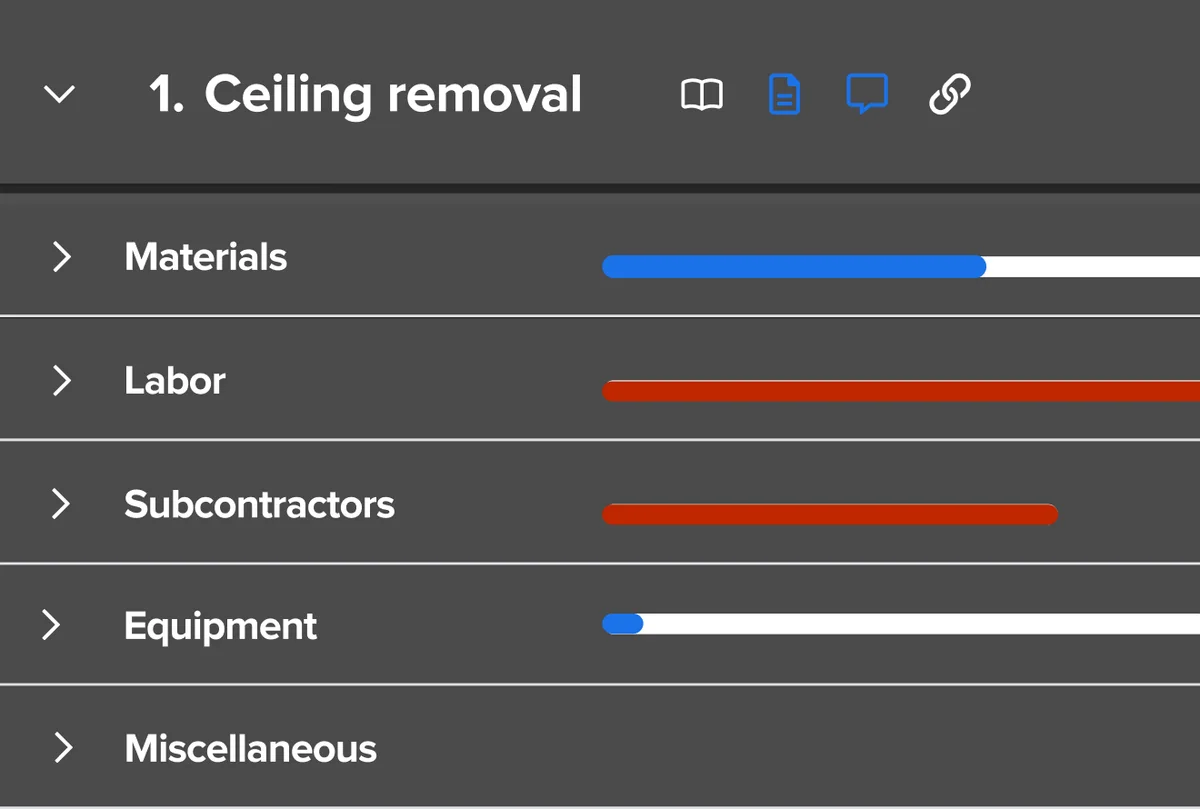
The rest of the plumbing is sound. Costs map to a project, phase and cost category by rules you set, so materials, labor, equipment, subcontractors and miscellaneous each track separately. You set default accounts payable and expense accounts once, per client and per vendor, and Knowify needs those defaults before it will send anything, which is how it avoids dropping a cost into an uncategorized bucket. Projects themselves only sync if you are on QuickBooks Online Plus or Advanced. QuickBooks Desktop and the Intuit Enterprise Suite are Enterprise-tier only. Progress billing, AIA pay applications with a schedule of values, and retainage all carry across, and draw requests on a construction loan are what the Billd partnership is for.
What the ratings say, and what they hide
Capterra rates Knowify 4.5 across 109 reviews, which is a decent sample for a product this specialised. Break the score apart and it tells you more than the headline does. Customer service scores 4.6 and ease of use 4.4, while features scores 4.2, so the lowest thing users rate is the software and the highest is the people answering the phone. And reviewers say the same thing in prose again and again, which is a fair signal about where this company puts its money. Support is rarely the thing that saves a software purchase, but in a category this fiddly it might be.
Then read the number under the stars. Likelihood to recommend sits at 7.6 out of 10, which is a cooler answer than a 4.5-star average implies, and Capterra labels most of the recent reviews as incentivized, meaning the reviewer was offered a nominal thank-you for writing one. Neither fact makes the corpus worthless. Both are worth knowing before you read a wall of five stars as consensus.
One directory detail worth checking yourself. Capterra puts Knowify on four 2026 Shortlists, including Electrical Contractor and Electrical Estimating, and prints its starting price as $99 labelled Per User, Per Month. The vendor bills by platform tier with users included, so that label misdescribes the model, and the Electrical Estimating badge is doing more work than the product supports. More on that below.
Where it falls short
Job costing is not on the entry plan. Everything above. The $99 tier cannot cost a job, budget a project or report WIP.
Reporting is the recurring complaint. And it shows up in three-star and five-star reviews alike. An office manager on public work wrote in January 2023 that there was not a single report in the app able to tell her phase value, subcontractor payments to date, and direct labour with burden, which is the exact report set a general contractor's accountant asks for. And a five-star reviewer that July wanted one report that could pull every job at once. So it is worth knowing that advanced reporting with a custom report builder is itself gated above Core.
Permissions are coarse below Enterprise. Core and Advanced get basic permissions, and the controls that hide costs while showing quantities, or restrict labour rates and wages, are Enterprise only. A director of operations named the coarseness of the permission structure as the product's main pain point in an August 2023 review.
Service work is a second subscription. Dispatching, the service map, service assets, maintenance agreements, the service portal and inventory all sit inside Service Pro, which is $99 a month annual and $199 month to month on top of whatever tier you are on.
Prevailing wage is priced as an add-on. The comparison table prices prevailing wage with a dollar sign rather than a Yes, and certified payroll itself runs through the Lumber or eBacon integrations. If Davis-Bacon work is most of your book, price that properly before you sign.
Time entry on the app frustrates crews. An owner-manager reviewing it in September 2025 said his guys have a hard time with time entry and still fill out hard copies alongside it, which is the failure mode that quietly poisons labour costing. And an office manager at an electrical contractor the same month wanted set labour rates on the plan-and-track view rather than a percentage increase.
What this means for an electrical contractor
Knowify markets hard to this trade and Capterra lists it on four 2026 Shortlists including Electrical Contractor and Electrical Estimating. The first badge is fair. The second one is misleading, and an electrical estimator will work out why in about four minutes.
Electrical estimating is a trade-exclusive discipline. You price a bid off NECA labor units from the Manual of Labor Units, graded Normal, Difficult and Very Difficult, against a live distributor price file such as TRA-SER, inside an assembly-driven package like Trimble Accubid or ConEst IntelliBid with a takeoff tool such as SureCount counting devices off the drawings. Conduit runs, home runs, conductor sizing under the National Electrical Code and a per-device labour hour are the units of that work.
Knowify has none of it. Its estimating is calculated cost templates plus cost codes, where you enter units and it does the arithmetic on labor, materials, equipment, subs and miscellaneous. There is no NECA labor unit library, no distributor price file and no takeoff engine anywhere in the product. And its integrations page names QuickBooks, Lumber, eBacon, Billd, CompanyCam, AIA Contract Documents and Zapier, with not one electrical estimating product among them.
So the honest recommendation for a licensed electrician running bid work is a two-tool stack, and no vendor comparison page is ever going to tell you that. Keep the estimating package for the bid, and run Knowify from contract award onward for the phases, the costs, the pay applications and the books. A master electrician doing service changes and panel upgrades on residential price-per-job work needs neither, and should be looking at an FSM. Our electrician marketing hub covers the demand side of both.
How it compares
Four alternatives a subcontractor evaluating Knowify will meet, with the starting price each vendor publishes. And two of the four publish nothing at all, which is itself the finding.
| Tool | Starting price | Pricing unit | Users included | Best suited to |
|---|---|---|---|---|
| Knowify | $99 a month annual, $149 monthly | Platform tier | 1 on Core, 10 on Advanced | Subcontractors billing AIA into QuickBooks Online |
| Contractor Foreman | $49 a month annual | Platform tier with a user cap | 1, rising to unlimited at $332 | Price-sensitive shops wanting the widest feature list |
| JobTread | $199 a month plus $20 per internal user | Base fee plus per user | 1, then tiered price breaks | Builders who want no contract and no setup fee |
| Buildertrend | Not published, custom quote | Platform tier, quoted | Not published | Custom builders and remodelers wanting selections |
| Procore | Not published, custom quote | Annual contract | Unlimited | Commercial general contractors needing document control |
Contractor Foreman is the obvious price comparison and it wins on sticker, though its user caps climb in steps and its Stripe processing rates are published where Knowify's are not. JobTread bundles implementation and training at no charge and takes no contract, which is a real answer to the auto-renewal clause above. Buildertrend stopped publishing prices, so any review quoting a Buildertrend monthly figure is quoting a number that no longer exists. And Procore is a different species: if you need submittal logs and versioned drawing sets, none of the others are competing for that job.
The verdict by crew size
One to three people
Probably not, and Core is the reason. At $99 a month you get billing and time tracking without job costing, and at that size a spreadsheet plus QuickBooks does the same work for nothing. But if you bill AIA pay applications to a general contractor, that changes the maths on its own, because producing a G702 and G703 by hand every month is a day you are not out selling the next job.
Four to fifteen people
Yes, on Advanced. This is the band the product is built for. Ten users are included, phase-level job costing pays for the plan the first time you find a job running over on labour, and the QuickBooks link removes the double entry that eats an office manager's week. So budget the $329 annual figure rather than the $99 one, and the decision is straightforward.
Fifteen and up, or commercial general contractor work
So Advanced plus per-user overflow works to roughly twenty-five people before Enterprise starts making sense on user count alone. Past that, or if you need granular permissions, equipment management, RFIs and submittals or QuickBooks Desktop, you are into a quote conversation and should price Procore in the same week. And if document control is the real requirement, this is the wrong class of tool at any tier.
The number nobody checks
Now, Fervor is a CRO and web design studio rather than a Knowify alternative, and we do not sell construction software. But there is one number in our own data that an electrical contractor buying job-costing software should sit with for a second.
We inspected 380 home services contractor websites for the Contractor CRO Index 2026. Only 21.8% of them put a licence number anywhere on the site, which is 83 with one and 297 without. And 82.8% loaded poorly on mobile.
Which is worth holding next to a $3,948 software decision. You can cost every phase to the penny and still lose the bid to a shop whose site says "licensed and insured" with the number printed underneath it, because a homeowner comparing two electricians on a phone at nine at night has no other way to tell you apart. The full statistics are public if you would rather check them yourself.
See what your website is costing you before you spend on software
Fervor inspects your site the way a homeowner uses it, then shows you the specific places quotes and calls leak out. It takes 5 business days.
Get a Site InspectionWhat we checked, and what we did not
We did not run Knowify on a live electrical job, and we will not imply otherwise. What this page is instead: the vendor's pricing page and its full three-tier feature comparison read row by row, the terms of service read line by line, the QuickBooks Online integration page and its sync lists read in both directions, the integrations index checked against the electrical estimating products it does not name, and four competitors' pricing pages read the same day.
Two sources refused automated access and we say so rather than pretending otherwise. Capterra returns a 403, so its current aggregate and its review bodies were read from Internet Archive copies of the same pages, dated 11 July 2026 and 24 February 2024. Buildertrend does the same, so its pricing page came from a February 2026 archive copy. Capterra, GetApp and Software Advice share one Gartner Digital Markets review pool, so an identical score across all three is one sample rather than three, and this page treats it that way. G2, TrustRadius and Trustpilot block automated access and nothing here comes from them. No claim on this page is sourced from Reddit or a contractor Facebook group, because neither could be retrieved and quoting them would mean inventing attribution.
"Knowify aggregate scores and review bodies were read from Internet Archive copies dated 11 July 2026 and 24 February 2024, because Capterra returns a 403 to automated access."
Internet Archive (2026)
And two figures we deliberately left blank. Knowify publishes no payment processing rate, so we print none. And it names no minimum contract term, so we report the absence rather than assuming a twelve-month lock-in by analogy with the rest of this category. If you want to evaluate Knowify yourself, its product site carries the tier comparison, and the 14-day trial needs no credit card.
What Knowify users say
Moving from a more service oriented CRM, job costing was the main reason for the switch. Specifically bid vs actuals and how time is tracked onto projects.
The interface can feel a bit dated, and some features take time to learn or require extra setup to use effectively.
And for subcontracts, I don’t like that a single subcontract cannot include multiple phases of a project.
The plan and track percentage increase option on the labor. Would be so much better if they gave the option for set rates like the Cost plus time & materials option.
We need to be able to search for customers by phone number or address or even their email address.
time in/out tracking on the app. Guys have a hard time with time entry. We have guys fill out hard copies too. Must be an easier way to log in/out
The inability to have multiple templates for proposals and also not being able to edit or change the proposal template without contacting knowify’s it team.
It makes our job costing and management much easier. We used to use paper as backup for our transactions, now mostly everything is electronic, and with the numbering system it’s easy to find what you’re looking for fast.
Frequently asked questions
How much does Knowify cost?
Knowify publishes two of its three tiers. Core is 99 dollars a month on annual billing and 149 dollars month to month, and it includes one user. Advanced is 329 dollars a month annual and 399 dollars month to month, and it includes ten users. Enterprise is quote only and adds unlimited users, inventory, equipment management, QuickBooks Desktop and the Intuit Enterprise Suite connection. Every extra user beyond the included count is 29 dollars a month on either published tier. Add-ons sit on top: Service Pro is 99 dollars a month annual and 199 month to month, live equipment tracking is 25 dollars per vehicle a month annual and 35 monthly, AI dashcams are the same 25 and 35 per unit, and tool tracking is 99 dollars a month on either billing period.
Does the 99 dollar Knowify plan include job costing?
No, and this is the single most important thing to know before comparing Knowify to anything else. Its own three-tier feature comparison marks job costing as unavailable on Core and available on Advanced. So do project budgets, project planning and tracking, real-time WIP reporting, work orders, daily logs, the client portal, custom workflows, subcontractor management, cost plus and time and materials contracts, subcontracts, calculated cost templates, custom branded documents, Zapier and advanced reporting. Core still gives you estimating, fixed-price contracts, scheduling, time tracking, change orders, progress billing, AIA pay applications and the QuickBooks sync. It is a capable billing and time product. It is not the job-costing platform the marketing describes, so budget 329 dollars a month rather than 99 if job costing is why you are shopping.
Is there a free trial, and is there a contract?
Knowify offers a 14-day free trial and states on its own electrical contractor page that it is unrestricted, needs no credit card and carries no commitment. On contracts, its terms of service name no minimum term and no early-termination or cancellation fee, which is better than most of this category. What they do state is that your subscription renews automatically on a recurring basis unless you terminate, that subscription fees are non-refundable, and that you are responsible for paying all unpaid fees through the end of the current term. So a year paid up front is a year spent. Cancelling means contacting Knowify rather than clicking a button in the app, and prices can rise on thirty days of emailed notice.
How good is the Knowify QuickBooks integration really?
The plumbing is genuinely strong and the direction still matters more than the label. Knowify pushes clients, vendors, products and services, vendor bills, bill payments, client invoices, invoice payments, deposits, retainage and time entries into QuickBooks Online. What it pulls back is narrower: clients, vendors, products and services, bill payments, invoice payments, accounts, classes, and tax rates and codes. Vendor bills and client invoices go out and never come back, and Knowify’s own FAQ says you will be creating vendor bills in Knowify and recording payment on either side. So a supply-house bill entered on the QuickBooks side never lands against the job or the phase. Projects sync only on QuickBooks Online Plus or Advanced, and the QuickBooks Desktop connection is Enterprise-tier only.
What do contractors complain about most in Knowify reviews?
Reporting, permissions and time entry, in that order. Capterra rates Knowify 4.5 overall across 109 reviews, with ease of use at 4.4, customer service at 4.6 and features at 4.2, which is its weakest sub-score. An office manager on public work wrote in January 2023 that no report in the app could show her phase value, subcontractor payments to date and direct labour with burden. A director of operations named permission granularity as the product’s main pain point in August 2023, and granular permissions remain Enterprise-only. Owner-managers reviewing in September 2025 reported crews struggling with clock in and clock out on the mobile app. Note also that likelihood to recommend sits at 7.6 out of 10, which is a softer number than 4.5 stars suggests.
Is Knowify electrical estimating software?
No, despite Capterra listing it on the 2026 Electrical Estimating Shortlist. Electrical estimating is a trade-exclusive discipline: you price a bid off NECA labor units from the Manual of Labor Units, against a live distributor price file such as TRA-SER, inside an assembly-driven package like Trimble Accubid or ConEst IntelliBid, with a takeoff tool counting devices off the drawings. Knowify has none of that. Its estimating is calculated cost templates plus cost codes, where you enter units and it calculates labor, materials, equipment, subcontractor and miscellaneous costs. Its integrations page names QuickBooks, Lumber, eBacon, Billd, CompanyCam, AIA Contract Documents and Zapier, and not one electrical estimating product. A licensed electrician bidding conduit runs and panel schedules keeps the estimating package and runs Knowify from contract award onward.
Does Knowify handle prevailing wage and certified payroll?
Partly, and the pricing shape is the thing to read carefully. Knowify’s feature comparison prices prevailing wage with a dollar sign rather than a yes, which means a paid add-on rather than an included module, and it shows nothing at all for prevailing wage on Core and Advanced. Certified payroll reporting itself runs through the Lumber or eBacon integrations rather than natively. Knowify does state on its prevailing wage page that you can try those tools free for 14 days. If Davis-Bacon work is most of your book, price the add-on and the payroll partner together before you sign, because the platform fee is not the number that matters in that case.
What are the best Knowify alternatives for a subcontractor?
It depends on whether you want a published price. Contractor Foreman publishes the lowest entry point in this class at 49 dollars a month on annual billing for one user, climbing to 332 dollars for unlimited users, and it publishes its Stripe processing rates where Knowify publishes none. JobTread publishes 199 dollars a month plus 20 dollars per internal user, with no contract, no setup fee and implementation and training included. Buildertrend no longer publishes any pricing and quotes custom, so any review naming a Buildertrend monthly figure is quoting a number that no longer exists. Procore also quotes custom and is a different species: commercial document control with unlimited users on an annual contract, which is the right answer only if you need submittal logs and versioned drawing sets.
Freshness
How we keep this page current
Three dates govern this review, and they carry different meanings. The initial source sweep is dated July 27, 2026; when only part of the evidence set is recaptured later, that later date is stated beside the refreshed claim. We last revised the page on July 30, 2026. And the user reviews we quote were posted over roughly the last 24 months, so their individual dates remain part of the evidence instead of being overwritten by a later pricing update.
We revise the page when Knowify changes a published price or a contract term, when a rating we cite moves by more than a few tenths, or when the vendor ships something big enough to change the verdict. We never bump the date just to look fresh, because Google treats that as manipulation and so do we. If a figure here reads as stale by the time you land on it, treat it as a floor and check the vendor's own page. We linked it at every number for exactly that reason.
Sourcing
How this review was researched
Every figure on this page traces to a captured source linked inline where it appears. The initial sweep is dated July 27, 2026; any later, partial recapture is dated at the claim rather than relabelling the whole evidence set. Ratings come from Capterra, GetApp, Software Advice and the Apple App Store. Note that Capterra, GetApp and Software Advice share one Gartner Digital Markets review pool, so an identical score across all three is a single sample rather than three corroborating ones, and this page treats it that way. G2, TrustRadius and Trustpilot block automated access, so where their numbers appear they are labelled as reported rather than verified. No claim here is sourced from Reddit or from a contractor Facebook group, because neither could be retrieved and quoting them would mean inventing attribution. Pricing marked as reported comes from third-party roundups, never from Fervor. Fervor's own findings come from the Contractor CRO Index 2026.
About
About Fervor Studio
Fervor Studio is a conversion rate optimization (CRO) and web design studio for home services contractors across North America, based in Cochrane, Alberta. Fervor does not sell field service management software and is not an alternative to Knowify. It publishes the Contractor CRO Index, a public benchmark measuring contractor website conversion potential using reproducible, open-source methods such as axe-core and Google Lighthouse. Fervor Studio is operated by Fervor Group Inc.
 Aug 1, 2026
 Tech Stack
Best Plumbing Software in 2026: Ten Ranked Across Four Classes
A plumbing company’s work runs through four classes of software that do not substitute for each other, and it only buys two of them. Ten products, each with a published price or an explicit statement that the vendor publishes none.
Read Article Jul 30, 2026
 Tech Stack
NiceJob vs Birdeye 2026: Pricing, Contracts and Review Gating
One of these vendors puts its price on the page and its cancellation terms in writing. The other puts a form in front of both, and the complaint record is where its contract length shows up.
Read Article Jul 30, 2026
 Tech Stack
Podium vs Birdeye 2026: Pricing, Contracts and Review Gating
Only one of these two will tell you what it costs before a sales call, and even that number carries a carve-out aimed squarely at trade contractors.
Read Article Jul 30, 2026
 Tech Stack
Best Electrical Contractor Software 2026: 11 Ranked and Priced
An electrical contracting business makes two software purchases that do not substitute for each other, and every roundup answering this query covers only one of them. Eleven platforms, with a published price or an explicit statement that the vendor publishes none.
Read Article Jul 30, 2026
 Tech Stack
Best HVAC Software in 2026: Eleven Ranked Across Three Classes
An HVAC contracting business buys across three classes of software that do not substitute for each other, and every roundup answering this query covers only one of them. Eleven products, each with a published price or an explicit statement that the vendor publishes none.
Read Article Jul 29, 2026
 Tech Stack
AccuLynx Pricing 2026: The Real Cost of a Quote-Gated Plan
One published figure, two blank plan cards, and a contract that says things the pricing page does not. A line-by-line breakdown of what AccuLynx really bills.
Read Article Jul 29, 2026
 Tech Stack
Houzz Pro Canada Review 2026: Pricing and Alternatives
Houzz Pro serves different pricing renderings. What Canadian buyers see, how GST/HST and payments work, what Custom gates, and what the annual contract commits you to.
Read Article Jul 29, 2026
 Tech Stack
JobNimbus Pricing in 2026: What the Quote Does Not Cover
JobNimbus prints no figure on any of its four plans. So the only rate you can read before a sales call is the payments meter, and it is the biggest line on the bill.
Read Article Jul 29, 2026
 Tech Stack
JobNimbus Review 2026: Pricing, Pros, Cons and Alternatives
JobNimbus rates 4.6 on Capterra and orders material straight from ABC Supply and SRS. But it publishes no price, and its supplement route carries a note.
Read Article Jul 29, 2026
 Tech Stack
BuildOps Review 2026: Pricing, Contract Terms and Alternatives
BuildOps runs commercial service and projects on one platform, and publishes no pricing at all. The billing unit, the 30-day data-export window, and who it suits.
Read Article Jul 29, 2026
 Tech Stack
FieldPulse Review 2026: Pricing, Pros, Cons and Alternatives
FieldPulse rates 4.6 on Capterra and is the platform contractors name when they leave a bigger system. But it publishes no price, and the contract runs a year.
Read Article Jul 29, 2026
 Tech Stack
Service Fusion Review 2026: Pricing, Contract and Alternatives
Service Fusion bills flat per company with unlimited users, which is the best structural deal in field service software. The published plans, the contract behind the no-contract line, and the app score every other review gets wrong.
Read Article Jul 28, 2026
 Tech Stack
AccuLynx Review 2026: Pricing, Tier Gating, Alternatives
AccuLynx rates 4.6 across 846 reviews and now publishes an entry price. What that price omits, which tier holds the insurance workflow, and who should skip it.
Read Article Jul 28, 2026
 Tech Stack
Unitel Voice Review 2026: Pricing, Features and Alternatives
Unitel Voice rates 4.6 on Capterra and gives a one-truck shop a business number for $9.99 a month. The published plans, the cost per call, and what it won't do.
Read Article Jul 28, 2026
 Tech Stack
NiceJob vs Podium 2026: Pricing, Contracts and Review Gating
Both vendors print a price, at very different scale and in different currencies. The gap that matters is what Podium will not print: the billing unit, and whether a trade shop gets the number on the page.
Read Article Jul 27, 2026
 Tech Stack
CompanyCam Review 2026: Pricing, Pros, Cons and Alternatives
Every page ranking for CompanyCam still quotes a per-user price the vendor no longer charges. Here are the real plans, the seat math, and who should skip it.
Read Article Jul 27, 2026
 Tech Stack
NiceJob Review 2026: Pricing, Pros, Cons and Alternatives
NiceJob rates 4.9 on Capterra and refuses to gate negative reviews. Real plan pricing, the active-customer threshold nobody publishes, and who should skip it.
Read Article Jul 26, 2026
 Tech Stack
Buildertrend Review 2026: Pricing, Limits and Alternatives
Buildertrend rates 4.5 across 2,486 Capterra reviews and quotes against your revenue rather than your seat count. The workflows, the export problem, the alternatives.
Read Article Jul 26, 2026
 Tech Stack
CallRail Review 2026: Pricing, Pros, Cons and Alternatives
CallRail rates 4.5 on Capterra, and its tracking numbers port out free. But the two usage rates that decide your real bill are the two it does not print.
Read Article Jul 26, 2026
 Tech Stack
Roofr Review 2026: Pricing, Pros, Cons and Alternatives
Roofr rates 4.6 on Capterra and sells $13 measurement reports against a market charging triple. But it will not import a report from anywhere else.
Read Article Jul 24, 2026
 Tech Stack
Housecall Pro Review 2026: Pricing, Pros, Cons, Alternatives
Housecall Pro has the shortest learning curve in the category and the widest review spread. Real pricing, the Instapay math, and the migration trap to plan around.
Read Article Jul 23, 2026
 Tech Stack
Jobber Review 2026: Pricing, Pros, Cons and Alternatives
Jobber rates 4.6 on Capterra with the best mobile app in the category. Real plan pricing, the feature gating that changes your entry price, and who it suits.
Read Article Jul 22, 2026
 Tech Stack
ServiceTitan Review 2026: Pricing, Pros, Cons, Alternatives
ServiceTitan rates 4.3 on Capterra but its weakest score is value for money. Real reported pricing, the 12-month contract, the exit fees, and who it suits.
Read Article Jun 2, 2026
 Tech Stack
HVAC Online Scheduling: The 43% Losing After-Hours Bookings
HVAC leads every trade on online booking at just 56.7%, which still leaves 43% of sites forcing an after-hours customer to wait for a business-hours phone call.
Read Article