Buildertrend Review 2026: Pricing, Limits and Alternatives
Buildertrend's quote form asks your annual construction volume across eleven brackets. What that band decides, and 4 alternatives that publish a price.

Page at a glance
Buildertrend is residential construction project management software for custom home builders and remodelers, covering the client portal, selections and allowances, change orders, the schedule and budget against actual. It publishes no price. Its pricing page carries a quote form instead, and that form asks for your annual construction volume across eleven brackets before anyone will talk numbers, so your bill is indexed to how much you build rather than how many seats you fill. Users are unlimited on every plan. It fits a builder running five or more projects a year with an office person to drive it. It is the wrong buy for a service shop with no projects, and wrong for a commercial general contractor who needs document control. Alternatives that publish prices are Contractor Foreman from $49 a month, JobTread at $199 a month plus $20 per internal user, and Buildern at $250 a month for two seats. CoConstruct, which Buildertrend owns, is not a live alternative any more.
The short verdict
Buildertrend earns its money on a residential remodeling project that runs three months or longer and involves a homeowner who wants to see things. If you are a design-build remodeler or a custom home builder with five to forty people, an office manager who owns the system, and jobs where selections and allowances are the thing that eats your margin, it does the job and it does it broadly. The client portal, the selections catalog, signed change orders and a budget that moves when a change is approved all sit in one place, and users are unlimited, so putting your whole crew and every trade partner on it costs nothing extra.
But you cannot find out what it costs without a sales call, and the quote is pinned to your revenue. Pricing was verified on 27 July 2026, and unlike most of this category, the vendor publishes nothing at all.
| Pricing model | Custom quote, indexed to annual construction volume |
|---|---|
| Published price | None. The pricing page is a four-question quote form |
| User cap | Unlimited users on every plan |
| Annual discount | 10% off when you pay annually upfront |
| Accounting sync | Two-way with QuickBooks, on every plan |
| Best fit | Residential builders and remodelers, 5+ projects a year |
What Buildertrend costs
The vendor publishes no price at all
Go to the pricing page and count the dollar figures. There are none. The headline reads "Grow your profits from $$ to $$$$", which is a dollar sign used as decoration, and the FAQ entry titled "How much does Buildertrend cost?" answers with this and nothing else: "Buildertrend's pricing is tailored to meet the unique needs of your business. To determine the best solution and pricing for your company, we recommend connecting with one of our team members."
So treat every third-party page quoting Essential, Advanced and Complete tiers with careful suspicion. Those tier names and their prices are not on the vendor's site today, and a roundup that reprints them is telling you what Buildertrend used to charge somebody else. And we are not going to print a per-month number we cannot open a vendor page and read, and the absence is itself the finding you need before you book the demo.
And the directories agree, which is the useful cross-check. GetApp records Buildertrend's starting price as "No pricing info", and Software Advice lists it as "Pricing available upon request". Software Advice also carries the sub-score that matters most here: value for money at 4.34, the lowest of its four dimensions, against ease of use at 4.37, functionality at 4.32 and customer support at 4.71. So buyers rate the support highly and the price less so, which is the pattern you would expect from a quote nobody can compare in advance.
"Software Advice scores Buildertrend value for money at 4.34, its lowest dimension, against ease of use 4.37, functionality 4.32 and customer support 4.71."
Software Advice (2026)
What the quote form asks before it prices you
And this is the part worth knowing, because it changes what you are buying. The quote form asks four questions, and the second one is your annual construction volume. It offers eleven brackets: $0 - 499K, $500K - 999K, $1M - 1.99M, $2M - 4.99M, $5M - 7.99M, $8M - 10.99M, $11M - 15.99M, $16M - 20.99M, $21M - 25.99M, $26M - 30.99M and $31M+. And builder type comes first, with residential home builder, residential remodeler, commercial general contractor and specialty or trade contractor as the four options.
Read that plainly and the model is a revenue-indexed platform fee. Two remodeling contractors with identical crews and identical feature needs get different quotes because one of them turned over $9 million last year and the other turned over $900,000. That is not the per-seat maths you use when you price field service software, and it inverts the usual advice. So growing your revenue raises your software bill even if nobody new logs in. Buildertrend's own pricing page names the target out loud: builders who "Oversee 5+ projects a year or handle complex, multi-phase builds" and who "Want to go from 6-8 figures in annual revenue".
What is not in the number you get quoted
Payment processing. Not disclosed publicly. Buildertrend runs owner invoicing and payments in-platform but publishes no processing rate anywhere on its site, so ask for the card and ACH rates in writing during the demo and compare them against what your merchant account already charges you.
Implementation and onboarding. No setup fee is published either way. The vendor's own FAQ says the subscription includes "unlimited users, access to our core set of tools, and helpful support resources like daily virtual trainings and our 24/7 Help Center", and that you can scale "without hidden fees". So take the wording as a claim to verify on the call, rather than as a quoted number.
Minimum term. Not published. The only public signal on term length is the annual discount, a "Special offer: 10% off" when you pay annually upfront, which tells you an annual prepay exists without telling you whether monthly does. And a CEO of a two to ten person construction firm writing on Capterra on 1 May 2026 describes being held to "the remainder of the annual debt" after six months with no active projects, which is what an annual commitment looks like from the inside.
Getting out. No early termination figure is published. What is documented is the exit friction, and it is the single most useful thing in the review corpus. An owner with more than two years on the platform, writing on 4 December 2025, reports being told "there is no option for bulk downloading data" and paying for a platform he no longer uses purely to keep access to his own project history.
The five workflows a remodeler is paying for
Feature totals are noise here. But a residential remodeling project lives or dies on five things, so those are the five to grade.
The client portal. Homeowners log in and see the schedule, daily logs with progress photos, documents and invoices. The useful detail is the switch: the vendor's own FAQ states the portal "can be customized so builders can decide which pieces of information they would like their clients to have access to", and gives the example that "you may not want your clients to have access to the budget", which you can turn off while leaving photos and documents visible. And on a cost-plus whole-home remodel that toggle is the difference between transparency and a weekly argument.
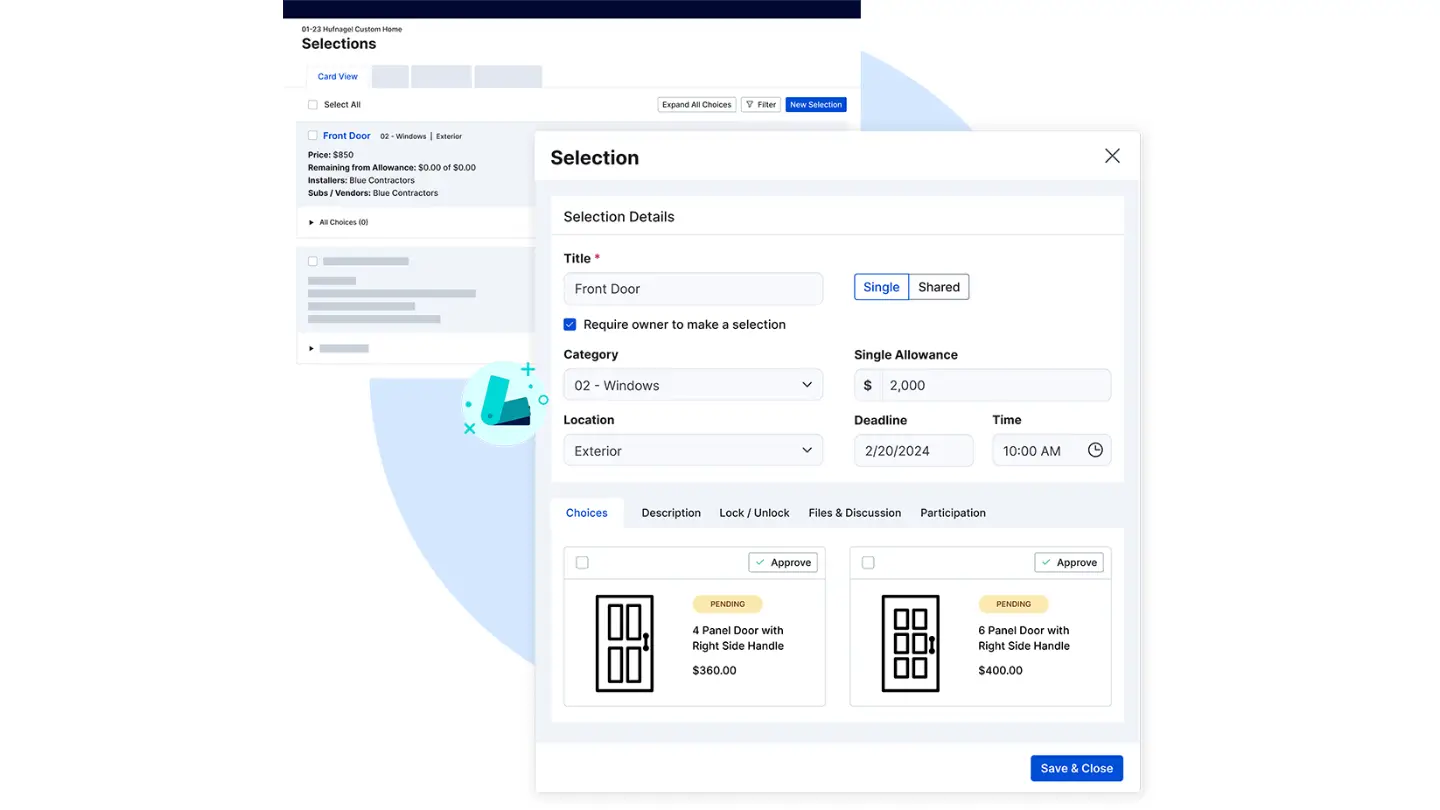
Selections and allowances. This is the module that separates this category from every other kind of contractor software, and it is where a home remodeler loses margin. Selections are catalogued per project, decisions sit as pending until the client approves them, and the vendor's feature table says selections "Sync selections with respective allowances and automatically add to project estimates" and can be "linked to schedule items, ensuring selections completion before dependent tasks are started". So an allowance overage surfaces as a number rather than as a surprise at closeout.
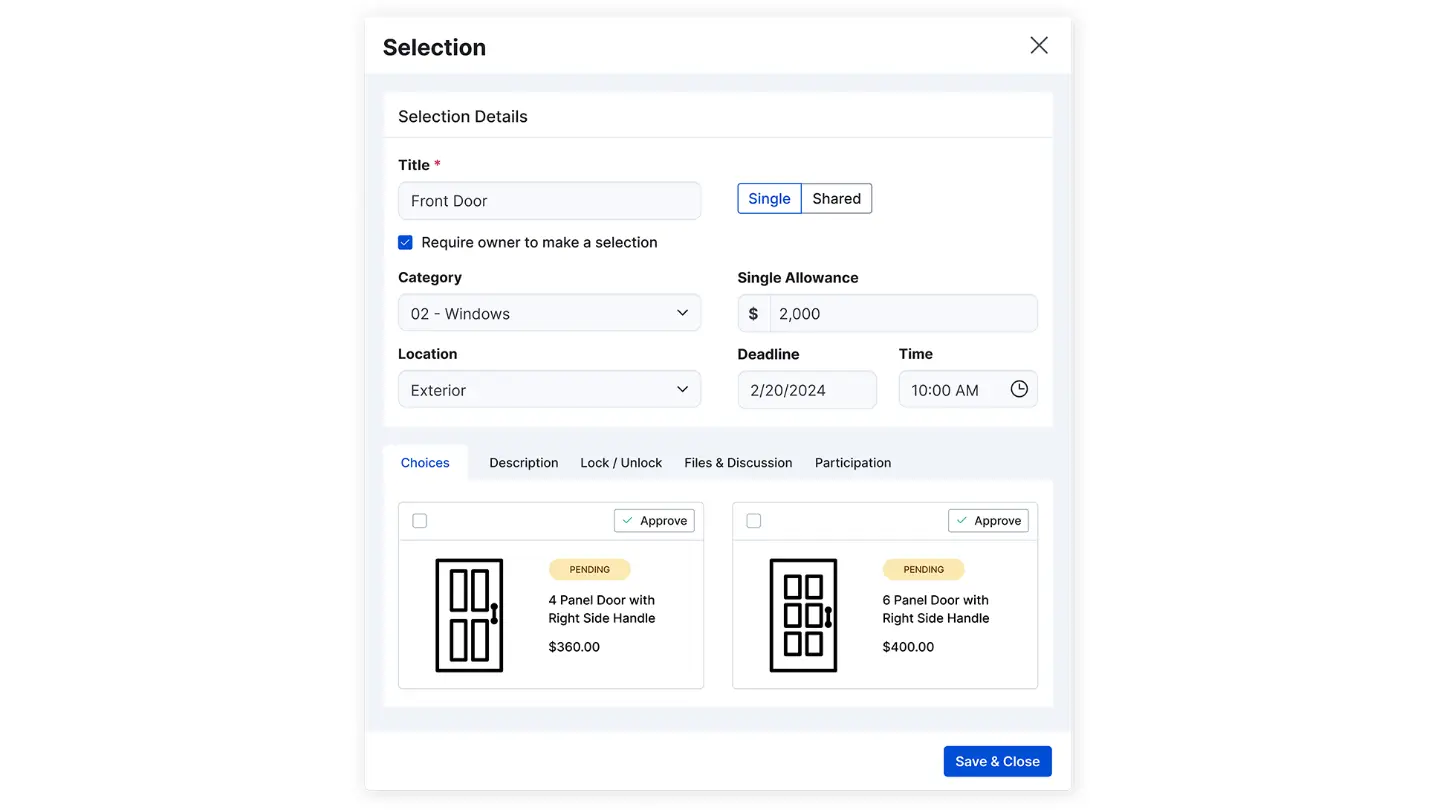
Change orders, and who signs. Approval mechanics are where a remodel makes or loses money, and most pages stop at the phrase "change order management" without saying who signs what. So here it is: the homeowner reviews and signs in the portal, the vendor's change-order FAQ states "Owners can review and sign change orders before work begins", digital signatures capture "internal or client signatures at any stage", and the approval moves the money. The vendor answers the budget question directly: "Approved change orders automatically connect to your budget and job costing using the same cost codes you use throughout Buildertrend." One signature, no second entry.
The schedule. It runs as a calendar and Gantt with dependencies, and clients see it in the portal and can comment per phase. But it is deliberately simple, which is a feature on a kitchen and bath remodel scope and a limitation elsewhere. A project manager reviewing on 7 April 2026 puts it exactly: "Its scheduling function works but can be very simple. When working on larger commercial projects it won't allow for the complexity needed."
Budget against actual. Job costing runs off cost codes, with committed costs and forecasts updating as change orders land. An estimator with two-plus years on the platform, writing 16 June 2025, says "the new Job Costing Budget tab is very accurate and we can control the entire job budget from there". So that is the sub-module to ask to be shown live, because it is the one reviewers name when they are happy.
The accounting link, and where it stops
The QuickBooks integration is genuinely two-way, and it is not tier-gated. The vendor's integration page lists the package requirement as "Works with all Buildertrend plans", and its FAQ states "The two-way sync functionality allows information to be passed between platforms" with job-specific expenses originating in QuickBooks flowing back into the Buildertrend budget for job costing. Costs map through cost codes, which is the part to test with your own chart of accounts before you sign, because a code your books do not recognise is how a labour charge quietly lands somewhere useless. Xero connects too.
Past those two, the road ends. A controller with two-plus years on the platform, writing 11 March 2025, gives the one-line version: "It does not integrate with our accounting software (Sage Intacct Construction)." And GetApp's own feature scoring puts accounting integration at 3.7, the weakest number on that page. If your books run on NAHB cost codes and an ERP rather than QuickBooks, weigh that before anything else. And weigh what is missing if you are a custom home builder financing spec homes. There is no construction loan draw schedule module and no AIA G702 or G703 progress billing in the public feature set, so draws get assembled out of owner invoices rather than produced by the software. A job-costing-first alternative like Knowify is built around that gap.
"GetApp's feature scoring puts Buildertrend accounting integration at 3.7, the weakest number on that page."
GetApp (2026)
The app your crew will hold
The field half is stronger than the review corpus suggests. The Buildertrend app on the App Store rates 4.5 out of 5 across 5K ratings. And its listing names electronic signatures, client and subcontractor portals, and a time clock with geofencing among the tools that travel to site. That matters more here than in most categories, because the person entering a daily log is standing in a half-framed hallway rather than sitting at a desk. But note the ceiling from the same corpus: GetApp scores Gantt or timeline view at 3.8 and budget management at 3.7, so the schedule you drive from a phone is simpler than the one you build in the office.
"The Buildertrend app rates 4.5 out of 5 across 5K App Store ratings."
Apple App Store (2026)
Where it falls short
Your data is hard to get back out. The most serious limitation on this page. An owner of a two to ten person construction firm reports on 4 December 2025 that "there is no simple or bulk way to download years' worth of files, photos, proposals, and customer information" and that manually exporting item by item "would take an unreasonable amount of time". So ask for the export path in writing before you migrate a decade of jobs in.
The selections screen is the weak spot for homeowners. An estimator who otherwise rates the platform five out of five writes that "The tab 'Selections' for the homeowner choose options is not very user friendly". And since selections are the reason a remodeler buys this class of tool, put a real homeowner in front of that screen during the demo.
The schedule will not carry commercial complexity. Named above, and it stays a hard ceiling rather than a configuration problem.
It is built for US and Canadian tax handling. A director reviewing on 19 February 2025 reports "Its not made for UK! You have to add VAT manually to every proposal/quote and invoice!" along with the QuickBooks connection being "locked to one user" and reporting being too thin to answer how much has been invoiced this month across all projects.
Volume and heavy customisation break it. An accounts payable reviewer writing 5 November 2025 says it "would be great for a low volume company with cookie cutter house builds. This will not work for huge volumes and customizations", and that her team was told it handled custom builds when it did not.
The feature surface overwhelms new users. A VP of sales and estimating writing 25 January 2026 puts it evenly: "At first, the range of features can feel overwhelming. Some functionalities overlap and require time to configure in order to fit internal processes." Budget real configuration time and name an internal owner, or it becomes expensive shelfware.
Who should not buy Buildertrend
Do not buy Buildertrend if you run service and repair work. If your day is dispatching short calls rather than running projects with a schedule and a selections list, none of the five workflows above is the thing you need, and you should buy a field service platform instead. Our Jobber review and the Housecall Pro review cover that side, and ServiceTitan covers the top of it.
Do not buy it if you are a commercial general contractor who needs document control. RFIs, submittal logs and drawing revision control are not what this class of tool does, and Procore exists for exactly that reason. Skip it too if your annual volume sits at the bottom bracket and you have one or two projects a year, because the quote is written for a builder doing five or more, and skip it if your books run on an ERP like Sage Intacct rather than QuickBooks or Xero.
The CoConstruct question, answered
If CoConstruct is on your shortlist, take it off. Buildertrend owns CoConstruct, and coconstruct.com now leads with "The next chapter starts with Buildertrend" and tells its own customers that the transition to Buildertrend "is entering its final phase". A reviewer saw the shape of it early, writing on 15 January 2025 that "They are no longer updating CoConstruct" and that it "feels like it is on a countdown timer before you are forced to switch to BuilderTrend."
So the practical read for a custom home builder still running CoConstruct is that the migration is a when, not an if. And the wider lesson for the shortlist below is that post-acquisition roadmap risk belongs in your comparison as its own column. An independent product can still be bought and folded into somebody else's roadmap two years after you sign.
How it compares
Four alternatives that a residential remodeling contractor would genuinely shortlist, with what each one publishes. The point of the price column is not that cheaper is better. It is that three of these four will tell you the number without a sales call.
| Tool | Entry price | Pricing unit | Users included | Published? |
|---|---|---|---|---|
| Buildertrend | Quote only | Platform fee, indexed to annual construction volume | Unlimited | No |
| Contractor Foreman | $49 per month | Platform tier with a user cap per tier | 1 on Basic, unlimited at $332 per month | Yes |
| JobTread | $199 per month | Platform fee plus $20 per month per internal user | Priced per internal user | Yes |
| Buildern | $250 per month | Platform fee with paid seats | 2 seats, extra seats $90 per month | Yes |
| Procore | Quote only | Priced on annual construction volume | Unlimited | No |
One more worth naming, because the review corpus names it: a project manager who moved to Buildertrend recorded switching from UDA ConstructionOnline, which sells to custom home builders and production builders and carries its own client selections module. If you are shortlisting, that is the peer a residential builder most often weighs against this one.
Contractor Foreman is the value pick and it publishes everything, down to a 2.9% plus $0.30 card processing rate, which is more disclosure than Buildertrend offers on any page. JobTread is the closest like-for-like on residential project management and states "No contract & no setup fees" on its own pricing page. Buildern is the newer entrant and gives you allowances, change orders and a QuickBooks or Xero integration on the entry plan. And Procore is the commercial answer, priced the same way Buildertrend does, on volume, which tells you something about where Buildertrend is aiming.
The verdict, by shop size
Under $500K a year, or one to four projects
No. But you sit in the bottom bracket of the quote form, and the vendor's own targeting says five or more projects a year. Contractor Foreman at $49 a month for a single user does the paperwork side of a small remodeling contractor without a sales call, and you can move up its tiers as you grow.
Design-build remodelers, five to forty people
Yes, and this is the shape the product is built for. A design-build remodeler or a semi-custom home builder running whole-home projects gets the most out of it, because the selections and allowances workflow, signed change orders and the client portal are worth real money on a whole-home remodel. But take the annual 10% discount only after you have seen the export path, and get the processing rate and the term length in writing.
Above $10M, or heavy customisation, or commercial
Probably not, and for two different reasons. A production home builder pushing volume runs into the ceiling that the accounts payable reviewer above names, and a commercial general contractor needs document control this class of tool does not have. Both of those are Procore conversations, since the quote is going to move with your revenue either way.
The number nobody checks before they buy software
Now, Fervor is a conversion rate optimization and web design studio rather than a Buildertrend alternative, and we do not sell construction software. But there is a gap next to this decision that we happen to have data on, and it is worth thirty seconds of your time.
In May 2026 we inspected 380 home services contractor websites for the Contractor CRO Index 2026. And 82.8% of them had poor mobile loading performance, which means a homeowner comparing three remodelers on a phone gives up on the slow one before the page finishes drawing. So a client portal that impresses a homeowner in month two cannot help you if the site that was supposed to win them never loaded in month zero.
"82.8% of the 380 contractor websites inspected had poor mobile loading performance."
Fervor Studio Contractor CRO Index (2026)
So price the software, by all means. Then open your own site on a phone and count how long it takes before you could tap a call button. The full statistics are public if you would rather check them yourself, and the State of Remodeling report breaks the same findings down for this trade specifically. Our remodeling marketing hub, kitchen and bath hub and custom home builder hub cover the demand side of the same problem.
See where your website is losing the jobs your software would have managed
Fervor inspects your site the way a homeowner uses it, then shows you the specific places calls and booked consultations leak out. It takes 5 business days.
Get a Site InspectionWhat we checked, and what we did not
We did not run Buildertrend on a live job, and we will not imply otherwise. There is no free trial to sign up for, and the only way to see a price is to hand a salesperson your revenue band. What this page is instead: the vendor's pricing, selections, change order, client portal and QuickBooks integration pages read line by line on 27 July 2026, the quote form's own field options read directly off the form, and the Capterra review corpus read by category rather than by star rating.
Ratings come from Capterra, which shares one Gartner Digital Markets review pool with GetApp and Software Advice, so an identical score across all three is one sample rather than three corroborating ones. And G2, TrustRadius and Trustpilot block automated access, so nothing here comes from them. Nothing here is sourced from Reddit or a contractor Facebook group either, because neither could be retrieved and quoting them would mean inventing attribution. Competitor pricing comes from Contractor Foreman, JobTread, Buildern and Procore.
If you want to evaluate Buildertrend yourself, its product site is where the demo request lives. Go in with your revenue band, your project count and a written list of the four things this page says are not published, and you will get more out of the call than the salesperson expects.
What Buildertrend users say
I attempted to cancel several months ago, only to learn that there is no simple or bulk way to download years' worth of files, photos, proposals, and customer information.
They are no longer updating CoConstruct. While they say that they won’t sunset the program in the near future, it still feels like it is on a countdown timer before you are forced to switch to BuilderTrend.
it was ok, and would be great for a low volume company with cookie cutter house builds. This will not work for huge volumes and customizations
Its scheduling function works but can be very simple. When working on larger commercial projects it won’t allow for the complexity needed.
Its everything together in one software, the new Job Costing Budget tab is very accurate and we can control the entire job budget from there.
It does not integrate with our accounting software (Sage Intacct Construction).
At first, the range of features can feel overwhelming. Some functionalities overlap and require time to configure in order to fit internal processes.
I have paid thousands for a service I never used operationally, and their legal department’s only response was to enforce the remainder of the annual debt.
The scheduling and client communication tools are my go-to. I’m able to manage subs, monitor progress and update homeowners in real time with live changes to the schedule all from the same platform.
The price was too high for me. Im a small town remodeler.
Frequently asked questions
How much does Buildertrend cost?
Buildertrend publishes no price. Its pricing page carries a four-question quote form instead of tiers, and the FAQ entry titled "How much does Buildertrend cost?" answers only that pricing "is tailored to meet the unique needs of your business" and recommends connecting with a team member. The form asks for your annual construction volume across eleven brackets, running from $0 - 499K up to $31M+, along with your builder type, before anyone quotes you. That means the quote is indexed to how much you build rather than to how many seats you fill. Third-party pages still printing Essential, Advanced and Complete tier prices are quoting a structure that is no longer on the vendor site.
Does Buildertrend charge per user?
No. Users are unlimited on every plan, which the vendor states three ways: the pricing page hero lists "Unlimited users", the FAQ says "we include unlimited users in your pricing, so there’s no need to worry about extra costs as your team grows", and subcontractors get portal access as well. That inverts the maths against field service software, where the bill rises with headcount. Here the bill rises with revenue instead, because annual construction volume is the field the quote form asks for.
Does Buildertrend require a contract?
The vendor does not publish a minimum term, an early termination fee or a payment processing rate anywhere on its site. The only public signal is the annual discount, a "Special offer: 10% off" when you pay annually upfront. A CEO of a two to ten person construction firm writing on Capterra on 1 May 2026 describes his legal exposure as "the remainder of the annual debt" after six months with no active projects, which is what an annual commitment looks like from the customer side. Get the term, the notice period and the processing rate in writing during the demo.
Does Buildertrend integrate with QuickBooks?
Yes, and the sync is two-way rather than a one-way invoice push. The integration page lists the package requirement as "Works with all Buildertrend plans", so it is not gated to a higher tier, and the vendor states "The two-way sync functionality allows information to be passed between platforms", with job-specific expenses that originated in QuickBooks flowing into the Buildertrend budget for job costing. Every cost maps through a cost code, so test yours against your own chart of accounts before you commit. Xero connects too. Beyond those, coverage stops: a controller with more than two years on the platform writes that "It does not integrate with our accounting software (Sage Intacct Construction)."
How do change orders and selections get approved in Buildertrend?
The homeowner approves in the client portal and signs electronically, and the approval moves the money without a second entry. The vendor states that "Owners can review and sign change orders before work begins", that digital signatures capture "internal or client signatures at any stage", and that "Approved change orders automatically connect to your budget and job costing using the same cost codes you use throughout Buildertrend". Selections work the same way: decisions sit pending until the client approves them, they sync to their allowances and add to project estimates automatically, and they can be linked to schedule items so a dependent task cannot start before the choice is made.
Is CoConstruct still a Buildertrend alternative?
No. Buildertrend owns CoConstruct, and coconstruct.com now leads with "The next chapter starts with Buildertrend" and tells its own customers that "CoConstruct’s transition to Buildertrend is entering its final phase." A reviewer flagged the direction early, writing on 15 January 2025 that "They are no longer updating CoConstruct" and that it felt like a countdown timer before a forced switch. Treat the migration as a when rather than an if, and weigh post-acquisition roadmap risk when you shortlist any independent alternative.
What are the best Buildertrend alternatives?
Three of the four closest alternatives publish their prices, which Buildertrend does not. Contractor Foreman starts at $49 per month for one user and runs to $332 per month for unlimited users on annual billing, and it publishes its card processing rate at 2.9% plus $0.30 per transaction. JobTread publishes $199 per month plus $20 per month per internal user and states "No contract & no setup fees". Buildern publishes $250 per month including two seats, with additional seats at $90 per month. Procore is the commercial answer and, like Buildertrend, quotes on annual construction volume rather than publishing a figure.
Who should not buy Buildertrend?
Two profiles, at opposite ends. A service and repair business that dispatches short calls rather than running multi-month projects will never open the selections list or the Gantt chart, and should buy a field service platform instead. A commercial general contractor who needs RFI, submittal and drawing revision control needs document management this class of tool does not have, and that is a Procore conversation. Two more cases to weigh: a builder under roughly $500K in annual volume sits below the five-projects-a-year profile the vendor names on its own pricing page, and a company whose books run on an ERP such as Sage Intacct rather than QuickBooks or Xero loses the accounting link that makes the job costing worth paying for.
Freshness
How we keep this page current
Three dates govern this review, and they carry different meanings. The initial source sweep is dated July 27, 2026; when only part of the evidence set is recaptured later, that later date is stated beside the refreshed claim. We last revised the page on July 27, 2026. And the user reviews we quote were posted over roughly the last 24 months, so their individual dates remain part of the evidence instead of being overwritten by a later pricing update.
We revise the page when Buildertrend changes a published price or a contract term, when a rating we cite moves by more than a few tenths, or when the vendor ships something big enough to change the verdict. We never bump the date just to look fresh, because Google treats that as manipulation and so do we. If a figure here reads as stale by the time you land on it, treat it as a floor and check the vendor's own page. We linked it at every number for exactly that reason.
Sourcing
How this review was researched
Every figure on this page traces to a captured source linked inline where it appears. The initial sweep is dated July 27, 2026; any later, partial recapture is dated at the claim rather than relabelling the whole evidence set. Ratings come from Capterra, GetApp, Software Advice and the Apple App Store. Note that Capterra, GetApp and Software Advice share one Gartner Digital Markets review pool, so an identical score across all three is a single sample rather than three corroborating ones, and this page treats it that way. G2, TrustRadius and Trustpilot block automated access, so where their numbers appear they are labelled as reported rather than verified. No claim here is sourced from Reddit or from a contractor Facebook group, because neither could be retrieved and quoting them would mean inventing attribution. Pricing marked as reported comes from third-party roundups, never from Fervor. Fervor's own findings come from the Contractor CRO Index 2026.
About
About Fervor Studio
Fervor Studio is a conversion rate optimization (CRO) and web design studio for home services contractors across North America, based in Cochrane, Alberta. Fervor does not sell field service management software and is not an alternative to Buildertrend. It publishes the Contractor CRO Index, a public benchmark measuring contractor website conversion potential using reproducible, open-source methods such as axe-core and Google Lighthouse. Fervor Studio is operated by Fervor Group Inc.
 Aug 1, 2026
 Tech Stack
Best Plumbing Software in 2026: Ten Ranked Across Four Classes
A plumbing company’s work runs through four classes of software that do not substitute for each other, and it only buys two of them. Ten products, each with a published price or an explicit statement that the vendor publishes none.
Read Article Jul 30, 2026
 Tech Stack
NiceJob vs Birdeye 2026: Pricing, Contracts and Review Gating
One of these vendors puts its price on the page and its cancellation terms in writing. The other puts a form in front of both, and the complaint record is where its contract length shows up.
Read Article Jul 30, 2026
 Tech Stack
Podium vs Birdeye 2026: Pricing, Contracts and Review Gating
Only one of these two will tell you what it costs before a sales call, and even that number carries a carve-out aimed squarely at trade contractors.
Read Article Jul 30, 2026
 Tech Stack
Best Electrical Contractor Software 2026: 11 Ranked and Priced
An electrical contracting business makes two software purchases that do not substitute for each other, and every roundup answering this query covers only one of them. Eleven platforms, with a published price or an explicit statement that the vendor publishes none.
Read Article Jul 30, 2026
 Tech Stack
Best HVAC Software in 2026: Eleven Ranked Across Three Classes
An HVAC contracting business buys across three classes of software that do not substitute for each other, and every roundup answering this query covers only one of them. Eleven products, each with a published price or an explicit statement that the vendor publishes none.
Read Article Jul 29, 2026
 Tech Stack
AccuLynx Pricing 2026: The Real Cost of a Quote-Gated Plan
One published figure, two blank plan cards, and a contract that says things the pricing page does not. A line-by-line breakdown of what AccuLynx really bills.
Read Article Jul 29, 2026
 Tech Stack
Houzz Pro Canada Review 2026: Pricing and Alternatives
Houzz Pro serves different pricing renderings. What Canadian buyers see, how GST/HST and payments work, what Custom gates, and what the annual contract commits you to.
Read Article Jul 29, 2026
 Tech Stack
JobNimbus Pricing in 2026: What the Quote Does Not Cover
JobNimbus prints no figure on any of its four plans. So the only rate you can read before a sales call is the payments meter, and it is the biggest line on the bill.
Read Article Jul 29, 2026
 Tech Stack
JobNimbus Review 2026: Pricing, Pros, Cons and Alternatives
JobNimbus rates 4.6 on Capterra and orders material straight from ABC Supply and SRS. But it publishes no price, and its supplement route carries a note.
Read Article Jul 29, 2026
 Tech Stack
BuildOps Review 2026: Pricing, Contract Terms and Alternatives
BuildOps runs commercial service and projects on one platform, and publishes no pricing at all. The billing unit, the 30-day data-export window, and who it suits.
Read Article Jul 29, 2026
 Tech Stack
FieldPulse Review 2026: Pricing, Pros, Cons and Alternatives
FieldPulse rates 4.6 on Capterra and is the platform contractors name when they leave a bigger system. But it publishes no price, and the contract runs a year.
Read Article Jul 29, 2026
 Tech Stack
Service Fusion Review 2026: Pricing, Contract and Alternatives
Service Fusion bills flat per company with unlimited users, which is the best structural deal in field service software. The published plans, the contract behind the no-contract line, and the app score every other review gets wrong.
Read Article Jul 29, 2026
 Tech Stack
Knowify Review 2026: Pricing, Job Costing and Alternatives
Knowify rates 4.5 on Capterra and its weakest sub-score is features. What the $99 Core plan withholds, which way the QuickBooks sync really runs, and who should not buy it.
Read Article Jul 28, 2026
 Tech Stack
AccuLynx Review 2026: Pricing, Tier Gating, Alternatives
AccuLynx rates 4.6 across 846 reviews and now publishes an entry price. What that price omits, which tier holds the insurance workflow, and who should skip it.
Read Article Jul 28, 2026
 Tech Stack
Unitel Voice Review 2026: Pricing, Features and Alternatives
Unitel Voice rates 4.6 on Capterra and gives a one-truck shop a business number for $9.99 a month. The published plans, the cost per call, and what it won't do.
Read Article Jul 28, 2026
 Tech Stack
NiceJob vs Podium 2026: Pricing, Contracts and Review Gating
Both vendors print a price, at very different scale and in different currencies. The gap that matters is what Podium will not print: the billing unit, and whether a trade shop gets the number on the page.
Read Article Jul 27, 2026
 Tech Stack
CompanyCam Review 2026: Pricing, Pros, Cons and Alternatives
Every page ranking for CompanyCam still quotes a per-user price the vendor no longer charges. Here are the real plans, the seat math, and who should skip it.
Read Article Jul 27, 2026
 Tech Stack
NiceJob Review 2026: Pricing, Pros, Cons and Alternatives
NiceJob rates 4.9 on Capterra and refuses to gate negative reviews. Real plan pricing, the active-customer threshold nobody publishes, and who should skip it.
Read Article Jul 26, 2026
 Tech Stack
CallRail Review 2026: Pricing, Pros, Cons and Alternatives
CallRail rates 4.5 on Capterra, and its tracking numbers port out free. But the two usage rates that decide your real bill are the two it does not print.
Read Article Jul 26, 2026
 Tech Stack
Roofr Review 2026: Pricing, Pros, Cons and Alternatives
Roofr rates 4.6 on Capterra and sells $13 measurement reports against a market charging triple. But it will not import a report from anywhere else.
Read Article Jul 24, 2026
 Tech Stack
Housecall Pro Review 2026: Pricing, Pros, Cons, Alternatives
Housecall Pro has the shortest learning curve in the category and the widest review spread. Real pricing, the Instapay math, and the migration trap to plan around.
Read Article Jul 23, 2026
 Tech Stack
Jobber Review 2026: Pricing, Pros, Cons and Alternatives
Jobber rates 4.6 on Capterra with the best mobile app in the category. Real plan pricing, the feature gating that changes your entry price, and who it suits.
Read Article Jul 22, 2026
 Tech Stack
ServiceTitan Review 2026: Pricing, Pros, Cons, Alternatives
ServiceTitan rates 4.3 on Capterra but its weakest score is value for money. Real reported pricing, the 12-month contract, the exit fees, and who it suits.
Read Article Jun 2, 2026
 Tech Stack
HVAC Online Scheduling: The 43% Losing After-Hours Bookings
HVAC leads every trade on online booking at just 56.7%, which still leaves 43% of sites forcing an after-hours customer to wait for a business-hours phone call.
Read Article