Best HVAC Software in 2026: Eleven Ranked Across Three Classes
Eleven HVAC products ranked across three classes. Three field service platforms publish prices from $29 to $208 a month, five do not, and Manual J is covered.

Disclosure This article features tools from our brand partners. If you choose to use them, we may receive compensation at no extra cost to you.
Our editorial choices are independent of these affiliate arrangements. Read our full affiliate disclosure.
Fervor is a CRO and web design studio, not a software reseller, and no vendor paid for placement here or for a kinder verdict. Affiliate links are flagged where they appear, and they never change what we report.
Page at a glance
An HVAC contracting business buys across three classes of software, and they don't replace each other. One runs the service side, which is dispatch, technician mobile, invoicing and payments. One sizes the equipment against ACCA Manual J, S and D. And one captures what the system is doing after the technician leaves. This page ranks eleven products across all three, each carrying a published price or an explicit statement that the vendor publishes none. Three field service platforms publish real numbers: Jobber from $29 a month on annual billing, Housecall Pro from $59, and Service Fusion from $208 with unlimited users. Five are quote-gated, including ServiceTitan, FieldEdge, Workiz, FieldPulse and BuildOps. On the load calculation side Cool Calc runs $59 per user per month and Wrightsoft $900 a year. Every entry carries a disqualifier, because you eliminate on those. Three of the eleven are Fervor brand partners.
The short answer
If you run a residential heating and cooling shop with two to fifteen technicians, buy Jobber. It publishes its prices and the entry tier is $29 a month on annual billing for one user. But above roughly fifteen technicians with a membership base underneath you, ServiceTitan is built around that shape. And if you run commercial mechanical service alongside quoted projects, BuildOps is designed for that split.
But none of those three will size a system. If your replacement work is permit-gated on a room-by-room Manual J load calculation, you're buying a second product: Cool Calc at $59 per user per month, or Wrightsoft Right-Suite Universal at $900 a year if you design duct. And if you want the install proven rather than assumed, measureQuick is the third purchase, a free tier plus $49 per user per month for the cloud.
Every figure here was read on July 31, 2026 off the vendor's own page or a review platform, and both are named where each number appears.
How we picked, and what we ignored
Four criteria, weighted, applied to every product in the same order. Pricing transparency at 35%, because a contractor who can't budget can't buy. HVAC fit at 30%, meaning whether the product does something a heating and cooling business needs that a generic service platform doesn't. Contract and exit terms at 20%, since the cost of leaving is the number nobody publishes. And evidence quality at 15%, the size and recency of the reviewer base behind any rating we quote.
We ignored three things on purpose. Brand recognition didn't score. Feature counts didn't either, because every platform here lists dispatch, invoicing and a mobile app. And integration logo grids didn't score: what we scored was sync direction and which records move.
"Capterra rates ServiceTitan 4.3 across 337 reviews, with the profile last updated July 23rd, 2026."
Capterra (2026)
The eleven, side by side
| Product | Class | Starting price | Best for |
|---|---|---|---|
| Jobber | Field service | $29 a month, annual billing, 1 user | Residential service shops, 2 to 15 technicians |
| Housecall Pro | Field service | $59 a month, annual billing, 1 user | Residential shops selling financing at the kitchen table |
| Service Fusion | Field service | $208 a month, annual billing, unlimited users | Shops with more office staff than trucks |
| ServiceTitan | Field service | No published price, per technician | 15-plus technicians, membership-heavy revenue |
| FieldEdge | Field service | No published price | Shops staying on QuickBooks Desktop |
| Workiz | Field service | No published base price, $55 an extra seat | Shops that still need a phone system |
| FieldPulse | Field service | No published price, seat-based | Crews outgrowing an entry platform |
| BuildOps | Field service | No published price | Commercial mechanical service plus projects |
| Cool Calc | Load calculation | $59 per user a month, or $45 per project | Shops running loads on replacement work |
| Wrightsoft Right-Suite Universal | Load calculation | $900 a year | Shops designing duct as well as sizing equipment |
| measureQuick | Field diagnostics | Free tier, $49 per user a month for Premier | Shops selling on measured system performance |
Three purchases, not one
A field service platform organises work that already exists. A call comes in, somebody schedules it, a technician runs it, an invoice goes out. And the unit is the call, which is why eight of the eleven products here would sell to a plumbing contractor or an electrical contractor unchanged.
Load calculation software does something no dispatch board does. You enter the house, its envelope and its windows, and it returns a room-by-room load under ACCA Manual J, selects equipment against manufacturer performance data under Manual S, and sizes the duct under Manual D. And a permit reviewer increasingly wants that sheet.
Field diagnostics is the third class, and its unit is a reading. Bluetooth probes stream superheat and subcooling, duct static pressure and delivered capacity into a phone, and the output is a report a homeowner can read. So carry one rule into the demos: the platform covers the part of your day that looks like every other trade's and leaves the part that's yours. Buy only the first class and you get a dispatch board that can't tell you whether the four-ton unit you quoted is two tons too big.
The eleven, ranked
Jobber, the best all-round buy for a small HVAC shop
Jobber tells you what it costs before you talk to anyone. But read the page carefully, because it now prices on two axes and every roundup quoting a single Jobber number is quoting the one-user column. Core at one user is $29 a month on annual billing and $49 with no commitment. Connect is $99 annual, Grow is $149, and Grow with ten users is $299. Plus includes five users at $399, with extra users $29 each.
"Jobber publishes Core at $29 a month on annual billing for one user, Connect at $99, Grow at $149, and Plus at $399 with five users included, with extra users at $29 a month each."
Jobber (2026)
What it does well: quoting and follow-up, a drag-and-drop dispatch board, and a two-way QuickBooks Online sync that moves customers, invoices and payments natively. An owner of a heating and refrigeration company wrote on February 17, 2026 that scheduling is "simple and clear, especially when you're juggling multiple service calls and larger installation projects at the same time".
Watch out for: the gap between the app and the browser. That same owner scored Value for Money 3 out of 5 and said "the mobile app doesn't offer all the same functionality as the desktop version." And there's no flat-rate price book at any tier.
Skip it if you dispatch more than fifteen technicians, sell repairs off a flat-rate book, or need install job costing separated from service. And Capterra rates it 4.6 across 1,468 reviews as of July 23rd, 2026.
The verdict: the highest floor and the lowest ceiling here, which is the trade a growing shop wants for its first real platform. See Jobber's current pricing. Partner link, and we may receive compensation if you sign up through it.
ServiceTitan, the best fit above fifteen technicians
ServiceTitan publishes no price at all. Its page lists Starter, Essentials and The Works, and every one carries a "Request Pricing" button where a figure belongs. But it does state the billing unit, describing "per-technician pricing" designed to fit a business "at any size". And all three list customizable memberships, the line that matters most past fifteen technicians with a maintenance base underneath you.
"ServiceTitan publishes no price for any of its 3 packages, Starter, Essentials and The Works, states that its pricing is per technician, and lists customizable memberships on all three."
ServiceTitan (2026)
What it does well: the dispatch board, the flat-rate price book, memberships billed off a card on file, and reporting deep enough that owners run the business from it. It's the one platform reviewers describe as built for the trade rather than stretched to fit it: an operations lead wrote on December 2, 2024 that "It was primerly built for the HVAC industry", meaning it as a criticism.
Watch out for: the contract, which is the most important paragraph on this page. An owner reviewing on November 23, 2024 wrote that the company "auto renew your contract without any notification for an entire year commitment" and said she "been denied the right to cancel without paying 15k to cancel." She also reports paying $1,500 a month for a marketing module. Get the minimum term, the notice period, the auto-renewal clause and the processing rate in writing before you sign.
Skip it if you run fewer than 10 technicians, or install new construction only with no service calls to dispatch. A one-truck shop uses none of the machinery it pays for.
The verdict: the right platform for the shape it was built for, on terms no small operator should sign without a lawyer on the renewal clause. Capterra rates it 4.3 across 337 reviews as of July 23rd, 2026. Request ServiceTitan pricing. Partner link, and it has not softened the paragraph above it.
Housecall Pro, the best fit for a shop selling at the kitchen table
Housecall Pro publishes three tiers. Basic is $59 a month on annual billing and $79 month to month with one user, Essentials is $149 annual and $189 monthly with five users, and MAX is $299 annual and $329 monthly. But the gating is where a heating and cooling shop should look hardest, because flat-rate pricing sits on Essentials. So the plan an HVAC repair business needs is the $149 one, not the $59 one.
"Housecall Pro publishes Basic at $59 a month on annual billing with one user, Essentials at $149 with five users, and MAX at $299, and gates flat-rate pricing to the Essentials tier."
Housecall Pro (2026)
What it does well: payments and speed to cash, financing offered while the technician is still in the hallway, and an interface a new dispatcher figures out unsupervised.
Watch out for: the add-on bill and the reporting. An owner on October 6, 2025 said prices run "a little bit to high compared to other softwares and they charge for every extra thing on top of that". A business manager wrote on October 13, 2025 that "You have to export excel files and do a lot of sorting and filtering to really get the data you want." And it is "Not great in areas with low signal," which describes a crawlspace.
Skip it if your work is project-based rather than call-based. A general manager running service contracts alongside project management wrote on February 18, 2025 that the product suits "people who are service based only."
The verdict: the easiest platform here to get running, with the widest gap between sticker and real bill. Capterra rates it 4.7 across 2,742 reviews as of July 21st, 2026, the largest reviewer base here. See Housecall Pro's plans. Partner link.
FieldEdge, the best fit for a maintenance book on QuickBooks Desktop
FieldEdge publishes no price. Select, Premier and Elite each end in a "Request Pricing" button. But it does publish the gating: the flat rate price book sits on the entry Select tier, while advanced service agreements are held for Premier and warehouse inventory for Elite. And it publishes mobile app licences per tier, at 2, 4 and 6, the closest thing to a per-seat figure anyone in the quote-gated half discloses.
"FieldEdge publishes no price for any of its 3 plans, includes 2, 4 and 6 mobile app licences on Select, Premier and Elite, and gates advanced service agreements to Premier."
FieldEdge (2026)
What it does well: the QuickBooks link, flat rate pricing on every tier, and the records an asset-centric trade runs on. An office manager listed what she uses it for on March 11, 2020: "tracking call sources, maintenance agreement tracking, installation/equipment tracking," the serial that follows the condenser rather than the address.
Watch out for: the payment processing arrangement. An office manager wrote on September 19, 2024 that "We were promised at signing a rate of 2.7% for each credit card transaction" and that the merchant service provider "charged us 3.4% right off the bat." That's one reviewer's allegation, and still the right question to ask in writing.
Skip it if you've moved your books to QuickBooks Online, because the Desktop depth is most of the reason to be here.
The verdict: the strongest maintenance-agreement product in the quote-gated half, on the lowest rating here, 4.2 across 310 reviews as of July 29th, 2026.
Service Fusion, the best fit when your office is bigger than your fleet
Service Fusion is the only platform here that doesn't bill per user, and for some businesses that inverts the comparison. Starter is $208 a month billed annually, Plus is $325 and Pro is $533, all with unlimited users. But read the add-on column first: job costing, inventory, a customer web portal and progressive billing are all add-ons on Starter, folding in at Plus.
"Service Fusion publishes Starter at $208 a month billed annually, Plus at $325 and Pro at $533, with unlimited users on every tier and job costing an add-on on Starter."
Service Fusion (2026)
What it does well: unlimited users, a customer web portal, progressive billing, and a QuickBooks integration covering Desktop and Online.
Watch out for: maintenance contract handling. A president whose business is "40% of our work is contracted PM Services" wrote on January 8, 2026 that he can't view a month of planned maintenance jobs in one window, scrolling one job at a time to see which sit near each other. A separate president wrote on December 10, 2025 that "over the last 3 years, the system has been very slow."
Skip it if planned maintenance is the centre of the business, or if fewer than four people need a login.
The verdict: the best pricing model here, attached to the weakest maintenance scheduling. And Capterra rates it 4.3 across 308 reviews.
Workiz, the one that publishes only its marginal seat
Workiz withdrew its tier prices, and Standard, Pro and Ultimate each carry a "Request pricing" button under a headline calling the product "easy, powerful & fairly priced." But it left one set of numbers nobody quotes. Each tier includes the first five users, each extra member on Standard is $55 a month on annual payment, and each on Pro is $65. So you can't price your base, and you can price your growth exactly.
"Workiz publishes no price on any of its 3 tiers, includes the first 5 users on each, and charges $55 a month for an extra Standard member and $65 for an extra Pro member on annual payment."
Workiz (2026)
What it does well: the built-in phone system, call recording against the job record, source tracking, and a dispatch board small teams pick up quickly. The trial is "7 days free trial," and the page says no credit card is required.
Watch out for: support, and the quote gate. An executive assistant with more than two years on it rated it 2 out of 5 on September 27, 2024: "Customer service is the absolute worst." But it averages 4.4 across 218 reviews, the smallest reviewer base of any field service platform here.
Skip it if you need a budget number this week, or already run a phone system you are happy with, because the strongest reason to be here is one you've answered.
The verdict: a differentiated product hiding behind a quote form, and it only counts if your phones are still up for grabs.
FieldPulse, the strongest middle option, now quote-gated
FieldPulse publishes no numbers anywhere. Its pricing page says the product "is seat-based," then closes with "Get a custom quote in one conversation." Lower down, three named packages sit under the line "Our per-technician pricing is designed to fit your business and goals, at any size", a different billing unit from the one above it and, word for word, the same sentence ServiceTitan runs over its own packages. So ask which unit your quote is built on before you compare it to anything. An owner wrote on July 8, 2026 that support helped make "our Commercial and Industrial HVAC business more effective."
"FieldPulse publishes no price, describes its pricing as seat-based at the top of the page and per technician above its 3 named packages, and quotes on request."
FieldPulse (2026)
What it does well: onboarding and support, plus its own phone layer, payments and pricebook as premium products.
Watch out for: job costing depth and the split between the app and the web interface. A co-owner writing on July 6, 2026 named the gaps as "(Job Costing & Invoicing in particular for me)". The owner quoted above added: "The app and online look so different."
Skip it if you need install job costing right on day one, or if quote-gated pricing is a dealbreaker.
The verdict: the best middle of the table, and harder to evaluate than it was. Capterra rates it 4.6 across 481 reviews as of July 27th, 2026.
BuildOps, the best fit for commercial mechanical
BuildOps publishes no price either. Its pricing page opens with "Get Personalized Pricing" and builds every quote around your crew size and trades, a polite way of saying the number is a conversation. But it does state a customer-count figure that tells you who it's for, describing itself as trusted by "1,000+ commercial contractors across North America."
"BuildOps publishes no price on any plan, builds each quote around crew size and trades, and states that it is trusted by 1,000+ commercial contractors across North America."
BuildOps (2026)
What it does well: the split between service and project management, multi-site customer hierarchies with asset registers underneath them, and integrations that sync job costs, invoices and purchase orders. A bookkeeper wrote on March 19, 2026 that it "Sync's well with QB's desktop" and that support and training are "second to none."
Watch out for: two things that bite a mechanical service contractor. A service sales reviewer wrote on April 20, 2026 that "When entering assets from the app, it can take a long time to load. almost not worth doing while onsite for walk throughs". The same reviewer names the other gap: "Not being able to quote PM contracts in the software."
Skip it if you're a residential change-out shop, since you'll pay for project controls you never open.
The verdict: the right answer for commercial mechanical, and the wrong one for anybody chasing no-cool calls in July. Capterra rates it 4.4 across 177 reviews.
Cool Calc, the cheapest honest entry into ACCA load calculation
Cool Calc is a web-based Manual J, S and D tool, and the one product in this class you can buy without committing to a year. Pro is $59 per user per month, or $50 per user per month equivalent on yearly billing. A Pro Plus tier at $249 is marked as coming in Q2. And Personal is $45 a project, the right shape for a shop running a load on the occasional permitted change-out.
"Cool Calc publishes Pro at $59 per user per month, or $50 per month equivalent on yearly billing, with a Personal per-project option at $45 and a Pro Plus tier at $249 marked as coming in Q2."
Cool Calc (2026)
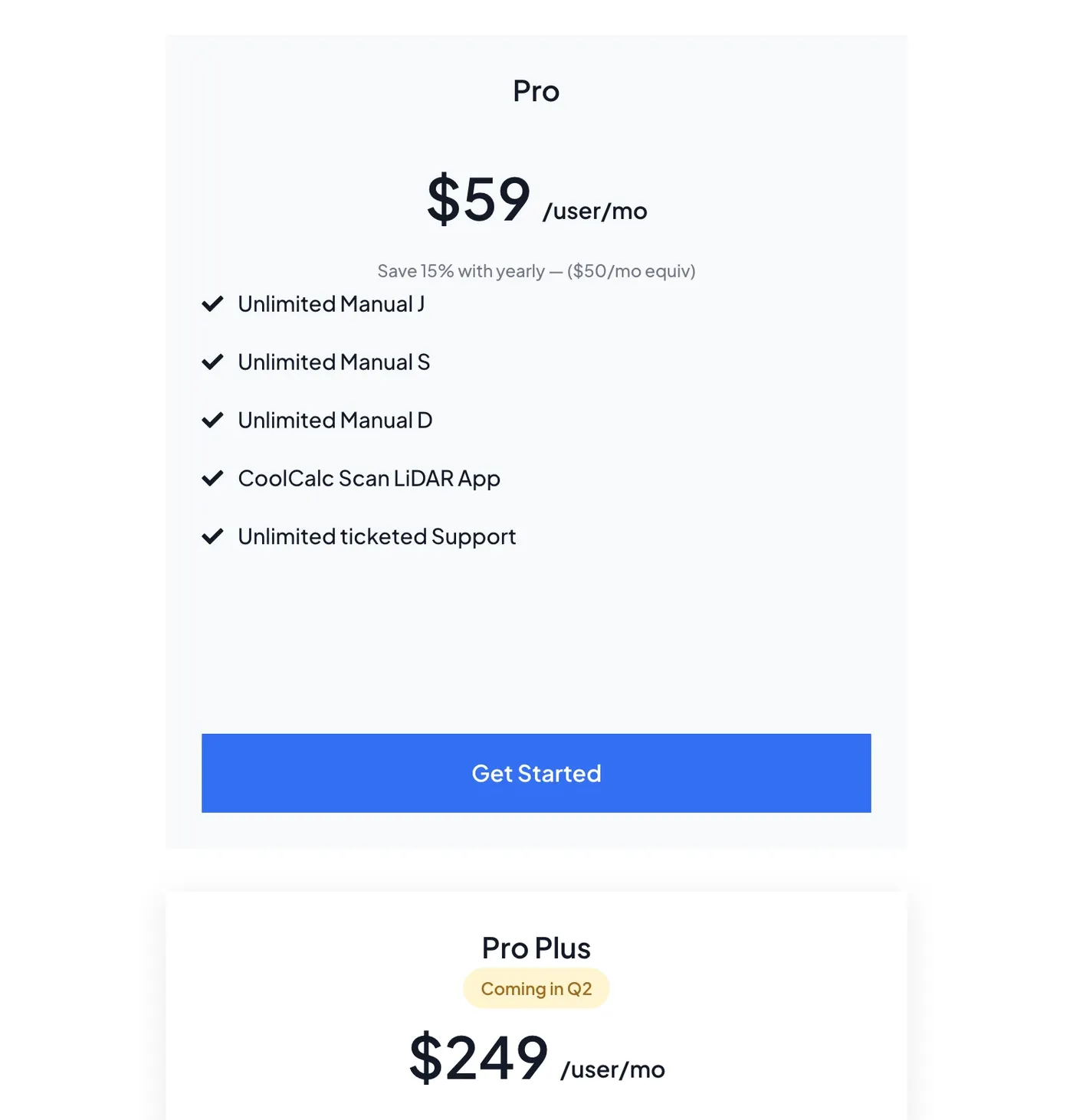
What it does well: geometry capture, the part everyone underestimates. You can capture the house with a phone LiDAR sensor during the in-home visit, upload a floor plan, trace the roofline off satellite imagery, or draw it by hand. And you only pay when you ask for the results.
Watch out for: the evidence base, the honest caveat on all three trade-owned products. Cool Calc carries no Capterra profile, so there's no reviewer pool to weigh against the 2,742 people who have rated Housecall Pro.
Skip it if your work is light commercial with block loads on multiple zones, since the cloud tools here are scoped to residential.
The verdict: the cheapest defensible route to a permit-ready load, and the only one you can buy one job at a time.
Wrightsoft Right-Suite Universal, the best fit for designing duct
Wrightsoft prices its whole catalogue on a public storefront, which makes it the most transparent vendor here. The RSU Residential and Commercial-only packages are $900 a year each, and the store states that all displayed prices are annual subscription fees in USD. But add-ons price separately: COMM Tools at $500, Right-CAD at $250 and the Title 24 energy add-on at $75. The cloud tools are cheaper, at $150 a year for Right-J Mobile and $300 for Right-Mobile Consultant.
"Wrightsoft publishes RSU Residential and RSU Commercial-only at $900 a year each, COMM Tools at $500, Right-CAD at $250, Right-J Mobile at $150 and Right-Mobile Consultant at $300, all as annual subscription fees in USD."
MiTek Wrightsoft (2026)
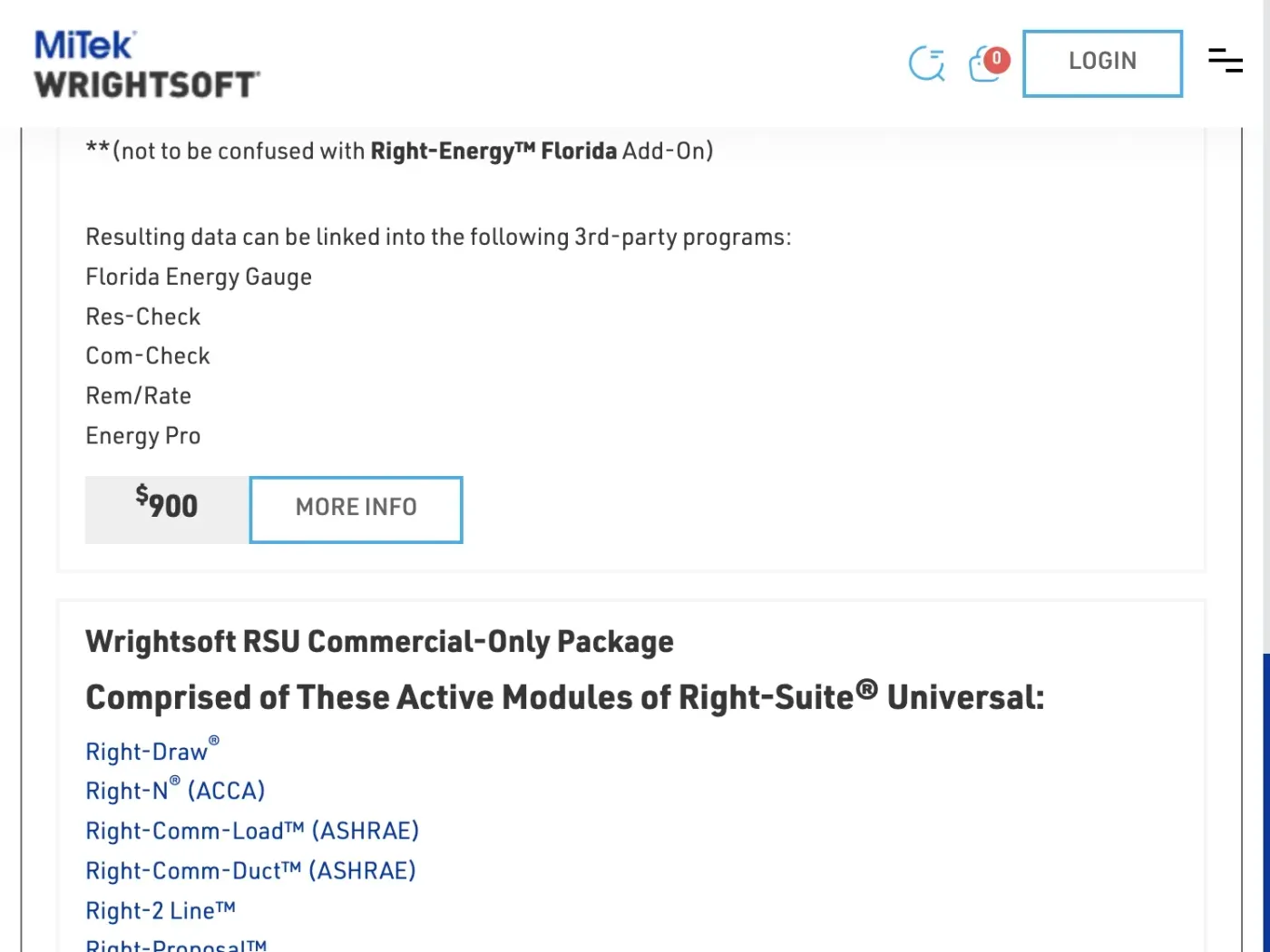
What it does well: the full ACCA chain in one place, with Right-J for the load, Right-D for the duct and Right-Draw for the plan.
Watch out for: the operating system. Right-Suite Universal "requires Windows 10 or newer," and the store says Mac users "would need a Windows emulator such as Parallels." For a shop standardised on iPads that's a real cost nobody quotes in the $900. And the cloud tier doesn't substitute, since its loads are "limited to residential whole-house block loads only."
Skip it if you run a Mac-only office, or if you only need a load figure rather than a duct design, because Cool Calc gets you the load for less.
The verdict: the deepest design tool in the trade, sold with the clearest price list here and the narrowest hardware assumption.
measureQuick, the best fit for proving the install
measureQuick sits in the third class, and its free tier is a real product rather than a trial clock. Premier is $49 per user per month and covers the cloud, the reporting and the diagnostic scoring. Add-ons price separately: the National Comfort Institute option at $10 per billable technician per month, and the training LMS at $30 per user per year. And it connects to ServiceTitan and Housecall Pro directly, so readings land against the job.
"measureQuick publishes a free tier and Premier at $49 per user per month, with the NCI option at $10 per billable technician per month and the training LMS at $30 per user per year."
measureQuick (2026)
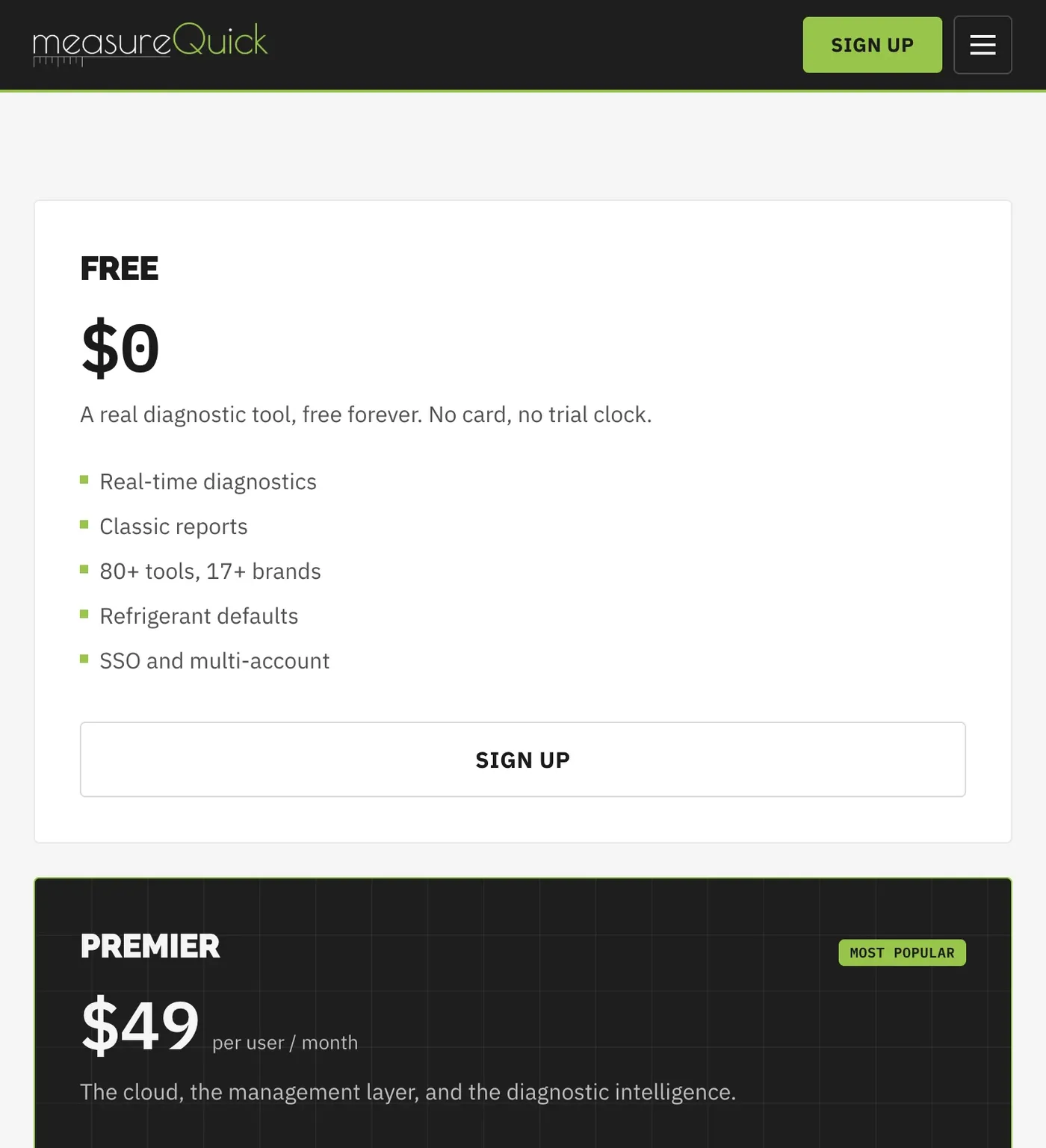
What it does well: it connects to probes you already own, supporting more than 80 Bluetooth tools across more than 17 brands, and turns readings into a graded report a homeowner will look at. The vendor makes its payback argument citing ACCA for a single callback costing $650 to $850 in labour, parts and the peak-season calls you can't run.
Watch out for: that being a vendor's own ROI claim rather than an independent finding, and that measureQuick, like both load calculation tools, carries no Capterra profile.
Skip it if your technicians won't adopt a phone workflow at the equipment, since the value depends on readings captured at the job rather than written on a ticket.
The verdict: the cheapest way to turn a service call into a documented sale, on a free tier that costs nothing to test.
Who these platforms were built around, and why HVAC is the exception
Roundups in this category usually close with a caveat that the platform was designed for somebody else's trade. Here it runs the other way. Flat rate price books, membership billing and change-out quoting all exist because a heating and cooling shop needed them first. An electrical contractor gets the worse deal from the same table, because no product here counts devices on a plan set. Our ranked list of electrical contractor software covers that second purchase.
Which one fits your shop
Four questions, and each one routes to a name rather than to a category.
Does your revenue arrive as a service call or as an installed system? Call-led shops weight the price book, the dispatch board and the membership engine, which points at Jobber, then Housecall Pro, then ServiceTitan as the crew grows. Install-led shops weight quoting, financing and load calculation, and should buy Cool Calc or Wrightsoft before upgrading the dispatch board, because a system you sized wrong costs more than a schedule you managed badly.
How many people need a login against how many trucks roll? If logins outnumber trucks, Service Fusion's flat rate is worth the arithmetic. If trucks outnumber logins, a per-user platform is cheaper and Jobber is where to start. And if you're hiring through the season, get the marginal seat price in writing, since Workiz is the only vendor here that publishes one.
Where do your technicians spend the day? Attics, crawlspaces and mechanical rooms are where cell signal dies, so make a dead-signal job close the first thing you try in any demo. No vendor volunteers that failure.
And does your accounting run on QuickBooks Desktop, QuickBooks Online, or an ERP? Desktop points at FieldEdge or Service Fusion, Online at Jobber or Housecall Pro, and Sage Intacct or NetSuite at BuildOps. Ask three things about whichever connector you inherit: whether the sync runs one-way or two-way, which records move, and whether it's native or built through a partner charging its own fee. On Service Fusion, job costing is itself an add-on on the entry tier, so a sync that "includes job costing" may be syncing a module you haven't bought.
What happens after you sign
Four costs sit outside every price on this page. Implementation is quoted separately almost everywhere, so ask for it as a line item before you agree to a subscription. And payment processing is its own bill: the FieldEdge reviewer who says he was quoted 2.7% and charged 3.4% is describing what happens when the rate is agreed verbally. Ask what the rate is, whether an outside processor is permitted, and what happens to your card-on-file agreements if you leave.
The third is the compliance layer nobody sells you. EPA Section 608 makes refrigerant recordkeeping a federal obligation unique to this trade: every adjustment to the refrigerant charge logged as pounds added and recovered, cylinder tracking, leak-rate calculation on larger appliances, and each EPA 608 certification on file. But none of the eleven products holds that as a first-class record. Build it as a required custom form so the numbers land against the equipment rather than a paper ticket in a van.
And call tracking sits outside the subscription. None of these is a phone system except Workiz, so attribution is a separate layer, whether that is CallRail, a VoIP product or an answering service. Confirm the booking writes back into the platform, because an attributed call that never becomes a job has told you nothing.
One thing worth saying, since Fervor is a conversion studio rather than a software reseller. Whichever platform you buy, its online booking widget only earns its money if it sits on the page a homeowner lands on. Across the 104 HVAC brands in Fervor's own study, 56.7% carried online scheduling at all, leaving 45 paying for a feature no visitor could reach. Our State of HVAC report carries the rest of those numbers, the HVAC marketing hub covers the demand side of the same problem, and HVAC conversion rate optimization is where the booking widget stops being a subscription line and starts being booked calls.
"56.7% of the 104 HVAC contractor websites in Fervor's State of the Industry study carry online scheduling or booking, leaving 45 without it."
Fervor Studio (2026)
How we researched this, and what we could not check
We read twelve vendor pages and eight review profiles on July 31, 2026 and committed the visible text of each as a snapshot, so every figure here is graded against bytes rather than a memory. And where a vendor publishes no price, we say so rather than filling the cell. But we didn't run these products hands-on, so nothing above is a testing claim. Capterra and Jobber's pricing page both return HTTP 403 to automated fetch, so both were rendered in a browser and transcribed, quotes verbatim including their original spelling.
Two limits on the evidence, and the second is why this article splits its lineup by class rather than ranking eleven products on one scale. Capterra, GetApp and Software Advice share a review pool, so an identical rating across all three is one sample rather than three. And the reviewer bases are absent for a whole class: 2,742 reviews behind Housecall Pro and 1,468 behind Jobber, against zero for Cool Calc, Wrightsoft and measureQuick. A 4.7 and a blank aren't two points on one scale.
Last researched July 31, 2026, with every price verified the same day. Three of the eleven products here are Fervor brand partners, and we may receive compensation if you use them. The eight that are not carry no outbound link at all, which is the only link asymmetry on this page.
What HVAC Software users say
It was primerly built for the HVAC industry. Yet they have made huge leaps in meeting the needs of other Home Improvement industry professionals.
They auto renew your contract without any notification for an entire year commitment. I called two weeks after renewal to cancel not knowing it auto-renewed and I have been denied the right to cancel without paying 15k to cancel.
Scheduling is simple and clear, especially when you’re juggling multiple service calls and larger installation projects at the same time.
The reporting features are not the greatest.It is very easy to pull reports however getting the data you actually want can be a task. You have to export excel files and do a lot of sorting and filtering to really get the data you want.
I like the amount of options the overall program offers; such as tracking call sources, maintenance agreement tracking, installation/equipment tracking, general layout of the software itself.
40% of our work is contracted PM Services. Being unable to view "ALL" the PM Jobs for each month in a LARGE VIEWABLE WINDOW sucks!
Customer service is the absolute worst.
She has helped us to make our Commercial and Industrial HVAC business more effective but taking the guess work out of the program.
When entering assets from the app, it can take a long time to load. almost not worth doing while onsite for walk throughs. Not being able to quote PM contracts in the software
Frequently asked questions
What is the best HVAC software for a small business?
Jobber, if the work arrives as service calls. It starts at $29 a month on annual billing for one user and $49 with no commitment, it publishes every tier rather than gating them behind a demo, and the technician app is the one field crews complain about least. The ceiling arrives around fifteen technicians. But read the second half of the question too: no field service platform on this page calculates a heating and cooling load, so a small shop doing permitted change-outs also needs Cool Calc at $45 a project or $59 per user per month.
How much does HVAC software cost in 2026?
For field service platforms that publish a price, the entry band runs $29 to $208 a month, verified 31 July 2026: Jobber from $29 on annual billing, Housecall Pro from $59, and Service Fusion from $208 with unlimited users. Five of the eight field service platforms on this page publish nothing at all, including ServiceTitan, FieldEdge, Workiz, FieldPulse and BuildOps, so a quote is the only way to budget for those. The trade-specific layers are priced separately again: Cool Calc runs $59 per user per month or $45 per project, Wrightsoft Right-Suite Universal is $900 a year, and measureQuick Premier is $49 per user per month over a free tier.
Which HVAC software does ACCA Manual J load calculations?
None of the field service platforms, which is the single most common wrong assumption in this category. Dispatch boards schedule and invoice; they do not size equipment. Manual J, S and D live in a separate class of software, and the two mainstream buys are Cool Calc, which is browser-based and prices at $59 per user per month or $45 for a single project, and Wrightsoft Right-Suite Universal, which is Windows software at $900 a year and covers duct design through Right-D as well as the load through Right-J. Cool Calc also captures house geometry from a phone LiDAR sensor, a floor-plan upload or a satellite trace, which is the part of a load calculation that takes the longest.
Does HVAC software handle EPA Section 608 refrigerant recordkeeping?
Not as a first-class record, on any of the eleven products reviewed here. Section 608 obliges you to log pounds added and recovered, track cylinders, calculate leak rates on larger appliances and hold technician certifications, and that duty has no equivalent in any other trade in this set, which is why generic field service software has not built for it. What you can do is make it a required custom form on the job so the numbers attach to the equipment record rather than a paper ticket in a van. Ask in the demo whether the field can be made mandatory and whether it reports, because a form a technician can skip is a record you do not have.
Which HVAC software is best for maintenance agreements?
ServiceTitan and FieldEdge, and the evidence points the same way for both. ServiceTitan lists customizable memberships on all three of its packages, and FieldEdge holds advanced service agreements on its Premier tier while a reviewer names maintenance agreement tracking as what she uses the product for. The one to be careful with is Service Fusion: a president whose shop is 40% contracted planned maintenance reported on 8 January 2026 that he cannot view all of a month’s PM jobs in one window. And a BuildOps reviewer reported on 20 April 2026 that PM contracts cannot be quoted in the software at all.
Does ServiceTitan publish its pricing?
No. Its pricing page lists three packages, Starter, Essentials and The Works, and every one carries a Request Pricing button instead of a figure. The page does state that pricing is per technician, so the meter runs on headcount rather than revenue. The gap that matters more than the number is the contract: an owner reviewing on 23 November 2024 wrote that the company will "auto renew your contract without any notification for an entire year commitment" and said she was denied the right to cancel "without paying 15k to cancel." Get the minimum term, the notice period, the auto-renewal clause and the payment processing rate in writing before you sign.
What is the cheapest HVAC software that includes a flat-rate price book?
FieldEdge, on the tier-gating evidence, although it will not tell you what that tier costs. Its entry Select plan carries the pricebook and flat rate pricing, while Housecall Pro holds flat-rate pricing back to its Essentials tier at $149 a month on annual billing rather than the $59 Basic tier. That reverses the two products on effective entry price for a repair shop selling off a book. Jobber has no flat-rate price book at any tier, so a shop that prices by the task rather than by the hour should rule it out early even though it is the cheapest product on this page.
Which products on this list are Fervor affiliate partners?
Three of the ten: ServiceTitan, Jobber and Housecall Pro. If you use their links we may receive compensation at no extra cost to you, and that is disclosed at the top of the page and again beside each one. The other seven carry no outbound link at all, because Fervor only links to a vendor when a tracked partnership exists. The commercial relationship did not change any ranking or any watch-out: the harshest paragraph on this page is the ServiceTitan auto-renewal section, and ServiceTitan is a partner.
Freshness
How we keep this page current
Three dates govern this review, and they carry different meanings. The initial source sweep is dated July 31, 2026; when only part of the evidence set is recaptured later, that later date is stated beside the refreshed claim. We last revised the page on July 31, 2026. And the user reviews we quote were posted over roughly the last 24 months, so their individual dates remain part of the evidence instead of being overwritten by a later pricing update.
We revise the page when HVAC Software changes a published price or a contract term, when a rating we cite moves by more than a few tenths, or when the vendor ships something big enough to change the verdict. We never bump the date just to look fresh, because Google treats that as manipulation and so do we. If a figure here reads as stale by the time you land on it, treat it as a floor and check the vendor's own page. We linked it at every number for exactly that reason.
Sourcing
How this review was researched
Every figure on this page traces to a captured source linked inline where it appears. The initial sweep is dated July 31, 2026; any later, partial recapture is dated at the claim rather than relabelling the whole evidence set. Ratings come from Capterra, GetApp, Software Advice and the Apple App Store. Note that Capterra, GetApp and Software Advice share one Gartner Digital Markets review pool, so an identical score across all three is a single sample rather than three corroborating ones, and this page treats it that way. G2, TrustRadius and Trustpilot block automated access, so where their numbers appear they are labelled as reported rather than verified. No claim here is sourced from Reddit or from a contractor Facebook group, because neither could be retrieved and quoting them would mean inventing attribution. Pricing marked as reported comes from third-party roundups, never from Fervor. Fervor's own findings come from the Contractor CRO Index 2026.
About
About Fervor Studio
Fervor Studio is a conversion rate optimization (CRO) and web design studio for home services contractors across North America, based in Cochrane, Alberta. Fervor does not sell field service management software and is not an alternative to HVAC Software. It publishes the Contractor CRO Index, a public benchmark measuring contractor website conversion potential using reproducible, open-source methods such as axe-core and Google Lighthouse. Fervor Studio is operated by Fervor Group Inc.
 Aug 1, 2026
 Tech Stack
Best Plumbing Software in 2026: Ten Ranked Across Four Classes
A plumbing company’s work runs through four classes of software that do not substitute for each other, and it only buys two of them. Ten products, each with a published price or an explicit statement that the vendor publishes none.
Read Article Jul 30, 2026
 Tech Stack
NiceJob vs Birdeye 2026: Pricing, Contracts and Review Gating
One of these vendors puts its price on the page and its cancellation terms in writing. The other puts a form in front of both, and the complaint record is where its contract length shows up.
Read Article Jul 30, 2026
 Tech Stack
Podium vs Birdeye 2026: Pricing, Contracts and Review Gating
Only one of these two will tell you what it costs before a sales call, and even that number carries a carve-out aimed squarely at trade contractors.
Read Article Jul 30, 2026
 Tech Stack
Best Electrical Contractor Software 2026: 11 Ranked and Priced
An electrical contracting business makes two software purchases that do not substitute for each other, and every roundup answering this query covers only one of them. Eleven platforms, with a published price or an explicit statement that the vendor publishes none.
Read Article Jul 29, 2026
 Tech Stack
AccuLynx Pricing 2026: The Real Cost of a Quote-Gated Plan
One published figure, two blank plan cards, and a contract that says things the pricing page does not. A line-by-line breakdown of what AccuLynx really bills.
Read Article Jul 29, 2026
 Tech Stack
Houzz Pro Canada Review 2026: Pricing and Alternatives
Houzz Pro serves different pricing renderings. What Canadian buyers see, how GST/HST and payments work, what Custom gates, and what the annual contract commits you to.
Read Article Jul 29, 2026
 Tech Stack
JobNimbus Pricing in 2026: What the Quote Does Not Cover
JobNimbus prints no figure on any of its four plans. So the only rate you can read before a sales call is the payments meter, and it is the biggest line on the bill.
Read Article Jul 29, 2026
 Tech Stack
JobNimbus Review 2026: Pricing, Pros, Cons and Alternatives
JobNimbus rates 4.6 on Capterra and orders material straight from ABC Supply and SRS. But it publishes no price, and its supplement route carries a note.
Read Article Jul 29, 2026
 Tech Stack
BuildOps Review 2026: Pricing, Contract Terms and Alternatives
BuildOps runs commercial service and projects on one platform, and publishes no pricing at all. The billing unit, the 30-day data-export window, and who it suits.
Read Article Jul 29, 2026
 Tech Stack
FieldPulse Review 2026: Pricing, Pros, Cons and Alternatives
FieldPulse rates 4.6 on Capterra and is the platform contractors name when they leave a bigger system. But it publishes no price, and the contract runs a year.
Read Article Jul 29, 2026
 Tech Stack
Service Fusion Review 2026: Pricing, Contract and Alternatives
Service Fusion bills flat per company with unlimited users, which is the best structural deal in field service software. The published plans, the contract behind the no-contract line, and the app score every other review gets wrong.
Read Article Jul 29, 2026
 Tech Stack
Knowify Review 2026: Pricing, Job Costing and Alternatives
Knowify rates 4.5 on Capterra and its weakest sub-score is features. What the $99 Core plan withholds, which way the QuickBooks sync really runs, and who should not buy it.
Read Article Jul 28, 2026
 Tech Stack
AccuLynx Review 2026: Pricing, Tier Gating, Alternatives
AccuLynx rates 4.6 across 846 reviews and now publishes an entry price. What that price omits, which tier holds the insurance workflow, and who should skip it.
Read Article Jul 28, 2026
 Tech Stack
Unitel Voice Review 2026: Pricing, Features and Alternatives
Unitel Voice rates 4.6 on Capterra and gives a one-truck shop a business number for $9.99 a month. The published plans, the cost per call, and what it won't do.
Read Article Jul 28, 2026
 Tech Stack
NiceJob vs Podium 2026: Pricing, Contracts and Review Gating
Both vendors print a price, at very different scale and in different currencies. The gap that matters is what Podium will not print: the billing unit, and whether a trade shop gets the number on the page.
Read Article Jul 27, 2026
 Tech Stack
CompanyCam Review 2026: Pricing, Pros, Cons and Alternatives
Every page ranking for CompanyCam still quotes a per-user price the vendor no longer charges. Here are the real plans, the seat math, and who should skip it.
Read Article Jul 27, 2026
 Tech Stack
NiceJob Review 2026: Pricing, Pros, Cons and Alternatives
NiceJob rates 4.9 on Capterra and refuses to gate negative reviews. Real plan pricing, the active-customer threshold nobody publishes, and who should skip it.
Read Article Jul 26, 2026
 Tech Stack
Buildertrend Review 2026: Pricing, Limits and Alternatives
Buildertrend rates 4.5 across 2,486 Capterra reviews and quotes against your revenue rather than your seat count. The workflows, the export problem, the alternatives.
Read Article Jul 26, 2026
 Tech Stack
CallRail Review 2026: Pricing, Pros, Cons and Alternatives
CallRail rates 4.5 on Capterra, and its tracking numbers port out free. But the two usage rates that decide your real bill are the two it does not print.
Read Article Jul 26, 2026
 Tech Stack
Roofr Review 2026: Pricing, Pros, Cons and Alternatives
Roofr rates 4.6 on Capterra and sells $13 measurement reports against a market charging triple. But it will not import a report from anywhere else.
Read Article Jul 24, 2026
 Tech Stack
Housecall Pro Review 2026: Pricing, Pros, Cons, Alternatives
Housecall Pro has the shortest learning curve in the category and the widest review spread. Real pricing, the Instapay math, and the migration trap to plan around.
Read Article Jul 23, 2026
 Tech Stack
Jobber Review 2026: Pricing, Pros, Cons and Alternatives
Jobber rates 4.6 on Capterra with the best mobile app in the category. Real plan pricing, the feature gating that changes your entry price, and who it suits.
Read Article Jul 22, 2026
 Tech Stack
ServiceTitan Review 2026: Pricing, Pros, Cons, Alternatives
ServiceTitan rates 4.3 on Capterra but its weakest score is value for money. Real reported pricing, the 12-month contract, the exit fees, and who it suits.
Read Article Jun 2, 2026
 Tech Stack
HVAC Online Scheduling: The 43% Losing After-Hours Bookings
HVAC leads every trade on online booking at just 56.7%, which still leaves 43% of sites forcing an after-hours customer to wait for a business-hours phone call.
Read Article