FieldPulse Review 2026: Pricing, Pros, Cons and Alternatives
FieldPulse's pricing FAQ calls the figures other sites print unverified. What the one-year contract obliges, where offline mode stops, and 5 alternatives.

Disclosure This article features tools from our brand partners. If you choose to use them, we may receive compensation at no extra cost to you.
Our editorial choices are independent of these affiliate arrangements. Read our full affiliate disclosure.
Fervor is a CRO and web design studio, not a software reseller, and no vendor paid for placement here or for a kinder verdict. Affiliate links are flagged where they appear, and they never change what we report.
Page at a glance
FieldPulse is field service management software: a dispatch board, a technician app, estimates and invoices, a flat-rate price book, maintenance agreements and a customer portal, sold in three packages called Essentials, Professional and Enterprise. It fits a residential or light-commercial service shop of roughly three to twenty field staff, and it's the platform contractors most often name when they leave a bigger system over cost. The catch is that FieldPulse publishes no price for any of it, and its own pricing FAQ says the figures other review sites print have not been verified by the company. You sign a one-year term, you buy seats upfront, and you give sixty days written notice to get out. Its Capterra score is 4.6 across 477 reviews and its iOS app rates 4.0. The closest alternatives that do publish prices are Jobber, Housecall Pro and Service Fusion.
The short verdict
FieldPulse is the right buy for a residential or light-commercial service business running roughly three to twenty technicians, where the office already dispatches every day and the reason you are shopping is that your current platform costs more than the work it does. The dispatch board, the price book and the customer portal are all present at a level that larger platforms charge separately for. And the support scores back it: Customer Service 4.7 is the strongest of its four Capterra sub-scores.
But nobody outside FieldPulse can tell you what it costs, and that includes us. Pricing was verified 27 July 2026 and the company publishes no number anywhere, so the only honest budget you can build is the one its sales team quotes you. Get that quote before the demo wins you over.
| Pricing model | Seat-based, bought upfront for the contract term. Nothing published |
|---|---|
| Packages | Essentials, Professional, Enterprise. All three say Request Pricing |
| Contract | One-year initial term, auto-renewing, sixty days written notice |
| Trial | None. A demo instead, and the vendor says so plainly |
| Offline | View and edit cached work. No payment collection, no new jobs |
| Best fit | 3 to 20 field staff, residential and light commercial service |
What works, and what to watch
Strong: a drag-and-drop dispatch board with real capacity planning, a flat-rate price book and good-better-best option sheets in the base package, maintenance agreements that bill from a card on file, a customer portal your homeowner can pay from, two-way QuickBooks syncing, and a support team reviewers rate higher than the product itself.
Weak: no published price for the software, the add-ons or the payment processing, an iOS app rating well below every rival in this comparison, no payroll module, an offline mode that stops short of the two things a technician needs most, and a one-year commitment that starts the day you sign rather than the day you go live.
What FieldPulse does
It runs the whole service business from one screen. A call becomes a job on the dispatch board, the board assigns it to a technician, the technician opens it in the mobile app, builds an estimate from the price book, converts it to an invoice, and takes payment on site. And the maintenance agreement side is genuinely good for a shop selling service plans, since renewals bill from a card on file rather than a spreadsheet reminder somebody forgot.
The package split matters more than it looks. Read the greyed-out rows on the pricing page and Essentials carries customer management, scheduling and dispatching, work order management, estimates and invoices, the mobile app and workflow automation. Project management and QuickBooks Sync only arrive at Professional. Multi-location management and the Open API only arrive at Enterprise. So if double entry into accounting is the problem you're buying this to solve, the entry package doesn't solve it, and you can't tell what the upgrade costs.
Who it is for, and who should not buy it
It fits the shop that has outgrown a starter platform without becoming an enterprise. Three
to twenty field staff, residential service work with some light commercial, an office person
who dispatches, and a price book somebody keeps current. Reviewers who switched from
ServiceTitan keep citing the
same reason, and one owner in construction puts it as plainly as anyone:
Pricing got way out of hand. And more and more useful functionality was only available as
add-on Pro products.
A dispatch operations specialist who came off
Jobber gives the mirror image of the
same complaint from the other end of the market.
So skip it in three cases. Skip it if you run fewer than 3 technicians, because a one-year seat commitment is a heavy way to buy a calendar and an invoice template. Skip it if you're a new construction only shop with nothing to dispatch, since scheduled builds don't need a service board and you'd pay for one anyway. And skip it if you need payroll inside the platform, which is the most repeated gap in its own review corpus.
What FieldPulse costs
Nothing is published, and the vendor says the estimates are wrong
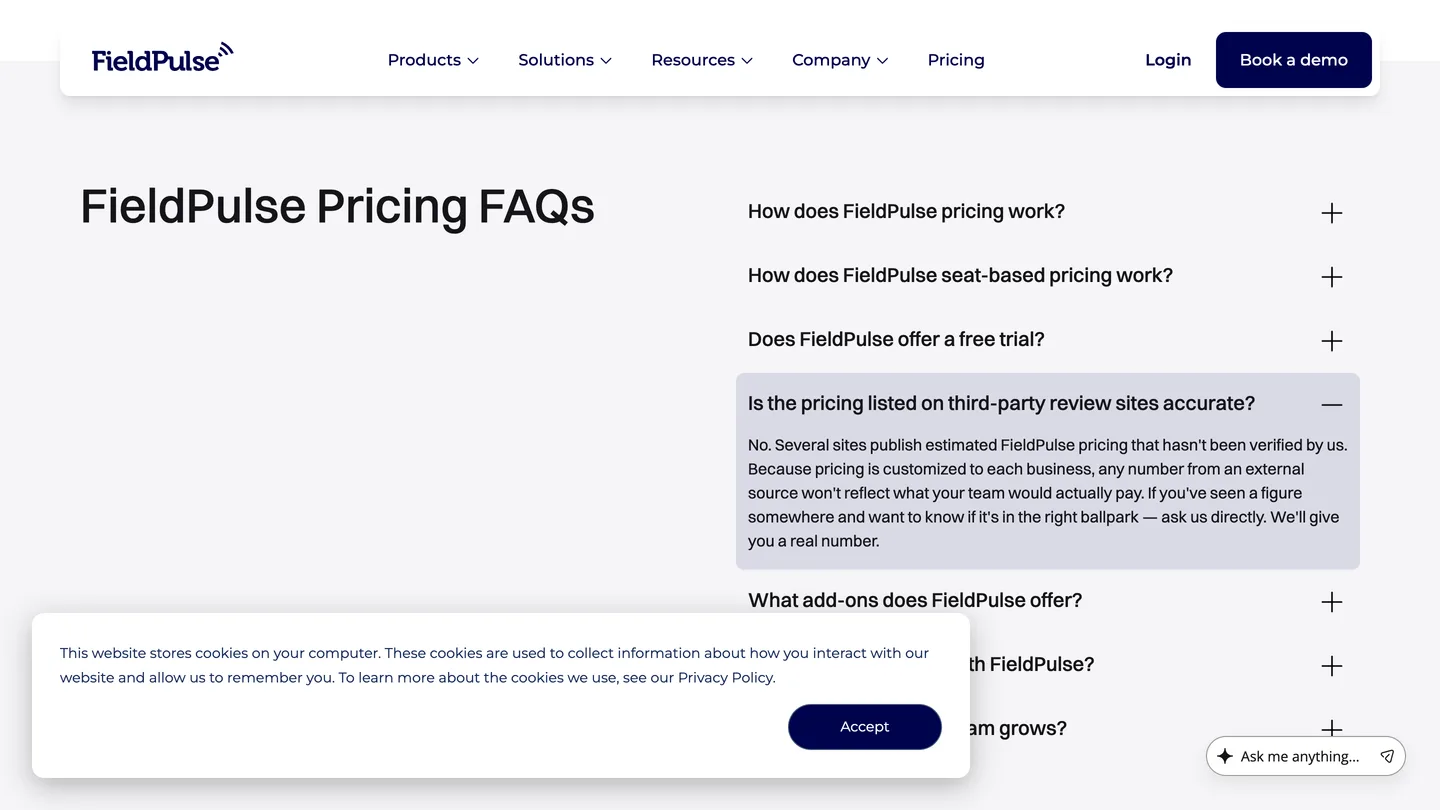
This is the finding that separates FieldPulse from everything else in the category, so it goes first. There is no price on the pricing page. There is no price on its Capterra profile either, where the starting-price field reads Get Price and the free-trial field reads not available. Every package button says Request Pricing, and the vendor asks you to book a demo before it will quote you.
Then read FieldPulse's own answer to the question, which is the most useful sentence on the
whole site. Asked whether the pricing listed on third-party review sites is accurate, it
answers:
No. Several sites publish estimated FieldPulse pricing that hasn't been verified by us.
So the per-user rates and tidy plan tiers you found on the first page of Google are estimates
the company disowns. We're not going to reprint them and pretend otherwise.
How the seat model sets your bill
FieldPulse describes the mechanics even though it withholds the rate, and the mechanics are what decide your invoice. You buy a set number of seats upfront for the contract term, and seats come in two grades. A full-access seat covers the whole platform. A field-only seat is for a technician who lives in the mobile app, who can see assigned jobs, upload files and clock in and out with location tracking, and who costs less because of it.
Which is a better model than a flat per-user charge, honestly, since a service business is mostly technicians and technicians don't need the back office. But it also means your bill is set by a mix you negotiate once, before you know how your crew will settle into using the thing. The unit that moves your cost is headcount.
What sits outside the subscription
Payment processing is a separate cost and the rate is unpublished. FieldPulse's own help centre says only that there is a processing fee for debit and credit cards and ACH, plus a monthly cost, and tells you to chat with the team for the number. For scale, Housecall Pro publishes its card-present rate to two decimal places. Ask FieldPulse for the same in writing before you sign, because a percentage point on a shop running a million dollars through the platform is real money.
Implementation is billable too. The terms of service bill your initial term and your implementation together, and say the implementation is suspended if fees aren't received within 30 days of the invoice due date. No implementation amount is published anywhere. Add-ons are the third layer: Operator AI, Chat AI, Engage VoIP, Fleet Tracking, Pricebook, Dynamic Proposals and Custom Forms, priced flat, by consumption or by seat depending on which one. None of those rates are published either.
The contract, which is the part reviews skip
The one-year term and the sixty-day window
Read the terms of service before the demo, not after. The initial term is one year and it commences on the date you accept the subscription, which is signature day and not go-live day. There's no provision to terminate before the end of a term. To leave at the end of one you give sixty days written notice, and miss that window and it renews for another full year. Fees may be raised for a renewal term on the same sixty days notice.
And the term is not a soft commitment. The terms state that a customer is obligated to pay the contract value for the entire term of the contract. There is also a clause most contractors never read until it bites: you agree not to issue or threaten a chargeback for any reason, and FieldPulse reserves the right to report a chargeback to the credit bureaus as a delinquent account. That is an unusually hard term for software at this end of the market, and it belongs in your decision.
What adding a technician mid-term costs
This is the clause nobody reports, and it changes the arithmetic for any shop that hires in spring. Additional users above what is listed on your order form are charged for the one-year term upfront through Stripe at the time the user is added. So a technician you hire in month nine does not cost you three months of seat. He costs you twelve, billed the day you add him, and his term runs alongside an account term that ends in three.
And there is no early termination fee named anywhere in the document, which sounds like good news and is not. A cancellation fee is a price for leaving. What FieldPulse has instead is an obligation to pay the contract value for the entire term, plus a sixty-day notice period you have to hit to stop the next one starting. So your exit exposure isn't a fee you can quote in advance. It's however much of your own term is left, and no figure for that exists until there's a signed order form in front of you.
For a seasonal trade that is the whole buying decision. A landscaping or roofing shop that doubles headcount for one season and lays half of it off in November is buying twelve months of seat for six months of work. Size your order form for your peak crew, get the seasonal ramp priced in writing at the quote stage, and ask what happens to a seat you stop using.
Getting your data out
The terms of service carry no data-export clause at all. We searched the document for export, for data retrieval and for post-termination access, and the only Export heading is an unrelated export-control paragraph about product feedback. The help centre does document a Data Imports and Exports section, so an export path exists inside the product. What isn't contractually promised is reaching it after your term ends, and migration tooling in this category almost always points inward.
Our read on the features
Offline mode, and exactly where it stops
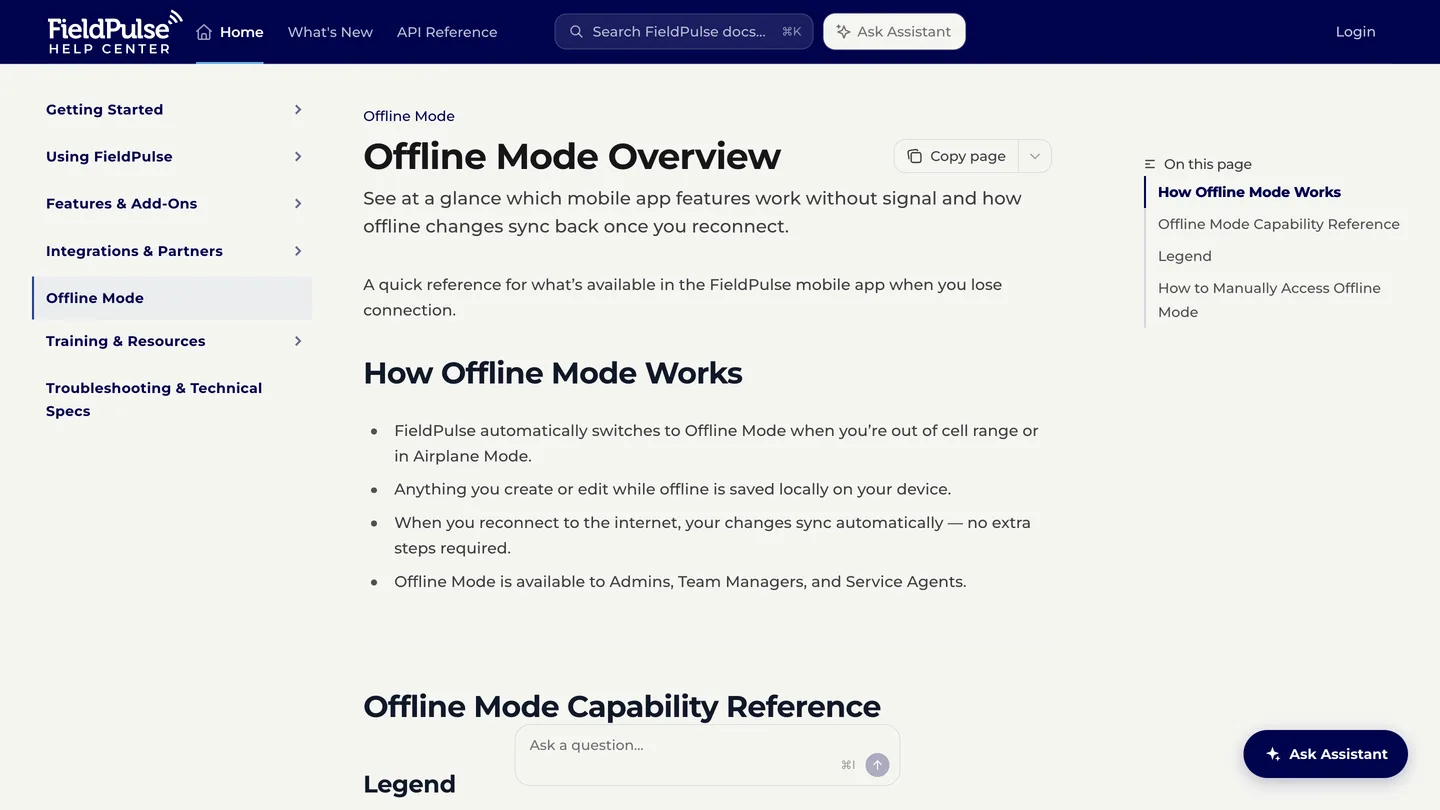
FieldPulse publishes an unusually honest offline capability reference, so this is checkable rather than a marketing adjective. The app switches to offline mode automatically out of cell range or in airplane mode, and syncs when it reconnects. Jobs and projects are cached for 1 week. You get up to 600 cached custom forms, 200 for each record type, up to 600 cached estimates and invoices combined, up to 300 material list records, and photo uploads in batches of 50.
"FieldPulse caches jobs and projects for 1 week offline, with up to 600 cached custom forms at 200 per record type and up to 600 cached estimates and invoices combined."
FieldPulse (2026)
Then the two limits that decide whether this works in a rural service area. Offline, a technician cannot collect payment, because payment collection is unavailable and resumes only once reconnected. And he cannot create a new job, a new customer or a new project either. Those wait until he is back online. So a basement with no signal is fine for finishing work that was already dispatched, and it's no good for taking a card at the door on a job you added on the spot.
The QuickBooks sync
Both QuickBooks Online and QuickBooks Desktop are supported, and the Online connector is a genuine two-way sync rather than a one-way push: customers, invoices and payments sync both ways, with line items, tax rates and sales and purchase accounts alongside them. You pick the time period and the entities at setup, and invoices carry a dependency: to sync invoices, your customers, line items and payments must sync too.
Two caveats. Connecting QuickBooks Online starts with requesting access from FieldPulse support rather than clicking a button, and the connector sits behind the Professional package. Migration is where it hurts, and a managing partner in construction on Capterra describes the shape of it: her team still had not managed a clean sync, because of a decade of pre-existing client lists from two different sources. Budget time for a data clean-up you will do yourself.
The mobile app, which is the weak point
FieldPulse on the App Store rates 4.0 out of 5 across 113 Ratings, with version 2.16.2 shipped in July. Capterra's feature-level score for Mobile Access sits at 4.5. And the Google Play listing shows 10K+ downloads and no aggregate star rating at all, which usually means too few ratings to publish one.
"FieldPulse rates 4.0 out of 5 across 113 App Store ratings, on version 2.16.2."
Apple App Store (2026)
Weigh the sample honestly in both directions. That's a thin corpus, so 4.0 is a signal rather than a verdict. But it sits below every alternative in the table further down, and the app is the surface your technicians touch for eight hours a day. Put it in the demo: have a real technician run one job start to finish on his own phone before anyone signs anything.
Where it falls short
No published price, anywhere, for anything. Not the software, not the add-ons, not the payment processing, not implementation. You cannot budget this platform without a sales call, and the vendor has disowned the third-party numbers that fill the gap.
No payroll. It's the most repeated gap in its own reviews. One office staffer in construction says the lack of payroll functions is the only issue she has with the product, and a director of technology and operations reports a custom sync to QuickBooks Time as the workaround.
Offline mode cannot take money. Payment collection is unavailable offline and new records cannot be created at all. For a rural service area, test that before you commit.
QuickBooks Sync is tier-gated. It is absent from Essentials and only appears at Professional, and since no tier carries a price, the cost of that upgrade is unknowable until you ask.
Bugs are a real cluster in the review corpus. Capterra groups 88 reviews under
frequent bugs and software glitches, 44% of them negative. An administrative assistant in
public safety lists the specifics:
line items and customers randomly getting deleted, long processing times, and work orders
not showing on calendars.
The record moves between estimate, job and invoice awkwardly. Several reviewers describe copying information between those three steps by hand, and one owner in construction calls the interconnection between services, estimates, invoices and purchase orders poor enough that staff hunt in several places for one job's information.
How the answer changes by trade
A plumbing contractor gets the strongest version of this product. Emergency service work is exactly what the dispatch board and the price book are built for, and good-better-best option sheets on a water heater replacement lift the average ticket more than any other feature here. Our plumbing marketing hub covers the demand side of it.
For an HVAC contractor the maintenance agreement module is the reason to look. Renewals billing from a card on file is the difference between a service plan book that grows and one that quietly churns every autumn. But price the seat ramp before a heat wave, because a mid-season hire costs a full year of seat. Our HVAC marketing hub covers what happens to demand in that same week.
An electrical contractor should test permissions hard during the demo. Service calls and panel upgrades want different approval paths, and one plumber reviewing the product reports the permission settings being too restrictive to let team managers build their own forms.
A roofing contractor is where the fit gets thinner, and the reason is the shape of the work rather than the software. A tear-off is a project with a supplement and a claim behind it, not a two-hour service call, so a roofer usually wants a roofing-specific platform instead. Our roofing marketing hub covers the storm-surge problem that drives it. And a landscape contractor should think hardest of all about the seat clause, since a crew that triples in April and halves in October pays twelve months of seat for a six-month season.
How it compares
The useful comparison is not feature depth, because at this end of the market everything schedules, invoices and dispatches. It is whether you can find out what you will pay before you talk to somebody. Prices below come from each vendor's own pricing page, read 27 July 2026.
| FieldPulse | Jobber | Housecall Pro | Service Fusion | Workiz | ServiceTitan | |
|---|---|---|---|---|---|---|
| Entry price on the vendor's own page | Not published | $49 a month | $79 a month | $245 a month | Request pricing | Request Pricing |
| Users at that price | Seats bought upfront | 1 user | 1 user | Unlimited Users | first 5 users | Request Pricing |
| Try before you sign | Demo only | 14 days | 14 days | Not stated | 7 days free trial | Get Demo |
Read the top row and three of six vendors will not tell you a number. Read the second and the models diverge completely: Housecall Pro and Jobber sell you one seat and charge for more, Service Fusion bundles unlimited users into a much higher flat rate, and FieldPulse asks you to guess your headcount a year ahead. So the real question isn't which is cheapest. It's which pricing model survives your hiring pattern, and a seasonal crew gets a different answer than four year-round technicians do.
The verdict, by crew size
Solo operator
No. A one-year seat commitment with no trial and no published price is the wrong shape for a one-truck business, and Jobber at $49 a month with a 14-day trial answers the same need without a phone call. Revisit FieldPulse when you have a second van and somebody in an office.
3 to 20 field staff
Yes, and this is the band the product is built for. Get a written quote covering the seat mix, the payment processing rate, the implementation fee and the add-ons you'll switch on, then compare that total against Housecall Pro and Service Fusion at the same headcount. And push the demo past the sales deck: run one real job through the mobile app, with the phone in airplane mode.
20-plus, or multi-location
Maybe, and only at Enterprise. Multi-location management and the Open API sit at the top package, and reporting depth is the gap reviewers name most often against the bigger platforms. An owner in construction who moved off ServiceTitan puts it evenly: there is a gap in information tracking against the biggest players, and he would like to report on job types more easily. If reporting is what you're buying, go in knowing that.
What it connects to
The connector list is short and specific. Capterra records nine integrations and names QuickBooks Online, QuickBooks Desktop, Google Calendar, Mailchimp and Zapier among them, and FieldPulse's own partners page adds CompanyCam for job photos, NiceJob for review collection, Ruby for live call answering, CardConnect and Clover Connect for card processing, Wisetack and Acorn Finance for consumer financing, Azuga for fleet tracking, and Angi and Thumbtack for leads.
Two absences worth knowing. There is no phone system integration listed because FieldPulse sells its own, Engage, whose page says only that pricing is line and license based and to ask the team. And CallRail does not appear on the partners page at all, so campaign-level call attribution runs through Zapier or not at all. If you spend real money on ads, confirm that path in the demo.
The number nobody checks
Now, Fervor is a CRO and web design studio rather than a FieldPulse competitor. But this platform ships a booking portal, and a booking portal only earns its keep if a homeowner can reach it, which is the part we happen to have data on.
In May 2026 we inspected 380 home services contractor websites for the State of HVAC report and the wider Contractor CRO Index 2026. Only 40% of them offered online scheduling or booking at all, which is 152 sites with it and 228 without. And 82.8% loaded poorly enough on mobile to be graded poor, so plenty of the rest make a homeowner wait before anything appears.
Which means you can buy the best-configured dispatch board in the trades and still have every job arrive by phone, because the booking portal it came with never made it onto the website. Pick the platform that fits your crew. Then open your own site on a phone at nine on a Tuesday night and count the taps it takes to book you. The full statistics are public if you would rather check them yourself.
See whether your website is feeding that dispatch board
Fervor inspects your site the way a homeowner uses it, then shows you the specific places calls and bookings leak out. It takes 5 business days.
Get a Site InspectionWhat we checked, and what we did not
We didn't run FieldPulse on a live contractor account, and we won't imply otherwise. There's no free trial to sign up for, so a hands-on test means a demo and a one-year commitment. What this page is instead: the vendor's pricing page read with every FAQ answer opened, the terms of service read clause by clause, four help-centre articles read in full, the Capterra corpus read by category rather than by star rating, and both app store listings read on 27 July 2026.
What we couldn't verify is the entire price. Not the seat rate, not the package rate, not the processing rate, not implementation, not a single add-on. That's the finding rather than a gap in the research, and it's why no dollar figure for FieldPulse appears above. Ratings come from Capterra, which shares one Gartner Digital Markets review pool with GetApp and Software Advice, so an identical score across all three is one sample rather than three. Open all three and you will find the same number over the same review count. G2, TrustRadius and Trustpilot block automated access and nothing here comes from them. No claim on this page is sourced from Reddit or a contractor Facebook group, because neither could be retrieved and quoting them would mean inventing attribution.
If you want to evaluate FieldPulse yourself, its product site is where the demo request lives. Fervor has no affiliate relationship with FieldPulse and earns nothing if you sign.
What FieldPulse users say
The system is clunky, with poor interconnection between components (services, estimates, invoices, purchase orders), requiring staff to have to click on multiple locations to find all the information needed.
We are currently hindered by the lack of Canadian financing options like Acorn and an unsustainable $1,500 transaction limit on CardConnect that fails to accommodate our $5,000+ invoices.
One of the things I like least about field pulse is that right now there are quite a few glitches- such as line items and customers randomly getting deleted, long processing times, and work orders not showing on calendars.
There is a gap in terms of information tracking vs the biggest players in the space. I'd like to be able to report more easily on job types.
We still haven't quite been able to successfully sync FieldPulse with Quickbooks Online, mostly because of over a decade of pre-existing Client Lists from 2 different sources.
I have had issues with price, flexibility in changing my setup. I find this CRM more expensive than competing companies.
The lack of payroll functions is about the only issue I have with Field Pulse.
Very expensive when you compare to what you get.
Moving from Estimates to Jobs to Invoices still feels a bit disjointed.
It seems to be slow moving recently and this causes a lot of frustration when trying to complete information on our jobs.
Frequently asked questions
How much does FieldPulse cost?
Nobody outside FieldPulse can tell you, and that is the finding rather than a gap in the research. Its pricing page shows three packages, Essentials, Professional and Enterprise, each behind a Request Pricing button, and its Capterra profile records the starting price as Get Price with no free trial. FieldPulse also disowns the figures that fill the vacuum: asked whether the pricing listed on third-party review sites is accurate, its own pricing FAQ answers no, and says several sites publish estimated FieldPulse pricing that has not been verified by the company. So treat every per-user rate you find in a search result as an estimate the vendor rejects, and get a written quote before you budget.
Does FieldPulse have a free trial?
No, and the vendor says so without hedging. Its pricing FAQ answers the question with no, and we are not going to pretend otherwise, then offers a demo built around your trade, team size and workflows instead, with no credit card required to book one. Capterra records the same thing from the other side: its free-trial field for FieldPulse reads not available. Since there is no trial and the contract runs a year, the demo is the only chance you get to test the product before committing, so run a real job through the mobile app during it rather than watching a slide deck.
Does FieldPulse lock you into a contract?
Yes. Its terms of service state that the initial term of a subscription is one year and commences on the date you accept the subscription, which is signature day rather than go-live day, and that there is no provision to terminate before the end of a term. Leaving at the end of one takes sixty days written notice; miss that window and it renews automatically for another year, and fees may be increased for a renewal term on the same sixty days notice. The terms also say a customer is obligated to pay the contract value for the entire term, and separately that you agree not to issue or threaten a chargeback, which FieldPulse may report to the credit bureaus as a delinquent account.
What does it cost to add a technician mid-contract?
A full year, billed the day you add them. FieldPulse’s terms state that additional users above what is listed on your order form are charged for the one-year term upfront through Stripe at the time the user is added. So a technician hired in month nine of your term costs twelve months of seat, not three. For a seasonal trade that is the single most expensive clause in the agreement: a landscaping or roofing crew that doubles in spring and halves in autumn buys a year of seat for a season of work. Size the order form for your peak crew and get the seasonal ramp priced in writing at the quote stage.
Does FieldPulse work offline?
Partly, and it publishes exactly where the line falls, which is rare. The app switches to offline mode automatically out of cell range or in airplane mode and syncs on reconnect. Jobs and projects stay cached for one week, you get up to 600 cached custom forms and up to 600 cached estimates and invoices combined, up to 300 material list records, and photo uploads in batches of 50. Two limits decide whether that works for you: payment collection is unavailable offline, and new jobs, customers and projects cannot be created until the phone reconnects. So a no-signal basement is fine for finishing dispatched work and wrong for taking a card at the door on a job you added on the spot.
Does FieldPulse sync with QuickBooks?
Yes, with both QuickBooks Online and QuickBooks Desktop, and the Online connector is a genuine two-way sync rather than a one-way push: customers, invoices and payments sync both ways, alongside line items, tax rates and sales and purchase accounts. You choose the time period and the entities at setup, and invoices carry a dependency, since customers, line items and payments have to sync for invoices to sync. Two caveats. Connecting QuickBooks Online begins with requesting access from FieldPulse support rather than clicking a button, and QuickBooks Sync is absent from the Essentials package and only appears at Professional.
What do users complain about most?
Bugs and the estimate-to-invoice handoff. Capterra groups 88 reviews under frequent bugs and software glitches, 44 percent of them negative, and an administrative assistant in public safety names line items and customers randomly getting deleted, long processing times and work orders not showing on calendars. Several reviewers describe copying information by hand between estimates, jobs and invoices. Payroll is the most repeated missing module. Against that, Customer Service is the strongest of its four Capterra sub-scores at 4.7, and the review corpus is full of named support specialists being thanked by name.
What are the best FieldPulse alternatives?
Jobber, Housecall Pro and Service Fusion are the three that publish prices, which is the axis that matters most here. Jobber starts at 49 US dollars a month for one user with a 14-day trial. Housecall Pro starts at 79 a month for one user, also with a 14-day trial. Service Fusion starts at 245 a month but bundles unlimited users and sells month to month. Workiz and ServiceTitan both route you to a sales conversation the way FieldPulse does. Note what is not an alternative: a photo app, a review platform or a takeoff tool is not a replacement for the system your whole service business runs on.
Freshness
How we keep this page current
Three dates govern this review, and they carry different meanings. The initial source sweep is dated July 27, 2026; when only part of the evidence set is recaptured later, that later date is stated beside the refreshed claim. We last revised the page on July 30, 2026. And the user reviews we quote were posted over roughly the last 24 months, so their individual dates remain part of the evidence instead of being overwritten by a later pricing update.
We revise the page when FieldPulse changes a published price or a contract term, when a rating we cite moves by more than a few tenths, or when the vendor ships something big enough to change the verdict. We never bump the date just to look fresh, because Google treats that as manipulation and so do we. If a figure here reads as stale by the time you land on it, treat it as a floor and check the vendor's own page. We linked it at every number for exactly that reason.
Sourcing
How this review was researched
Every figure on this page traces to a captured source linked inline where it appears. The initial sweep is dated July 27, 2026; any later, partial recapture is dated at the claim rather than relabelling the whole evidence set. Ratings come from Capterra, GetApp, Software Advice and the Apple App Store. Note that Capterra, GetApp and Software Advice share one Gartner Digital Markets review pool, so an identical score across all three is a single sample rather than three corroborating ones, and this page treats it that way. G2, TrustRadius and Trustpilot block automated access, so where their numbers appear they are labelled as reported rather than verified. No claim here is sourced from Reddit or from a contractor Facebook group, because neither could be retrieved and quoting them would mean inventing attribution. Pricing marked as reported comes from third-party roundups, never from Fervor. Fervor's own findings come from the Contractor CRO Index 2026.
About
About Fervor Studio
Fervor Studio is a conversion rate optimization (CRO) and web design studio for home services contractors across North America, based in Cochrane, Alberta. Fervor does not sell field service management software and is not an alternative to FieldPulse. It publishes the Contractor CRO Index, a public benchmark measuring contractor website conversion potential using reproducible, open-source methods such as axe-core and Google Lighthouse. Fervor Studio is operated by Fervor Group Inc.
Fervor's full cross-trade dataset lives in the CRO Index statistics.
 Aug 1, 2026
 Tech Stack
Best Plumbing Software in 2026: Ten Ranked Across Four Classes
A plumbing company’s work runs through four classes of software that do not substitute for each other, and it only buys two of them. Ten products, each with a published price or an explicit statement that the vendor publishes none.
Read Article Jul 30, 2026
 Tech Stack
NiceJob vs Birdeye 2026: Pricing, Contracts and Review Gating
One of these vendors puts its price on the page and its cancellation terms in writing. The other puts a form in front of both, and the complaint record is where its contract length shows up.
Read Article Jul 30, 2026
 Tech Stack
Podium vs Birdeye 2026: Pricing, Contracts and Review Gating
Only one of these two will tell you what it costs before a sales call, and even that number carries a carve-out aimed squarely at trade contractors.
Read Article Jul 30, 2026
 Tech Stack
Best Electrical Contractor Software 2026: 11 Ranked and Priced
An electrical contracting business makes two software purchases that do not substitute for each other, and every roundup answering this query covers only one of them. Eleven platforms, with a published price or an explicit statement that the vendor publishes none.
Read Article Jul 30, 2026
 Tech Stack
Best HVAC Software in 2026: Eleven Ranked Across Three Classes
An HVAC contracting business buys across three classes of software that do not substitute for each other, and every roundup answering this query covers only one of them. Eleven products, each with a published price or an explicit statement that the vendor publishes none.
Read Article Jul 29, 2026
 Tech Stack
AccuLynx Pricing 2026: The Real Cost of a Quote-Gated Plan
One published figure, two blank plan cards, and a contract that says things the pricing page does not. A line-by-line breakdown of what AccuLynx really bills.
Read Article Jul 29, 2026
 Tech Stack
Houzz Pro Canada Review 2026: Pricing and Alternatives
Houzz Pro serves different pricing renderings. What Canadian buyers see, how GST/HST and payments work, what Custom gates, and what the annual contract commits you to.
Read Article Jul 29, 2026
 Tech Stack
JobNimbus Pricing in 2026: What the Quote Does Not Cover
JobNimbus prints no figure on any of its four plans. So the only rate you can read before a sales call is the payments meter, and it is the biggest line on the bill.
Read Article Jul 29, 2026
 Tech Stack
JobNimbus Review 2026: Pricing, Pros, Cons and Alternatives
JobNimbus rates 4.6 on Capterra and orders material straight from ABC Supply and SRS. But it publishes no price, and its supplement route carries a note.
Read Article Jul 29, 2026
 Tech Stack
BuildOps Review 2026: Pricing, Contract Terms and Alternatives
BuildOps runs commercial service and projects on one platform, and publishes no pricing at all. The billing unit, the 30-day data-export window, and who it suits.
Read Article Jul 29, 2026
 Tech Stack
Service Fusion Review 2026: Pricing, Contract and Alternatives
Service Fusion bills flat per company with unlimited users, which is the best structural deal in field service software. The published plans, the contract behind the no-contract line, and the app score every other review gets wrong.
Read Article Jul 29, 2026
 Tech Stack
Knowify Review 2026: Pricing, Job Costing and Alternatives
Knowify rates 4.5 on Capterra and its weakest sub-score is features. What the $99 Core plan withholds, which way the QuickBooks sync really runs, and who should not buy it.
Read Article Jul 28, 2026
 Tech Stack
AccuLynx Review 2026: Pricing, Tier Gating, Alternatives
AccuLynx rates 4.6 across 846 reviews and now publishes an entry price. What that price omits, which tier holds the insurance workflow, and who should skip it.
Read Article Jul 28, 2026
 Tech Stack
Unitel Voice Review 2026: Pricing, Features and Alternatives
Unitel Voice rates 4.6 on Capterra and gives a one-truck shop a business number for $9.99 a month. The published plans, the cost per call, and what it won't do.
Read Article Jul 28, 2026
 Tech Stack
NiceJob vs Podium 2026: Pricing, Contracts and Review Gating
Both vendors print a price, at very different scale and in different currencies. The gap that matters is what Podium will not print: the billing unit, and whether a trade shop gets the number on the page.
Read Article Jul 27, 2026
 Tech Stack
CompanyCam Review 2026: Pricing, Pros, Cons and Alternatives
Every page ranking for CompanyCam still quotes a per-user price the vendor no longer charges. Here are the real plans, the seat math, and who should skip it.
Read Article Jul 27, 2026
 Tech Stack
NiceJob Review 2026: Pricing, Pros, Cons and Alternatives
NiceJob rates 4.9 on Capterra and refuses to gate negative reviews. Real plan pricing, the active-customer threshold nobody publishes, and who should skip it.
Read Article Jul 26, 2026
 Tech Stack
Buildertrend Review 2026: Pricing, Limits and Alternatives
Buildertrend rates 4.5 across 2,486 Capterra reviews and quotes against your revenue rather than your seat count. The workflows, the export problem, the alternatives.
Read Article Jul 26, 2026
 Tech Stack
CallRail Review 2026: Pricing, Pros, Cons and Alternatives
CallRail rates 4.5 on Capterra, and its tracking numbers port out free. But the two usage rates that decide your real bill are the two it does not print.
Read Article Jul 26, 2026
 Tech Stack
Roofr Review 2026: Pricing, Pros, Cons and Alternatives
Roofr rates 4.6 on Capterra and sells $13 measurement reports against a market charging triple. But it will not import a report from anywhere else.
Read Article Jul 24, 2026
 Tech Stack
Housecall Pro Review 2026: Pricing, Pros, Cons, Alternatives
Housecall Pro has the shortest learning curve in the category and the widest review spread. Real pricing, the Instapay math, and the migration trap to plan around.
Read Article Jul 23, 2026
 Tech Stack
Jobber Review 2026: Pricing, Pros, Cons and Alternatives
Jobber rates 4.6 on Capterra with the best mobile app in the category. Real plan pricing, the feature gating that changes your entry price, and who it suits.
Read Article Jul 22, 2026
 Tech Stack
ServiceTitan Review 2026: Pricing, Pros, Cons, Alternatives
ServiceTitan rates 4.3 on Capterra but its weakest score is value for money. Real reported pricing, the 12-month contract, the exit fees, and who it suits.
Read Article Jun 2, 2026
 Tech Stack
HVAC Online Scheduling: The 43% Losing After-Hours Bookings
HVAC leads every trade on online booking at just 56.7%, which still leaves 43% of sites forcing an after-hours customer to wait for a business-hours phone call.
Read Article