Remodeling Website Accessibility: The 59.6% Lawsuit Risk
59.6% of remodeling websites carry a critical accessibility violation. See what remodeling website accessibility requires, and the lawsuit risk of ignoring it.

Here's a number that should bother you. Across 146 remodeling contractor sites Fervor scored this spring, 59.6% shipped at least one critical violation. Not a typo, not a rounding artifact. Critical, as the axe-core scanner defines it. So if you've never thought hard about remodeling website accessibility, the odds say your gorgeous portfolio is already sitting in the failing column with nearly six in ten of your competitors.
And that's the irony of it. Yours is a design-led trade. You sell taste. So your site is the most visual thing you own. But the keyword its galleries can't seem to escape is "lawsuit," because the same beautiful, airy, low-contrast look that wins the client also fails the standard a plaintiff's lawyer hunts for.
So let's walk through what an ADA compliant website requires, what your site is most likely getting wrong, and what it costs you broken. No legal jargon you'd need a lawyer to decode. Just the math and the fixes.
What remodeling website accessibility means in practice
Quick reality check, because the term gets thrown around loosely. The Americans with Disabilities Act doesn't ship a checklist for the web. There's no government form, no certificate you hang next to your NARI membership. What courts and the Department of Justice settled on instead is the Web Content Accessibility Guidelines, WCAG 2.1 Level AA. So when someone says you need an ADA compliant website, they mean WCAG 2.1 AA conformance.
That bar is mostly mechanical. It's a list of things a machine can check: does your text have enough contrast, do your form fields have labels, do your headings nest in order, do your links have names. One of the most-cited rules is the contrast ratio.
"WCAG 2.1 AA compliance requires: normal text ≥4.5:1 contrast ratio, large text ≥3:1 contrast ratio." — W3C / WAI (2024)
That contrast rule is one of dozens. But it's the one you'll fail most, and it's almost a trade hazard. Thin gray captions under your project photos. A faint "Request a Consultation" button in a muted brand color that reads but doesn't clear the ratio. Designers love a soft, editorial look, and that aesthetic is quietly failing on a lot of these galleries.
So WCAG compliance isn't an abstract exercise you can file under "someday." It's the literal mechanism a homeowner with low vision uses to figure out whether your kitchen-remodel page has a phone number. When the markup breaks, they reach the next remodeler instead.
The 59.6% number, and the rest of the picture
Let me give you the full spread, because one stat in isolation is easy to wave off. The State of Remodeling report measured every site against axe-core, the WCAG 2.1 AA scanner consultants run when building a case.
- 59.6% carry at least one critical violation.
- 92.5% carry at least one serious violation.
- Only 40.4% ship zero critical issues.
- It was the single weakest scored category: a mean of 3.63 out of 8, just 45.4% of the points available.
That last number is the one to sit with. The trade mean Fervor Score landed at 65.67 out of 100, and this category was the anchor dragging it down. Whatever your site does well, this is almost certainly where it does worst. The soft spot of a trade that prides itself on craft.
And this isn't yours alone. It's the contractor pattern. HVAC sat at 64.4% critical, roofing at 60.8%. Nearly two-thirds of every trade Fervor has scored would fail an accessibility scan today. Your competitors are in the same hole. Which is either cold comfort or a genuine opening, depending on whether you're the one who climbs out first.
What the scanner actually counted
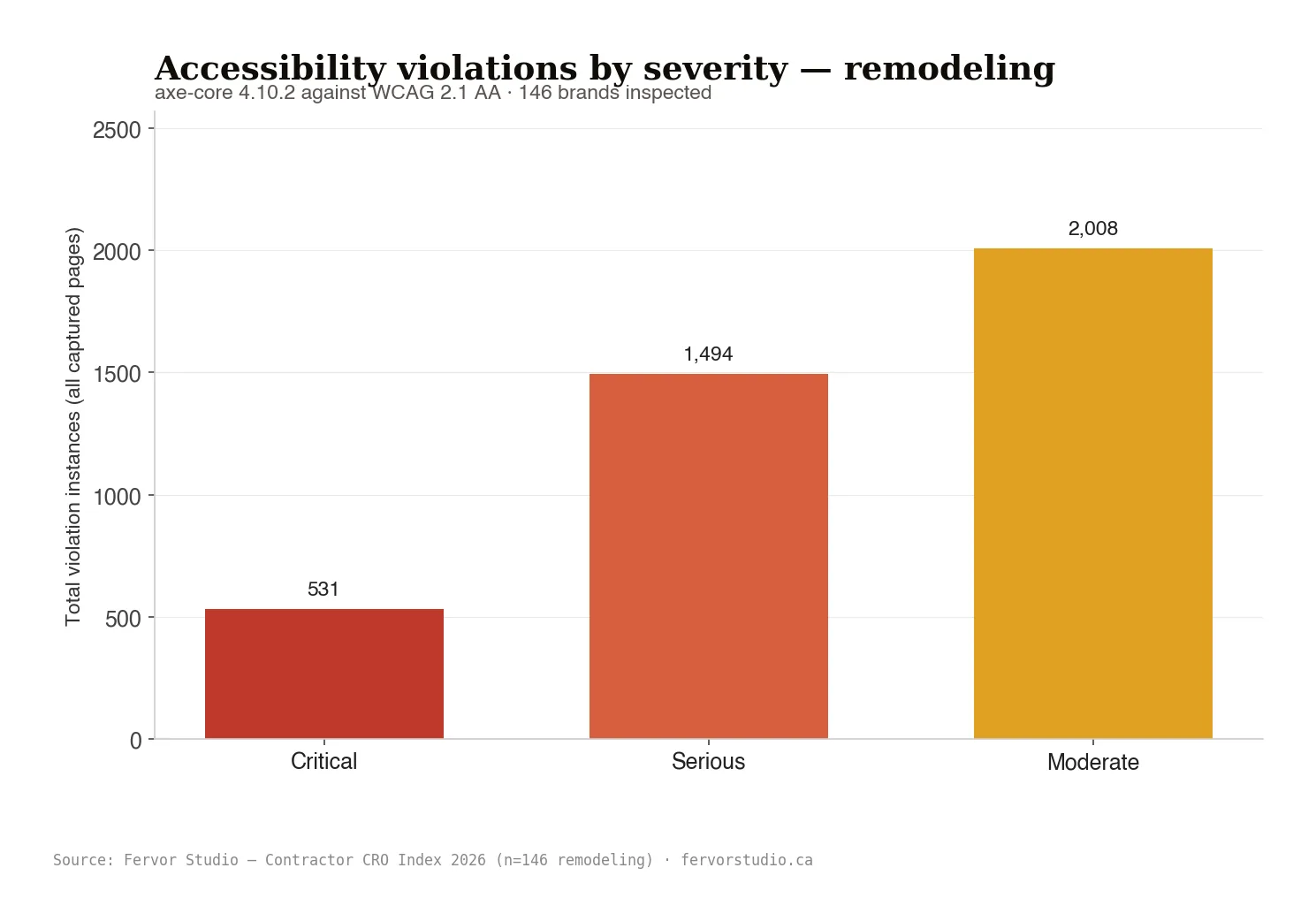
Averages are easy to ignore. Raw counts are harder. So the volume the scanner logged across every captured page in the sample, sorted by severity, looks like this:
- 531 critical violations: the kind that flat-out block a screen-reader user, like an unlabeled booking button or an image with no text alternative.
- 1,494 serious violations: gaps that badly degrade the experience, like a contrast failure on your primary call-to-action.
- 2,008 moderate violations: smaller structural problems that pile up into a page hard to navigate without sight.
None of those are exotic. None require a developer to puzzle over for a week. But they creep in when a portfolio gets built fast, for the photos, with nobody checking the markup underneath. And that's exactly why remodeling website accessibility scores bottom out across the trade. Not because you don't care, but because nobody ever ran the accessibility scan.
Why "but it looks gorgeous" is the trap
You've looked at your site the only way you can. Working eyes, a big monitor, your project photos rendering beautifully. None of the people the rules protect browse that way. A homeowner using a screen reader doesn't see your before-and-after gallery. They hear it, link by link, heading by heading, top to bottom. If your "Start Your Project" button is an unlabeled icon, they hear "button" and nothing else. If your phone number is baked into a header image instead of live text, it's invisible to them. It's all mechanical, all measurable.
So the reason this keeps blindsiding contractors is simple. The failures are invisible to the person who owns the site and glaring to the person filing the complaint. You can't fix what your own browser is hiding from you. That accessibility scan is the only honest mirror.
The lawsuit risk isn't theoretical
Now the math gets uncomfortable. These lawsuits have turned into a volume business for a handful of plaintiff's firms. The play: run an automated accessibility scan across hundreds of small-business sites, flag the failures, fire off demand letters, settle. And a 92.5% serious-violation rate means most remodelers would light up that accessibility scan on the first pass. You don't have to do anything wrong beyond ship broken markup.
A complaint doesn't require a homeowner to prove they were harmed. It requires your site to fail a standard. And the axe-core results say it does, for nearly six in ten of you. Finding your violations costs about thirty seconds of a lawyer's time. Fixing them after a demand letter lands costs a settlement plus the rush job.
If you do any business in Ontario, it's not only U.S. case law in play. The Accessibility for Ontarians with Disabilities Act carries penalties of up to $50,000 per day for an individual and $100,000 per day for a corporation. So for any remodeler doing business in the province, the remodeling website ADA exposure goes past litigation risk into a regulatory line with real per-day teeth behind it. You don't need to panic. But stop filing it under "someday."
What good looks like
And the encouraging part is real: most of this is fixable in an afternoon, not a rebuild. The 40.4% that ship zero critical violations didn't buy special software or tear down their portfolio. They just got the fundamentals right.
- Text and captions that clear the 4.5:1 contrast ratio. Darken the gray under your project photos. Done.
- Every form field labeled, so a screen reader announces "phone number" instead of "edit text."
- Real heading structure: one H1, then H2s and H3s in order, no skipped levels.
- Named links and buttons. "Request a kitchen consultation," not a bare icon.
- Alt text on your gallery, so the work you're proudest of actually exists for a blind visitor.
Not one of those changes how the page looks to a sighted visitor. They change whether the other ten-to-twenty percent of your market can use it at all, and whether you survive an accessibility scan. So an ADA compliant website isn't a design downgrade. The fixes are invisible to everyone except the people who currently can't get through your door.
What to fix first
If you only do one thing this week, run a WCAG scan and fix contrast. It's the violation that piled up to 1,494 serious flags across the sample, it's usually a pure CSS change, and it's the one a homeowner on a phone in a sunlit driveway notices anyway. After that, walk your most-trafficked pages (home, main service page, contact) and check three things by hand: does every form field have a visible label, does every link have real text, does the heading order go 1-2-3 without skipping.
Then put it on a recurring schedule, because this rots. Every time you add a project to the gallery or swap a hero image, you can reintroduce a violation. The sites that stay compliant treat remodeling website accessibility as a habit, not a one-time project. A quick scan after every change keeps you out of the failing column.
Where this overlaps with conversion
One more angle, because it's the reason Fervor scores this at all. The same gaps that fail the standard also leak leads.
A button a screen reader can't identify is also a button a distracted homeowner misreads while scrolling your gallery on the couch at 9pm. Heading structure that confuses assistive tech also confuses Google's crawler, part of why so many of these sites quietly underperform on search. Low contrast that fails the ratio is also hard to read on a phone, outdoors, one-handed, which is how a huge share of remodeling leads browse. So WCAG compliance rarely sits apart from conversion. It's frequently the exact same fix wearing a different label.
That's the lens the framework uses. This is one of eight scored categories, sitting next to lead capture and mobile experience. Most contractors think this is charity. It's plumbing. When it's broken, money leaks out.
Run the numbers. Say your average project is worth $35,000, and your site brings in 12 qualified consultation requests a month. If one in twenty of those visitors bounces because a screen reader couldn't read your consultation button, that's roughly one lost lead a month. Close even a third of the ones you lose and that's a $35,000 project a quarter walking out the door, from a CSS change and an afternoon. And that's before the legal column. On remodeling project values, the number is brutal.
Frequently asked questions
Is my site legally required to be accessible?
If you serve the public, courts have broadly treated business sites as places of public accommodation under the ADA, using WCAG 2.1 AA as the benchmark. There's no certification to earn, but the legal exposure is real, and in Ontario, AODA layers on explicit per-day penalties. Given that 59.6% of remodelers carry a critical violation, assume yours has issues until an accessibility scan proves otherwise.
How do I know if my site passes?
Run it through a WCAG 2.1 AA scanner like axe-core, the same tool Fervor uses. It'll flag contrast failures, missing labels, broken heading order, and unnamed links in seconds. You can also test by hand: navigate with only the keyboard, or turn on your phone's screen reader and see if you can request a consultation without your eyes.
How much does it cost to fix?
Most critical violations (contrast, labels, heading order, link names) are CSS and markup changes, not a rebuild. The 40.4% that pass aren't running anything special. So the expensive path is ignoring it until a demand letter shows up and you're paying a settlement plus a rush fix.
Do accessibility overlay widgets make my site compliant?
No. Automated overlay tools have repeatedly failed to deliver real conformance, and several have themselves been named in lawsuits. Real remodeling website ADA compliance comes from fixing the underlying markup, not bolting a widget over the top and hoping. The scanner sees right through it.
What's the single most common failure on remodeling sites?
Color-contrast failures lead the pack, which tracks with the 1,494 serious flags the scanner logged across the sample. And the fix is usually a quick CSS change that also helps everyone reading your gallery on a phone. Start there, then labels and headings.
Will fixing it ruin how my portfolio looks?
Almost never in a way a sighted visitor would notice. Darkening gray caption text a few shades to clear the ratio is the most visible change, and most read it as the site looking sharper. Labeling fields, naming links, and adding gallery alt text all happen in the markup. So you keep the beautiful site and pass an accessibility scan at once. The remodelers who pass aren't running an uglier portfolio. They're running a more correct one.
Methodology
Where these numbers come from
Every figure in this post traces to the State of Remodeling report, part of the Contractor CRO Index. Fervor ran 146 remodeling contractor websites through axe-core, a WCAG 2.1 AA scanner, across every captured page, scoring accessibility as one of eight categories. The trade mean Fervor Score was 65.67, a D, with this the weakest category at 3.63 of 8. Cross-trade comparisons (HVAC 64.4%, roofing 60.8% critical) come from the companion State of HVAC and State of Roofing reports. The contrast-ratio thresholds are the published WCAG 2.1 AA requirements. Every site in the sample is named and publicly graded inside the Contractor CRO Index. This report is the aggregate layer on top of those public teardowns.
See where your site actually stands
The State of Remodeling report shows exactly how the trade scores on accessibility and seven other conversion categories. And if you want your own site scored (the critical violations, the contrast failures, the specific gaps a homeowner hits before they bounce), the free Site Inspection returns the exact list of what's broken. Far better to read that list from us, on your schedule, than from a lawyer on theirs.
Get My Free Inspection → Sep 27, 2026
 Agency Selection
Best Concrete Contractor CRO Agencies in 2026
A concrete site quietly serves two different buyers: a homeowner picking a patio pattern and a GC scoping a foundation pour. Here are 5 CRO agencies scored on the split.
Read Article Sep 26, 2026
 Agency Selection
Best Deck Builder CRO Agencies in 2026
Deck projects concentrate into a hard spring rush most builder sites are not built to catch. Here are 5 CRO agencies scored on whether they solve for it.
Read Article Sep 26, 2026
 Agency Selection
Best Landscaping CRO Agencies in 2026
A landscaping site has to sell a five-figure hardscape build and a renewing maintenance contract at the same time. Here are 5 CRO agencies scored on the split.
Read Article